Every music festival lives or dies by how well it sells the experience before the first note is played. In 2026, that experience starts on a screen. Attendees discover lineups through Instagram stories, compare ticket tiers on their phones during lunch breaks, and share festival websites with friends in group chats weeks before gates open. The website is no longer a digital brochure. It is the first stage of the festival itself.
Yet most festival organizers pour enormous budgets into artist fees, production, and on-site logistics while treating the website as an afterthought. They cobble together a basic page on a free website builder, stuff it with a PDF lineup poster, and wonder why ticket sales plateau. The disconnect is costly. Research from event industry analysts consistently shows that festivals with dedicated, well-designed websites convert casual browsers into ticket buyers at significantly higher rates than those relying on social media pages or generic landing pages alone.
This guide breaks down everything you need to know about choosing, evaluating, and launching a music festival website in 2026 — from the non-negotiable features every festival site needs, to the real costs involved, to the design principles that turn visitors into attendees.
Why Your Music Festival Needs a Dedicated Website
Social media platforms are powerful for discovery, but they are rented land. Algorithm changes can cut your organic reach overnight. A dedicated festival website gives you full control over the attendee journey from first click to ticket purchase.
Consider what happens when a potential attendee hears about your festival. They search the name, and within seconds they are forming opinions. A polished, purpose-built website communicates legitimacy, professionalism, and trustworthiness. A generic page on a free builder or a basic social media profile does the opposite — it raises questions. Is this festival real? Is it safe to buy tickets here? Will the production quality match what they are promising?
A dedicated website also serves as the central hub for every marketing channel you operate. Your paid ads, email campaigns, press releases, and social posts all funnel back to one place where you control the narrative, the user experience, and the conversion path.
Beyond branding and trust, a dedicated festival website unlocks practical capabilities that social media simply cannot provide. You can embed interactive schedules that let attendees build custom itineraries. You can host audio samples from performing artists. You can run countdown timers that build anticipation. You can process ticket sales directly without sharing revenue with third-party platforms. And critically, you can capture email addresses and first-party data that fuels your marketing for years to come.
The 9 Non-Negotiable Features Every Festival Website Needs
Not all festival websites are created equal. Some look beautiful but frustrate users with buried ticket links. Others are functional but visually forgettable. The best festival websites nail both form and function by including these essential elements.
1. A Hero Section That Captures the Festival’s Energy
The hero section is the first thing visitors see, and it needs to do heavy lifting in under three seconds. Static images can work, but animated or video backgrounds create an immediate emotional connection. Particle effects, looping video highlights from past events, or dynamic animated backgrounds set the tone far better than a flat banner image.
The hero should include the festival name, dates, location, and a prominent call-to-action button — typically a “Buy Tickets” or “Get Passes” button that contrasts sharply against the background. Every additional second a visitor spends searching for the ticket link is lost revenue.
2. Artist Lineup and Schedule Pages
The lineup is the single most-viewed page on any festival website. Attendees want to see who is performing, when they are on stage, and on which stage. The best lineup pages offer both a visual grid of artists with photos and a detailed schedule with filters by day, stage, or genre.
Individual artist profiles that include bios, photos, and embedded audio or video samples keep visitors on your site longer and build excitement. When visitors can preview the music of unfamiliar artists directly on your website, they discover reasons to attend beyond the headliners.
3. Ticket Sales and E-Commerce Integration
The ticket purchasing experience must be seamless. Multi-step checkout processes with confusing forms and slow loading times kill conversions. The best festival websites offer clear ticket tier options — general admission, VIP, single-day, multi-day, group packages — with transparent pricing and minimal steps between selection and payment.
Cart and checkout pages should handle both ticket sales and merchandise. Many festivals generate significant additional revenue by selling branded apparel, commemorative items, and camping packages alongside event passes.
4. Photo and Video Gallery
Visual proof of past events is one of the strongest trust signals a festival can display. A filterable gallery that lets visitors browse photos by event year, category (main stage, afterparty, camping, food village), or artist creates an engaging browsing experience.
Lightbox functionality that opens images in full-screen without navigating away from the gallery page keeps visitors immersed. The gallery is not just nostalgia — it is a sales tool. Prospective attendees who see the energy and scale of past festivals are far more likely to commit.
5. Audio Playback and Music Integration
This is where music festival websites diverge sharply from generic event websites. A festival celebrating music should let visitors hear music directly on the site. Built-in audio players that showcase curated playlists, featured artist tracks, or official festival compilations add a layer of experience that no amount of text or imagery can replicate.
Custom audio players with track controls, progress bars, and album artwork transform a static website into a multimedia experience. This feature alone separates dedicated music festival templates from repurposed event or conference templates.
6. Countdown Timer
Countdown timers create urgency and anticipation simultaneously. A prominent countdown displayed on the homepage — counting down to the event date or to the end of an early-bird ticket window — gives visitors a visual and emotional reason to act now rather than later.
The psychological impact is well documented. Countdown timers tap into the fear of missing out and the excitement of an approaching event. They work particularly well for early-bird pricing deadlines, lineup announcement dates, and gate-opening day.
7. Mobile-Responsive Design
More than 70 percent of festival website traffic now comes from mobile devices. A festival website that is not fully responsive across all screen sizes is functionally broken for the majority of its audience.
Responsive design goes beyond shrinking content to fit smaller screens. Navigation menus should collapse into intuitive mobile menus. Image galleries should support swipe gestures. Ticket purchase flows should be thumb-friendly with large buttons and minimal typing. And the entire experience should load quickly on cellular connections, not just high-speed Wi-Fi.
8. Newsletter and Email Capture
Email remains the highest-converting marketing channel for event ticket sales. A festival website should capture email addresses at every reasonable opportunity — through dedicated newsletter signup sections, exit-intent popups, or early-bird ticket waitlists.
Building an email list is a long-term asset. Even if a visitor does not buy a ticket this year, capturing their email means you can market to them for next year’s event at zero additional acquisition cost.
9. Social Media Integration
Festival communities live on social media. Your website should link prominently to your festival’s social profiles and, where possible, embed social feeds that show real-time buzz. Links to Facebook, Instagram, Twitter, TikTok, YouTube, and Soundcloud give visitors multiple ways to stay connected.
Social proof displayed directly on the website — follower counts, embedded posts, or testimonials — reinforces the festival’s popularity and legitimacy.
How Much Does a Music Festival Website Actually Cost?
Understanding the true cost spectrum helps you make an informed decision about how to build your festival’s online presence. The range is enormous, and the right choice depends on your festival’s scale, budget, and timeline.
| Approach | Cost | Recurring Fees | Code Ownership |
|---|---|---|---|
| Custom Web Development | $5,000 – $20,000+ | $50–$300/month | Yes |
| SaaS Builder (Wix/Squarespace) | $0 setup | $16 – $50/month | No |
| Event Platform (EventCreate) | $0 setup | $0 – $50/month | No |
| Premium HTML Template | $14 – $59 one-time | None | Yes |
Custom Web Development: $5,000 to $20,000+
Hiring a web development agency or freelance developer to build a custom festival website from scratch gives you maximum flexibility and a unique design. However, it comes with significant costs, long timelines (typically 6 to 12 weeks), and ongoing maintenance expenses.
For large-scale festivals with complex ticketing integrations, custom CMS requirements, and unique brand experiences, custom development may be justified. But for the vast majority of festivals — especially first-year events, mid-size community festivals, and independent promoters — the cost is prohibitive.
SaaS Website Builders: $16 to $50 Per Month
Platforms like Wix, Squarespace, and specialized event builders like EventCreate offer drag-and-drop website creation with monthly subscription fees. They are easy to use but come with limitations.
You are locked into the platform’s design system. Customization options are constrained. You pay monthly whether the festival is happening or not. And most importantly, you do not own the code — if the platform changes its pricing, features, or terms, you have no alternative but to comply or start over.
Premium HTML Templates: $14 to $59 One-Time
Premium HTML templates occupy the sweet spot between custom development and SaaS builders. You purchase a professionally designed, fully coded template once, customize it to match your festival’s branding, and host it anywhere you choose.
The advantages are compelling. You own the code permanently. There are no monthly subscription fees. Templates built on modern frameworks like Bootstrap 5 are inherently responsive and well-structured. And purpose-built festival templates include features like audio players, countdown timers, and gallery systems that generic templates and basic website builders lack.
The tradeoff is that you need basic HTML and CSS knowledge (or a developer willing to help) to customize the template beyond simple text and image changes. But for the price of a single month’s subscription on some SaaS platforms, you get a permanent, fully functional festival website foundation.
Design Principles That Drive Ticket Sales
A festival website is not a corporate brochure. It should feel alive, energetic, and immersive. Here are the design principles that separate high-converting festival websites from forgettable ones.
Lead with Emotion, Not Information
The first impression should trigger an emotional response — excitement, curiosity, anticipation. Large hero visuals, animated backgrounds, and bold typography create an atmosphere before the visitor reads a single word. Save the logistical details for secondary pages. The homepage should sell the feeling of being at the festival.
Make the Ticket Button Impossible to Miss
The primary call-to-action — buying a ticket — should be visible at all times. Use a fixed navigation bar with a high-contrast ticket button. Repeat the CTA throughout the page. Every scroll should bring the visitor closer to a decision, and the mechanism to act on that decision should always be within reach.
Use Dark Backgrounds for Visual Drama
Music and nightlife events benefit enormously from dark background designs. Dark themes make neon accent colors pop, give photography more visual weight, and create an atmosphere that mirrors the festival experience. Light text on dark backgrounds also reduces eye strain during late-night browsing sessions — exactly when many festival-goers are exploring event options.
Prioritize Loading Speed
A festival website loaded with high-resolution images and animations must still load quickly. Compress images aggressively. Use lazy loading for gallery sections. Minimize render-blocking scripts. A one-second delay in page load can reduce conversions by seven percent. For a festival selling thousands of tickets, that math adds up fast.
Choosing the Right Festival Website Template
With the features, costs, and design principles established, the question becomes: which template actually delivers on all of these requirements?
Most templates in the event category are built for conferences, corporate meetups, or generic gatherings. They include speaker profiles and session schedules but completely lack music-specific features like audio playback, album showcases, and festival-style photo galleries. Choosing a generic event template and trying to retrofit it for a music festival is like booking a jazz trio for a heavy metal show — technically live music, but completely wrong for the audience.
The ideal music festival template should be purpose-built for the music industry with features that a conference template simply does not have: a custom audio player, album and tracklist pages, a filterable photo gallery organized by event categories, and e-commerce pages designed for ticket tiers and merchandise — not seminar registrations.
What to Look for When Evaluating Festival Templates
Not every template marketed as a “festival template” actually delivers what music events need. Many are conference or corporate event templates with a dark color scheme applied. Before purchasing, evaluate these critical factors.
Page count and specificity. A template with 9 or more festival-specific pages — home, lineup, album detail, gallery, cart, checkout, blog archive, blog detail, and contact — signals that the developer built it with festivals in mind. Templates with only 3 to 5 generic pages will require significant custom development to fill the gaps.
Audio capability. If the template does not include a built-in audio player, you are looking at a generic event template, not a music festival template. Audio playback is the defining feature that separates music-focused templates from everything else in the event category.
Gallery filtering. A flat image grid is not a gallery — it is a dump. True gallery functionality includes category filtering (by event, year, or stage), lightbox viewing, and responsive image sizing. Isotope-based filtering is the gold standard for interactive gallery experiences.
E-commerce readiness. Ticket sales are not an afterthought. The template should include designed cart and checkout pages that handle multiple ticket types and merchandise items. Retrofitting e-commerce onto a template not designed for it is time-consuming and often produces poor results.
Animation quality. Basic fade-in effects are table stakes. Look for scroll-triggered animations (WOW.js or GSAP), parallax sections, and particle effects that create the visual energy a music event demands. The animation quality of the template directly reflects the perceived quality of your festival.
Framework and code quality. Templates built on Bootstrap 5 or later use modern, well-documented code that any developer can customize. Older frameworks or custom CSS-only approaches create maintenance headaches and limit your ability to find developers who can modify the template later.
Why Abirga Stands Out for Music Festivals
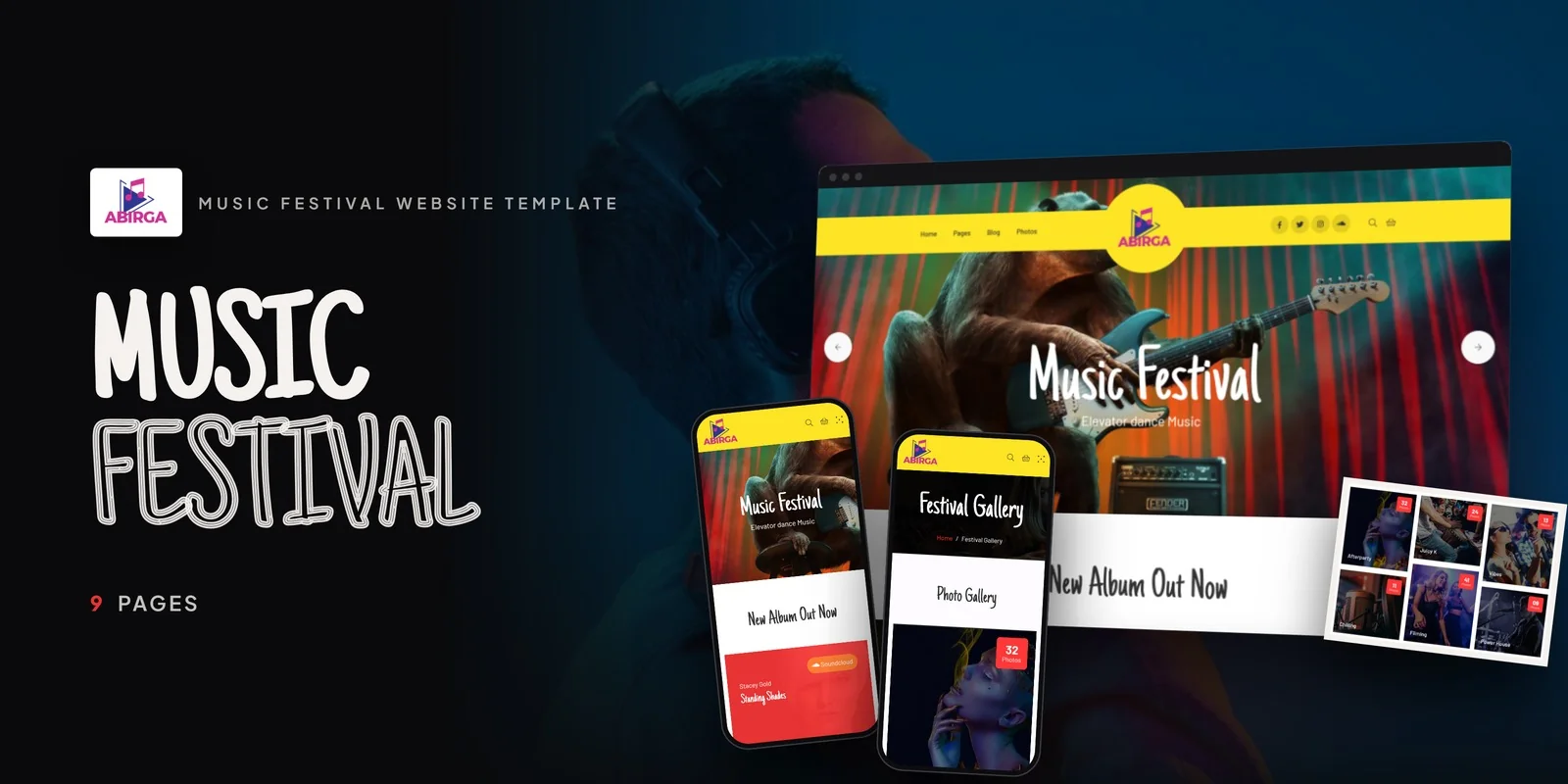
Abirga is a music festival HTML5 template that was built from the ground up for exactly this use case. Rather than adapting a generic event template to fit the music industry, Abirga was designed specifically for music festivals, concert promoters, artists, and event organizers.
The template ships with 9 fully designed HTML5 pages that cover every essential festival website need. The homepage features an animated Particles.js hero background that creates the kind of visual energy and atmosphere that static images cannot match. A built-in custom audio player powered by sigma-audioplayer.js allows visitors to listen to featured tracks directly on the site — no embedded Spotify widgets or external links required.
The album showcase section includes both an archive grid for browsing multiple albums and a full album detail page with tracklist — purpose-built for artists and festivals that want to highlight their musical catalog. The festival photo gallery houses over 32 photos with Isotope-based category filtering, letting visitors browse by event type such as afterparty, chilling, filming, and more.
For revenue generation, Abirga includes complete e-commerce pages — a cart and checkout system designed for ticket and merchandise sales. Combined with the built-in countdown timer for building hype around upcoming events and a newsletter subscription section for capturing attendee emails, the template covers the full conversion funnel from discovery to purchase.
On the technical side, Abirga is built on Bootstrap 5.0.1 for responsive, mobile-first performance across all devices. Swiper carousels handle touch-friendly content sliders. WOW.js delivers smooth scroll-triggered animations. Magnific Popup provides a full-screen lightbox experience for the gallery. And the template includes app download CTAs for festivals with companion mobile apps, social media integration across all major platforms, and a complete blog module for ongoing content marketing.
Setting Up Your Festival Website: A Practical Walkthrough
Once you have selected a template, the setup process follows a straightforward sequence that most organizers can complete in a weekend.
Step 1: Gather Your Assets. Before touching any code, collect your festival logo, artist photos, lineup information, ticket tier details, and any past event photography. Having all assets ready before you begin prevents stop-and-start editing that drags the process out over weeks.
Step 2: Customize the Hero Section. Replace the default hero content with your festival’s name, dates, and location. If you have video footage from past events, consider using a video background. If not, the animated particle effect provides an equally engaging visual that requires no video production.
Step 3: Build Out the Lineup. Populate artist profiles with names, photos, bios, and audio samples. Link each artist to their social profiles and streaming platforms. This page is the most-visited section of your site, so invest time making it comprehensive.
Step 4: Configure Ticket Sales. Set up your ticket tiers with clear pricing, descriptions, and purchase buttons. Connect the cart and checkout to your chosen payment processor. Clearly communicate what each ticket tier includes to reduce pre-purchase hesitation.
Step 5: Populate the Gallery. Upload past event photos organized by category. If this is a first-year festival, use high-quality images from similar events (with proper licensing) as placeholders, and replace them with your own photos after your inaugural event.
Step 6: Activate Supporting Features. Set the countdown timer to your event date. Configure the newsletter signup to connect to your email marketing platform. Update social media links. Publish a few blog posts to establish content freshness.
Step 7: Test on Mobile. Open the site on multiple phones and tablets. Walk through the entire user journey — from landing on the homepage to completing a ticket purchase — on a mobile device. Fix any layout issues, oversized images, or hard-to-tap buttons before launch.
Frequently Asked Questions
What is a music festival website template?
A music festival website template is a pre-designed, pre-coded website package built specifically for music festivals, concerts, and live event promotions. It includes purpose-built pages for artist lineups, event schedules, ticket sales, photo galleries, and music playback — all styled and structured so organizers can launch a professional website by replacing the default content with their own festival details.
How much does it cost to build a music festival website?
Costs range widely based on the approach. Custom web development runs $5,000 to $20,000 or more. SaaS website builders charge $16 to $50 per month in ongoing fees. Premium HTML templates offer the most cost-effective option at $14 to $59 as a one-time purchase with no recurring fees, while still providing professional designs and festival-specific features like audio players and ticket sales pages.
Do I need coding skills to use a festival website template?
Basic familiarity with HTML and CSS is helpful for customizing text, images, colors, and layout adjustments. However, most modern templates are designed so that non-developers can make content changes by editing the HTML files directly — replacing placeholder text and images with festival-specific content. For more advanced customizations, a freelance developer can handle adjustments for a few hundred dollars.
Can I sell tickets directly through a festival website template?
Yes, most premium festival templates include cart and checkout pages designed for ticket sales. You can integrate these with payment processors like Stripe or PayPal to accept payments directly. Some organizers prefer to link to dedicated ticketing platforms like Eventbrite for more advanced features like assigned seating or tiered early-bird pricing, and templates accommodate both approaches.
What makes a music festival template different from a regular event template?
Regular event templates are typically designed for conferences, corporate meetups, and seminars. They include speaker profiles, session schedules, and registration forms — but lack music-specific features. Music festival templates include custom audio players, album showcase pages with tracklists, festival photo galleries with category filtering, ticket and merchandise e-commerce, and dark-themed designs that reflect nightlife and music culture aesthetics.
How long does it take to launch a festival website using a template?
Most organizers can have a fully customized festival website live within one to two weekends of focused work. The timeline depends on how much content is ready before you begin — if your artist bios, photos, ticket details, and branding assets are prepared in advance, the process is primarily replacing placeholder content. Complex customizations or custom feature additions may extend the timeline to two to three weeks.
Should I use a template or a website builder for my festival site?
Templates offer more control, better performance, no recurring costs, and full code ownership. Website builders are easier for complete beginners but lock you into monthly subscriptions, limit customization, and tie your content to a specific platform. For festivals that plan to run annually, owning your website code through a template provides long-term value and flexibility that a subscription-based builder cannot match.
Final Verdict
Building a music festival website in 2026 does not require a five-figure development budget or months of agency timelines. With the right template, festival organizers can launch a professional, feature-complete website that handles artist lineups, ticket sales, photo galleries, audio playback, and fan engagement — all for a fraction of the cost of custom development.
The key is choosing a template that was built for music festivals specifically, not a generic event template that happens to have a dark color scheme. Features like custom audio players, album showcases, Particles.js animated heroes, and merchandise-ready e-commerce set music festival templates apart from the crowd.
For festival organizers, concert promoters, and event companies looking to maximize their online presence while keeping budgets focused on what matters most — the music and the experience — a purpose-built music festival template is the smart investment.



