The food industry has shifted online faster than almost any other sector. Between delivery platforms, grocery ordering, and recipe content, consumers now expect food businesses to have a digital presence that matches the quality of what they serve. A dedicated food website template gives restaurants, delivery services, and grocery brands the specialized layouts they need without months of custom development.
We evaluated food and beverage website templates across usability, visual design, and real-world functionality. The three templates in this guide cover the major categories: food delivery platforms, grocery and organic stores, and delivery logistics. All are built on Bootstrap 5 with responsive layouts tested on mobile devices where most food ordering happens.
Why Food Businesses Need Dedicated Website Templates
A generic business template cannot do what a food-specific template does. Food websites have unique requirements that general-purpose designs simply do not address. Menu presentation, delivery zone configuration, order tracking interfaces, and high-impact food photography layouts are not features you can bolt onto a corporate template. They need to be part of the design from the start.
The numbers support this. Online food ordering has grown by over 300% since 2020, and consumers spend an average of 45 seconds deciding whether to order from a platform or leave. That decision hinges on how quickly they can find what they want, how appetizing the food looks on screen, and how straightforward the ordering process feels. A food website template built around these behaviors outperforms a repurposed business template every time.
There is also a trust factor specific to food. Visitors need to see fresh photography, transparent ingredient information, delivery timelines, and customer reviews before they commit to an order. A template designed for food businesses places these trust signals in the right locations. Generic templates bury them or leave them out entirely.
What Makes a Great Food Website
Before diving into specific templates, it helps to understand the four pillars that separate effective food websites from ones that lose customers.
Online Ordering Flow
The ordering process should feel effortless. Visitors browse a menu or product catalog, add items to a cart, and check out in three steps or fewer. The best food website templates include pre-built cart interfaces, quantity selectors, and order summary panels that stay visible during browsing. Any friction in this flow costs you sales. Templates that require visitors to navigate away from the menu to view their cart or complete a purchase will see higher abandonment rates.
Menu and Product Showcase
Food is visual. The menu or product listing page needs large, high-quality image slots with enough space for item names, descriptions, prices, and dietary labels (vegan, gluten-free, organic). Grid layouts with category filtering let visitors jump to what they want. Individual product pages should include nutritional information, ingredient lists, and related item suggestions. This is where a food-specific template pays for itself. It already accounts for the content structure that food products demand.
Delivery Integration
For delivery-focused food businesses, the website needs to communicate delivery zones, estimated times, minimum order values, and tracking status. Geo-location features that detect the visitor’s area and show relevant restaurant or store options reduce friction significantly. Templates with built-in delivery UI components save weeks of custom development compared to starting from a blank page. The delivery information page should also include service hours, holiday schedules, and a clear explanation of delivery fees. Customers who understand the logistics upfront are far more likely to complete their order.
Visual Appeal and Photography
Food photography drives conversions more than any other element on a food website. The template layout needs to support full-width hero images, gallery sections, and product cards where the image takes up at least 60% of the card area. Parallax backgrounds with food imagery, hover effects that zoom into dishes, and lightbox galleries for restaurant interiors all contribute to the appetite appeal that turns browsers into buyers. A template that constrains your images or treats them as secondary to text is the wrong choice for food businesses.
3 Best Food and Beverage Website Templates (2026)
Each template below has been reviewed for code quality, mobile responsiveness, page speed, and practical functionality for food businesses.
1. Bunlicious – Food Delivery Platform Template
Best for: Food delivery platforms, multi-restaurant ordering services, meal delivery startups
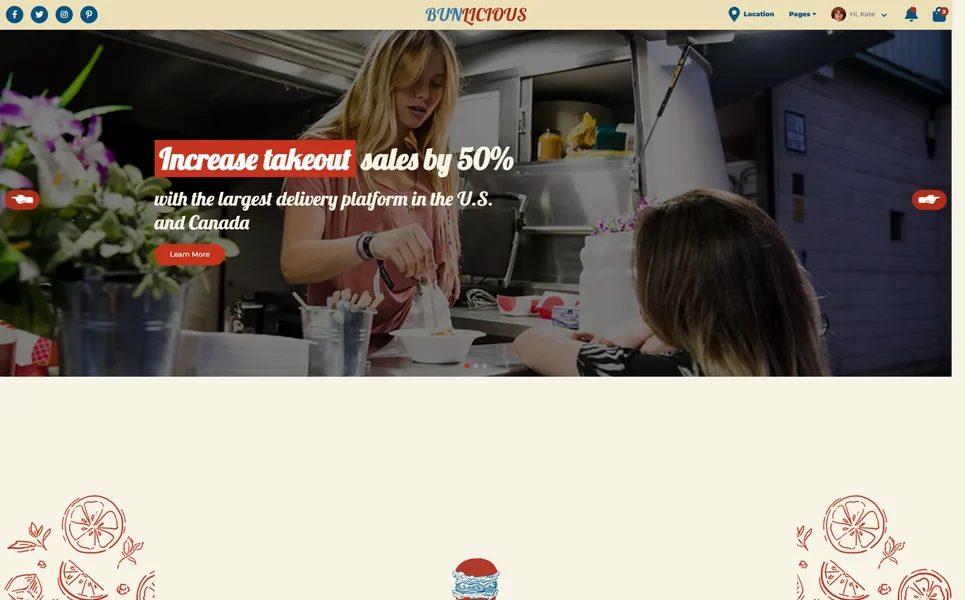
Bunlicious is the most comprehensive food delivery template in our catalog, shipping with 20 pages that cover every aspect of running a delivery platform. The standout feature is the geo-locator on the homepage: visitors enter their address or allow location detection, and the template surfaces nearby restaurant listings with delivery time estimates. This is the same pattern used by major delivery platforms, and having it pre-built saves significant development time.
The restaurant listing pages use a card grid showing each restaurant’s cuisine type, rating, estimated delivery time, and minimum order value. Clicking through leads to a restaurant detail page with a full menu organized by category (appetizers, mains, desserts, drinks), each item displaying a photo, description, price, and an “Add to Cart” button. The cart panel slides in from the right side of the screen, showing a running total without taking visitors away from the menu.
Bunlicious also includes an order tracking page with a step-by-step progress indicator (order placed, preparing, out for delivery, delivered) and an estimated arrival countdown. Additional pages cover partner registration for restaurants wanting to join the platform, a blog section for food content marketing, and a FAQ page addressing common delivery questions. The partner registration page is a smart inclusion because it addresses both sides of the marketplace: customers ordering food and restaurants joining the platform. The page includes a multi-step form that collects restaurant details, cuisine type, operating hours, and delivery capacity.
On the technical side, Bunlicious uses clean Bootstrap 5 markup with modular CSS that makes it straightforward to adjust the color scheme, typography, and card layouts to match your brand. The JavaScript is well-organized, with separate modules handling the geo-locator, cart functionality, and menu filtering. For anyone building a food delivery service, this template provides a production-ready foundation that would take months to build from scratch.
2. Freshly – Grocery and Organic Store Template
Best for: Grocery stores, organic food shops, health food brands, farm-to-table businesses
Freshly targets the grocery and organic food market with a clean, nature-inspired design that communicates freshness and quality. The homepage opens with a large hero slider showcasing seasonal products and promotions, followed by a category grid (fruits, vegetables, dairy, bakery, beverages) that helps visitors navigate directly to what they need. The color palette leans into greens and earth tones, reinforcing the organic and natural positioning.
The product listing pages use a sidebar layout with filters for category, price range, and dietary preferences (organic, non-GMO, gluten-free). Each product card displays the item image, name, weight or unit size, price, and an add-to-cart button. Product detail pages include tabs for description, nutritional information, and customer reviews. This structure mirrors what grocery shoppers expect from online stores and reduces the learning curve for first-time visitors.
Freshly also includes pages for weekly specials, a recipe section that cross-links to products used in each recipe, and an about page that tells the brand’s sourcing and sustainability story. The recipe section is particularly valuable for SEO. Each recipe page targets long-tail search terms like “organic quinoa salad recipe” or “gluten-free banana bread,” driving organic traffic from people searching for recipes who then discover your products. This content-to-commerce pipeline is difficult to set up from scratch but comes pre-structured in Freshly. For grocery businesses and organic brands building an online storefront, this template provides the complete page set without requiring custom design work.

3. Freshwheel – Food Delivery Template
Best for: Food delivery services, meal kit companies, catering businesses
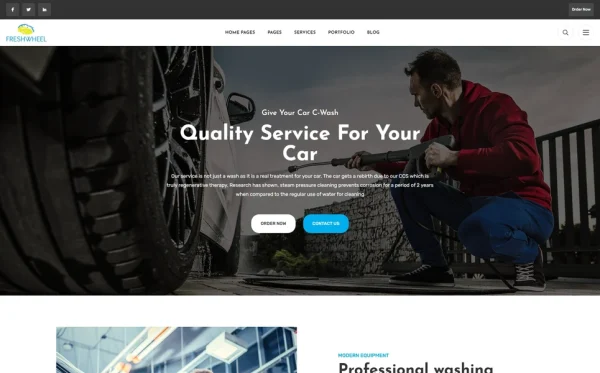
Freshwheel takes a streamlined approach to food delivery website design. Where Bunlicious focuses on multi-restaurant platforms, Freshwheel is optimized for single-brand delivery operations. This makes it ideal for restaurants launching their own delivery service, meal kit companies, and catering businesses that want to manage orders through their own website rather than third-party platforms.
The template features a hero section with a prominent order CTA and a scrolling banner of food categories. The menu section uses a tabbed layout organized by meal type (breakfast, lunch, dinner, snacks), with each tab revealing a grid of food cards. The card design gives generous space to food photography, with item name, a short description, price, and portion size displayed below each image. This layout prioritizes visual browsing, which aligns with how most people choose food online.
Freshwheel includes a delivery information page that covers service areas, delivery hours, pricing tiers, and an FAQ section. The contact page features a reservation form alongside the standard contact form, making it useful for restaurants that handle both dine-in bookings and delivery orders. The blog section supports food-focused content with large featured images and a clean reading layout. A testimonials section displays customer reviews with star ratings and order details, building confidence for first-time visitors considering a delivery order. The footer includes quick links to the menu, delivery zones, and social media profiles, ensuring visitors can access key information from any page. For food businesses that want a focused delivery presence without the complexity of a multi-vendor platform, Freshwheel delivers exactly what is needed.
Essential Features for Food Websites
Whether you choose one of the templates above or evaluate other options, these features should be on your checklist for any food and beverage website.
- Mobile-First Menu Design – Over 70% of food orders happen on mobile devices. Menu layouts must be thumb-friendly with large tap targets, easy scrolling, and a persistent cart indicator.
- High-Resolution Image Support – Food photography makes or breaks conversion. The template should support full-width hero images, product card images of at least 400×400 pixels, and gallery layouts with lightbox zoom.
- Category and Filter Navigation – Visitors should reach any menu item in two clicks or fewer. Tabbed categories, sidebar filters, and search bars are all necessary for larger menus.
- Cart and Checkout UI – A slide-in cart panel, item quantity adjusters, order notes field, and a clean checkout flow with delivery address and payment method fields.
- Delivery Zone Display – Clear communication of service areas, delivery times, and minimum order values. Map-based zone visualization is ideal.
- Customer Reviews and Ratings – Star ratings on product cards and a review section on detail pages. Social proof is especially important for food businesses where taste expectations drive decisions.
- Nutritional and Allergen Information – Dedicated tabs or sections for ingredients, calorie counts, and allergen warnings. This is both a trust signal and, in many jurisdictions, a legal requirement.
- Blog and Recipe Section – Content marketing drives organic traffic. A blog with recipe posts that link to products creates a natural sales funnel from search traffic to order completion.
- Fast Page Load Times – Image-heavy food websites need optimized assets. Look for templates with lazy loading, compressed image support, and minified CSS/JS to keep load times under 3 seconds.
- Bootstrap 5 Foundation – Responsive grid, utility classes, and modern component library without jQuery overhead. Clean upgrade path as Bootstrap continues to update.
- Social Media Integration – Food businesses thrive on Instagram and TikTok. Social feed widgets, sharing buttons on product pages, and linked social icons in the header and footer.
- Contact and Reservation Forms – Multi-purpose forms that handle general inquiries, catering requests, table reservations, and partnership proposals.
Start Building Your Food Business Website
The food industry rewards speed. Every day without a functional website is a day your competitors capture orders that should be yours. The templates in this guide give you a tested, responsive foundation that covers delivery, grocery, and platform models. Pick the template that matches your business type, add your branding and photography, and launch.
Bunlicious handles the complexity of multi-restaurant delivery platforms with 20 pages of geo-located listings, order tracking, and partner registration. Freshly serves grocery and organic brands with product-focused layouts, dietary filters, and a recipe section that drives organic search traffic. Freshwheel provides a lean delivery solution for single-brand operations that want full control over the customer experience without relying on third-party apps.
All three templates ship with Bootstrap 5, clean HTML5 markup, and mobile-optimized layouts built for the way people actually order food: on their phones, expecting the process to be seamless. Your menu, your delivery zones, your brand story. These templates give you the structure. You bring the content and photography.
Browse all food and beverage website templates and get your food business online. Each template includes full source code, documentation, and the responsive layouts your customers expect.