The catering industry has changed more in the past five years than in the previous twenty. Corporate offices now order lunch for hybrid teams through online portals. Wedding couples browse catering portfolios on their phones during evening commutes. Private event hosts compare caterers by scrolling through galleries and reading reviews — all before picking up the phone. If your catering business does not have a website that works as hard as your kitchen, you are losing contracts to competitors who do.
Yet the majority of catering businesses still operate with either no website at all, a bare-bones page on a free builder, or a restaurant-style template that does not reflect how catering actually works. Catering is not a walk-in business. Nobody drives past your storefront and decides to order a buffet for 200 guests. Every catering client begins their search online, and the website they land on determines whether your business makes the shortlist or gets skipped.
This guide covers everything a catering business owner needs to know about building an effective online presence in 2026 — from the features that actually generate leads, to the costs involved at every budget level, to the design decisions that separate professional catering websites from amateur ones.
Why Catering Businesses Need More Than a Restaurant Website
Restaurant websites and catering websites solve fundamentally different problems. A restaurant website needs to show a menu, display hours, and let people make reservations. A catering website needs to showcase capabilities, build trust for large-budget decisions, and capture detailed event information from prospective clients.
When a corporate office manager is sourcing catering for a quarterly company lunch, they are not looking for your hours of operation. They want to see your menu options for large groups, your ability to handle dietary restrictions, your portfolio of past corporate events, and a way to request a custom quote with specific details about their event size, date, and preferences.
When a bride is choosing a wedding caterer, she is not browsing your dine-in menu. She wants to see photos of elegant plating, testimonials from past wedding clients, your range of cuisine styles, and a clear process for booking a tasting. She needs confidence that you can execute at scale with consistency and polish.
These are entirely different user journeys from someone looking for a table at 7 PM on a Friday night. Using a restaurant template for a catering business is like wearing a line cook’s apron to a client tasting — technically related to food, but completely wrong for the occasion.
The 10 Features Every Catering Website Must Have
A catering website that generates real business inquiries needs purpose-built features that generic food templates lack. Here are the elements that separate lead-generating catering websites from digital dead ends.
1. A Visual Menu Showcase
The menu is the core of your catering business, and your website should present it with the same care you put into the food itself. Static PDF menus are a relic. Modern catering websites display menus with high-quality food photography, detailed descriptions, and clear categorization by cuisine type, event type, or dietary accommodation.
The best catering menu pages let visitors browse by category — appetizers, entrees, desserts, beverage packages — and each item should include a professional photo, description of ingredients and preparation, and serving size information. Some caterers organize menus by event type: corporate lunch packages, wedding reception menus, cocktail party selections, and holiday catering specials.
2. Recipe and Culinary Content Pages
This is where catering websites diverge from basic restaurant sites. Recipe pages serve a dual purpose: they demonstrate your culinary expertise to potential clients, and they generate organic search traffic from food enthusiasts who may become future customers.
A recipe archive with individual recipe detail pages positions your brand as a culinary authority. When a potential client sees that you publish professional recipes with detailed preparation instructions and beautiful photography, it reinforces the perception that you take food seriously — exactly the message that wins catering contracts.
3. Event Portfolio and Photo Gallery
Catering is a visual business. Clients need to see what you can deliver before they trust you with their event. A curated gallery of past events — organized by event type such as weddings, corporate functions, private parties, and holiday celebrations — provides the social proof that text descriptions alone cannot deliver.
Each portfolio entry should include multiple photos showing food presentation, table setup, venue styling, and the overall atmosphere. Before-and-after shots of venue transformations are particularly effective for full-service caterers who handle both food and event design.
4. Online Ordering and Quote Request System
Catering websites need two distinct ordering pathways. For standardized offerings like boxed lunches, preset menus, and daily specials, an online ordering system with add-to-cart functionality lets clients browse options, select quantities, and complete purchases directly.
For custom events requiring tailored menus, a quote request form is essential. This form should guide clients through key questions: event date, estimated guest count, venue location, cuisine preferences, dietary restrictions, budget range, and service style (buffet, plated, family-style, food stations). Multi-step forms that break these questions into digestible sections significantly outperform single-page forms with overwhelming field counts.
5. Shopping Cart and Checkout
For caterers who sell products directly — packaged sauces, spice blends, meal kits, cookbooks, or branded merchandise — a complete e-commerce flow with product pages, cart, and secure checkout is non-negotiable. Even caterers who primarily sell services benefit from offering add-on items like extra servings, premium upgrades, or event rentals through an online store.
6. Multiple Blog Layouts for Content Marketing
Content marketing drives organic traffic and positions your catering business as an industry expert. A blog section with multiple layout options — grid, list, and masonry formats — lets you publish diverse content types effectively.
Grid layouts work well for recipe posts with prominent photos. List layouts suit longer editorial pieces about event planning tips or seasonal menu guides. Masonry layouts create a Pinterest-style browsing experience that encourages exploration. Having all three options available means your blog looks professional regardless of the content mix.
7. Testimonials and Social Proof
Catering is a high-trust purchase. Clients are committing significant budgets for events that cannot be redone if the food disappoints. Testimonials from past clients — especially those that mention specific events, guest compliments, and the caterer’s professionalism — directly address this trust barrier.
Display testimonials prominently with client names, event types, and photos where possible. Video testimonials are even more powerful, but well-written text testimonials with specific details outperform generic praise.
8. Team and About Pages
Catering clients are not just buying food — they are hiring people who will be present at their most important events. Team pages that introduce chefs, event coordinators, and service staff with professional photos and brief bios humanize the business and build personal connections before the first meeting.
An about page that tells your founding story, highlights your culinary philosophy, and showcases your experience and credentials gives prospective clients reasons to choose you over competitors they have never met.
9. Mobile-Optimized Design
More than 65 percent of catering website visitors browse on mobile devices. A catering website that does not work flawlessly on phones and tablets is effectively invisible to the majority of potential clients.
Mobile optimization means more than responsive layouts. Menus should be easily browsable with touch-friendly navigation. Photo galleries should support swipe gestures. Quote request forms should be simple to complete with a phone keyboard. And click-to-call buttons should be prominently placed for clients who want to speak with someone immediately.
10. Login and Community Features
For catering businesses that serve repeat corporate clients, login and account features add significant value. Returning clients can access their order history, saved preferences, favorite menu selections, and scheduled upcoming events. This convenience creates loyalty and reduces the friction of reordering.
Registration pages also enable newsletter signups, loyalty programs, and exclusive access to seasonal menus or early booking windows for peak periods like holiday season and wedding season.
How Much Does a Catering Website Actually Cost?
Understanding the cost landscape helps catering business owners make decisions that align with their budget and growth stage.
| Approach | Cost | Recurring Fees | Code Ownership |
|---|---|---|---|
| Custom Agency Design | $2,000 – $10,000+ | $50–$300/month | Yes |
| Website Builder (Wix/Squarespace) | $0 setup | $16 – $50/month | No |
| Catering Platform (CaterZen) | $0 setup | $79 – $300/month | No |
| Premium HTML Template | $14 – $59 one-time | None | Yes |
Key Insight: For catering businesses, a premium template delivers 20+ professionally designed pages with recipe archives, e-commerce, and multiple blog layouts — all for less than a single month on some catering platforms.
Custom Design Agency: $2,000 to $10,000+
Hiring a web design agency delivers a custom website tailored to your brand. Expect $2,000 to $5,000 for a basic brochure site and $5,000 to $10,000 or more for sites with online ordering, custom quote forms, and full e-commerce. Timelines typically run four to eight weeks, and ongoing maintenance adds $50 to $300 per month.
For established catering companies with strong revenue, this investment may be justified. For startups and growing businesses, the cost is often prohibitive — especially when that budget could fund kitchen equipment, marketing, or staff training.
Website Builders: $16 to $50 Per Month
Platforms like Wix and Squarespace offer catering-specific templates with drag-and-drop editing. They are easy to use but come with ongoing monthly costs, limited design flexibility, and platform lock-in. Over three years, a $30 per month subscription costs $1,080 — and you own nothing. Cancel the subscription and your website disappears.
Specialized Catering Platforms: $79 to $300 Per Month
Dedicated catering software platforms like CaterZen and HoneyCart include website functionality alongside ordering systems, CRM tools, and operational management. They are powerful but expensive, and they lock your web presence to a specialized platform with limited design customization.
Premium HTML Templates: $14 to $59 One-Time
Premium HTML templates offer the most cost-effective path for catering businesses that want a professional website without recurring fees. A one-time purchase gives you a fully designed, multi-page website with features like menu showcases, recipe pages, e-commerce integration, and blog layouts — all built on modern frameworks and fully customizable.
The tradeoff is that templates require basic HTML knowledge to customize, or a freelance developer for more complex modifications. But the total cost — including template purchase and a few hours of development help — is a fraction of any other approach.
Design Principles for Catering Websites That Win Contracts
Lead with Food Photography
Nothing sells catering services like beautiful food photography. The hero section should feature your best food imagery — not stock photos, but real photos of your dishes and events. If you do not have professional food photography yet, invest in a half-day shoot before launching your website. The return on that investment will pay for itself many times over in won contracts.
Organize Around Event Types
Structure your navigation and content around how clients think about catering: by event type. Separate sections for wedding catering, corporate catering, private parties, and holiday events let visitors immediately find content relevant to their needs. This is more effective than organizing by food type alone.
Make the Inquiry Process Effortless
The path from browsing to inquiry should require minimal effort. Include prominent contact buttons and quote request links on every page. Use a multi-step form that feels conversational rather than overwhelming. And always confirm submissions with a clear next-step message so clients know what to expect.
Use Warm, Appetizing Color Palettes
Food websites perform best with warm, rich color schemes. Earth tones, warm oranges, deep reds, and cream backgrounds evoke appetite and comfort. Avoid cold, corporate blue-gray palettes that work for tech companies but feel sterile for food businesses.
Choosing the Right Catering Website Template
Most food templates available today are designed for dine-in restaurants. They feature reservation widgets, hours-of-operation displays, and single-page menus — features that are irrelevant or actively misleading for catering businesses. A caterer showing a “Make a Reservation” button confuses visitors who are looking to book a private event.
The ideal catering website template needs to be built around the food service business model: menu showcases that display catering packages, recipe content pages that establish culinary authority, multi-step forms for custom event inquiries, e-commerce for direct ordering, and blog capabilities for content marketing.
Common Mistakes Catering Businesses Make With Their Websites
Even catering businesses that invest in a professional website often undermine their own success with avoidable mistakes. Understanding these pitfalls helps you build a website that actually generates business rather than simply existing online.
Using a restaurant template without adaptation. The most common mistake is purchasing a dine-in restaurant template and using it as-is. The result is a catering website with a “Make a Reservation” button, dine-in hours, and a single-page menu — none of which serve catering clients. Every element on the site should reflect the catering business model: event-based service, custom quotes, and delivery or on-site preparation.
Neglecting mobile optimization. Corporate event planners browse during meetings. Brides scroll through catering options on their phones during commutes. If your menu gallery is clunky on mobile or your quote request form requires precise mouse clicks, you are losing the majority of your potential clients. Mobile traffic to food and event websites exceeds 65 percent — and it continues to grow.
Relying on stock photography. Nothing kills credibility for a food business faster than stock photos. Potential catering clients need to see your actual food, your actual presentation, and your actual event setups. A half-day professional food photography session pays for itself many times over in client confidence and conversion rates.
Burying the inquiry process. If a potential client has to navigate through three pages to find your contact or quote request form, most of them will not complete the journey. Contact options and inquiry buttons should appear on every page — in the header navigation, within the content, and in the footer.
What to Evaluate When Choosing a Catering Template
The food website template market is crowded, but most options are designed for dine-in restaurants — not catering businesses. Before purchasing a template, evaluate these critical differentiators that separate catering-ready templates from restaurant templates wearing a different label.
Recipe and menu architecture. A catering template needs dedicated recipe archive pages and individual recipe detail pages that showcase your culinary expertise. Restaurant templates typically offer a single menu page — adequate for a dine-in menu but completely insufficient for a catering business that needs to display multiple menu packages, seasonal offerings, and custom options.
E-commerce depth. A shop page alone is not enough. Look for a complete flow: product archive, individual product detail page, cart, and checkout. Catering businesses that sell packaged products, gift baskets, meal kits, or add-on services need this full pipeline to convert browsing into revenue.
Blog layout variety. Content marketing drives organic traffic for food businesses, but different content types need different presentations. Recipe posts need large featured images (grid layout). Long-form guides about event planning work better in list format. And seasonal roundups benefit from masonry layouts. A template with three or more blog layout options gives you the flexibility to publish diverse content effectively.
Multi-step form capability. Catering inquiries require detailed information — event date, guest count, dietary restrictions, budget range, service style preferences. A single contact form cannot capture this efficiently. Templates that include jQuery Steps or similar multi-step form functionality let you guide potential clients through the inquiry process without overwhelming them.
Page count. A catering website needs more pages than a typical restaurant site. Look for templates with 15 or more pages covering home variants, recipe sections, shop flow, blog layouts, authentication pages, and contact. Templates with fewer than 10 pages will require significant custom development to fill gaps.
Authentication pages. Login and register pages enable returning client accounts — a valuable feature for catering businesses serving repeat corporate customers. Not all food templates include these pages, and adding them after purchase requires development work.
Why Aboudo Fits the Catering Business Model
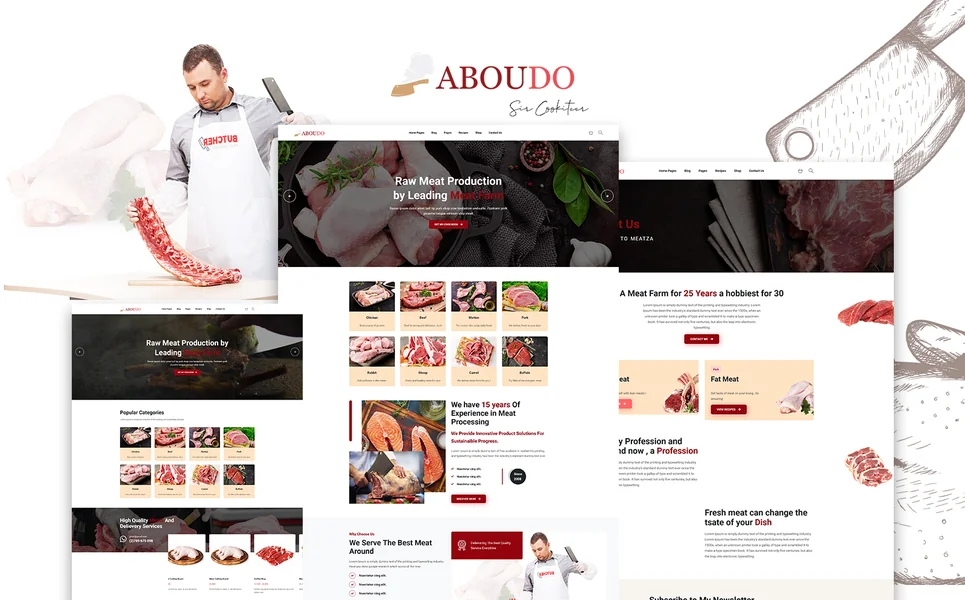
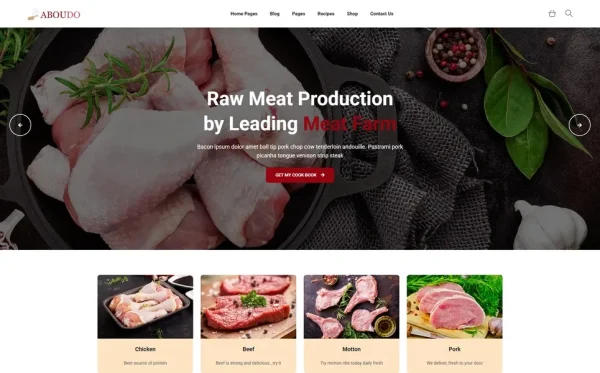
Aboudo is a food, recipe, and cooking e-commerce HTML5 template designed specifically for food businesses that operate beyond the traditional restaurant model. With 20 fully crafted HTML pages, it offers the depth and variety that catering businesses need to present their full range of services.
The template includes two unique home layouts, giving catering businesses the flexibility to choose a hero style that best represents their brand identity. The recipe archive and individual recipe detail pages provide exactly the culinary content capability that positions a catering business as a food authority — a feature that most restaurant templates completely lack.
For direct sales, Aboudo includes a complete e-commerce flow: shop archive, product detail page, cart, and checkout. Catering businesses can sell packaged products, meal kits, gift baskets, or event add-ons directly through their website. The blog system is particularly robust, offering three archive layout options — grid, list, and masonry — plus three distinct single-article styles. This variety means your food blog and content marketing look polished regardless of content type.
Login and register pages enable client accounts for repeat customers, and the Isotope grid filtering provides professional-grade content organization for menus, recipes, and portfolio items. Built on Bootstrap 4 with Slick carousels, jQuery Steps for multi-step forms, Countdown timers for seasonal promotions, Magnific Popup lightbox, and the Flaticon icon set, Aboudo delivers a production-ready catering web presence at a fraction of custom development costs.
Setting Up Your Catering Website: A Step-by-Step Approach
Step 1: Professional Food Photography. Before customizing any template, invest in professional photos of your signature dishes, event setups, and team in action. These images are the foundation of your entire web presence.
Step 2: Define Your Menu Structure. Organize your catering offerings by event type and service style. Create clear categories that match how clients search for catering services.
Step 3: Write Compelling Descriptions. Each menu item and service package needs a description that goes beyond ingredients. Describe the experience — the presentation, the flavors, the reaction from guests.
Step 4: Set Up Your Blog. Publish at least five initial posts: two to three recipes that showcase your culinary style, one behind-the-scenes look at your kitchen or team, and one seasonal menu announcement. This establishes content freshness and gives visitors reasons to return.
Step 5: Configure Your Quote Request Process. Set up a multi-step inquiry form that captures event details without overwhelming potential clients. Keep the initial form simple and follow up for detailed information.
Step 6: Test the Full Client Journey. Walk through the entire experience on both desktop and mobile: landing on the homepage, browsing the menu, reading a recipe, exploring the portfolio, and submitting a quote request. Every step should feel intuitive and professional.
Frequently Asked Questions
What should a catering business website include?
A catering business website should include a visual menu showcase organized by event type, a portfolio of past events with photos, a quote request or online ordering system, client testimonials, team profiles, a blog for recipes and food content, and clear contact information with multiple inquiry options. E-commerce functionality for selling packaged products or add-ons is an increasingly valuable addition.
How much does a catering website cost?
Costs vary by approach. Custom agency design runs $2,000 to $10,000 or more. Website builders charge $16 to $50 per month in ongoing subscription fees. Specialized catering software platforms can cost $79 to $300 per month. Premium HTML templates offer the most cost-effective path at $14 to $59 as a one-time purchase with no recurring fees, providing professional designs and food-specific features.
Why is a restaurant template not suitable for a catering business?
Restaurant templates are designed for dine-in businesses with features like reservation systems, hours of operation, and single-location menus. Catering businesses need different functionality: event-based menu showcases, custom quote request forms, portfolio galleries of past events, recipe content pages for SEO, and e-commerce for selling packaged products. Using a restaurant template for catering confuses visitors and misses critical conversion opportunities.
Can I add online ordering to a catering website template?
Yes. Premium catering templates include cart and checkout pages that can be integrated with payment processors like Stripe or PayPal. For standard menu items and preset packages, clients can add items to a cart and complete purchases directly. For custom event catering that requires personalized menus and quotes, multi-step inquiry forms capture the necessary details for follow-up by your team.
How important is a blog for a catering business website?
Extremely important. A blog with recipes, event planning tips, seasonal menu announcements, and behind-the-scenes content serves dual purposes. It drives organic search traffic from people looking for food and recipe content — some of whom become catering clients. And it demonstrates your culinary expertise and food philosophy, building trust with prospective clients who are evaluating multiple caterers for their event.
Do I need coding skills to set up a catering website template?
Basic HTML and CSS knowledge is helpful for content customization — changing text, swapping images, and adjusting colors. Most modern templates are structured so that non-developers can make these changes by editing HTML files directly. For advanced customizations like connecting payment gateways or building custom form integrations, a freelance developer can typically handle the work for a few hundred dollars.
How long does it take to launch a catering website?
With a premium template and prepared content (food photos, menu descriptions, testimonials), most catering businesses can launch a professional website within one to two weeks. The biggest time investment is usually content preparation — writing menu descriptions, organizing photos, and gathering testimonials — rather than technical setup. Having a professional food photography session scheduled before you begin will streamline the process significantly.

Final Verdict
A catering business in 2026 cannot afford to operate without a purpose-built website. The clients you want — corporate accounts, wedding couples, event planners — all begin their search online and make shortlist decisions based on what they see on your website before they ever taste your food.
The smart path is choosing a template designed for the food service business model rather than repurposing a dine-in restaurant template. Features like recipe archives, multi-step inquiry forms, e-commerce capability, and multiple blog layouts address the specific ways catering clients evaluate and engage with food businesses online.
For catering business owners who want to maximize their online presence without diverting kitchen budgets to web development agencies, a purpose-built catering template delivers professional results at a fraction of the cost.