Your sushi rolls are sliced with surgical precision. Your nigiri sits on the plate like edible sculpture. Your omakase counter delivers an experience that customers remember for months.
But when those same customers search for your restaurant online, what do they find? A Facebook page with blurry phone photos? A five-year-old website that loads like it is running on dial-up? A Yelp listing you do not control?
Here is the uncomfortable truth most sushi restaurant owners face: your website is the first bite your customer takes. And right now, for a lot of Japanese restaurants, that first bite is stale.
This guide breaks down exactly what a sushi restaurant website needs to do in 2026, how to present your menu so it drives reservations instead of confusion, and why investing in the right sushi restaurant website template can transform your online presence without draining your bank account.
Why Your Sushi Restaurant Website Matters More Than You Think
Seventy-six percent of people who search for a restaurant on their phone visit one within 24 hours. That statistic alone should make every sushi bar owner take their website seriously. But the data goes deeper than that. When a potential customer searches for sushi near them, Google pulls information from your website to decide whether to show your restaurant in local results. Your menu items, your location details, your hours, your customer reviews embedded on your site, and even the structure of your HTML all feed into that algorithm. A sushi restaurant without a proper website is invisible to the fastest-growing segment of diners: people under 40 who decide where to eat based on what they find on their phone in the next ten minutes. And unlike a delivery app listing that you share with every competitor in your zip code, your website is yours. You control the story, the presentation, and the experience. No algorithm decides whether your nigiri photos appear above or below a pizza chain’s ad.What Diners Actually Look For
Before they walk through your door, online visitors want three things answered within seconds: 1. What is on the menu and what does it cost? They want to see your rolls, your sashimi platters, your omakase pricing. Not a downloadable PDF. Not a photograph of a paper menu. A real, browsable, mobile-friendly menu with descriptions and prices. 2. Can I book a table right now? If they have to call, you have already lost a percentage of them. An online reservation form that takes date, time, party size, and seating preference removes friction between the thought “let us go for sushi tonight” and the action of showing up. 3. Where are you and when are you open? This sounds obvious, but an alarming number of restaurant websites bury this information three clicks deep or hide it in a tiny footer. Hours, address, and a map should be visible without scrolling on every device. Everything else — the gorgeous photography, the chef’s backstory, the sake selection — that is all important. But if those three questions are not answered instantly, none of the extras matter.Menu Presentation: The Heart of a Sushi Restaurant Website
No cuisine depends on visual presentation quite like sushi. A tuna roll on a lacquered plate, garnished with microgreens and a thin drizzle of spicy mayo, is not just food. It is art. Your website needs to treat it that way.Organizing Your Digital Menu
The best sushi restaurant websites organize their menu the way a guest would naturally explore it: Nigiri and Sashimi come first for traditionalists. These are your purest expressions of fish quality, and serious sushi diners judge a restaurant by this section. List each fish with its Japanese name alongside the English, and note whether it is wild-caught, farm-raised, or seasonal. Maki Rolls and Specialty Rolls are where most American sushi restaurants generate the bulk of their revenue. Organize these from simple (cucumber roll, avocado roll) to complex (signature creations with multiple sauces and toppings). Each specialty roll deserves a two-line description that makes the reader taste it through the screen. Appetizers, Sides, and Soups ground the menu. Edamame, miso soup, gyoza, tempura. These are the items that turn a solo sushi order into a full dinner for two. Beverages and Sake are often an afterthought on restaurant websites, but for a Japanese restaurant, your sake and Japanese whisky selection is a point of differentiation. A well-organized drink menu signals sophistication. Omakase and Tasting Menus deserve their own section. If you offer a chef’s tasting menu, present it with weight. Describe the experience, not just the price. How many courses, how long it takes, whether it is available at the bar only, whether reservations are required.Menu UX That Actually Works
A few specific design decisions separate professional sushi restaurant menus from amateur ones: No PDFs. A PDF menu is the digital equivalent of handing someone a crumpled takeout flyer. It does not resize on mobile, it loads slowly, and search engines cannot read it properly, which means your menu items never appear in Google results. Category tabs or scroll sections. Let users jump directly to rolls, sashimi, or drinks without scrolling through the entire menu. Tabs work on desktop. Sticky section headers work on mobile. Prices visible, not hidden. Some restaurant owners hide prices to seem exclusive. On a website, this just seems evasive. Display your prices clearly. If your omakase is $150 per person, the customers who can afford it will appreciate the transparency, and the ones who cannot will not waste your time with a reservation they will cancel. Dietary indicators. Small icons or labels for gluten-free, vegetarian, contains raw fish, and contains nuts are not optional in 2026. Allergy awareness has moved from nice-to-have to legal liability.Online Reservations: Converting Visitors Into Seated Guests
A reservation form on a sushi restaurant website is not just a convenience feature. It is a revenue engine. Every barrier between a hungry visitor and a confirmed booking costs you real money.What Your Booking Form Needs
The minimum viable reservation form for a sushi restaurant includes:- Date and time selection with visual availability. Grayed-out times for slots that are full. Calendar widget for date picking.
- Party size as a simple dropdown. Two, four, six, eight, larger party (please call).
- Seating preference matters more at a sushi restaurant than almost any other dining concept. Sushi bar seating, where guests watch the itamae work, is a fundamentally different experience from a booth. Let guests choose.
- Special occasion field so your staff can prepare. Anniversary, birthday, business dinner. This is a small touch that creates enormous goodwill.
- Contact information with both phone and email. Some restaurants text a confirmation, which younger diners overwhelmingly prefer.
Reservation Integration Options
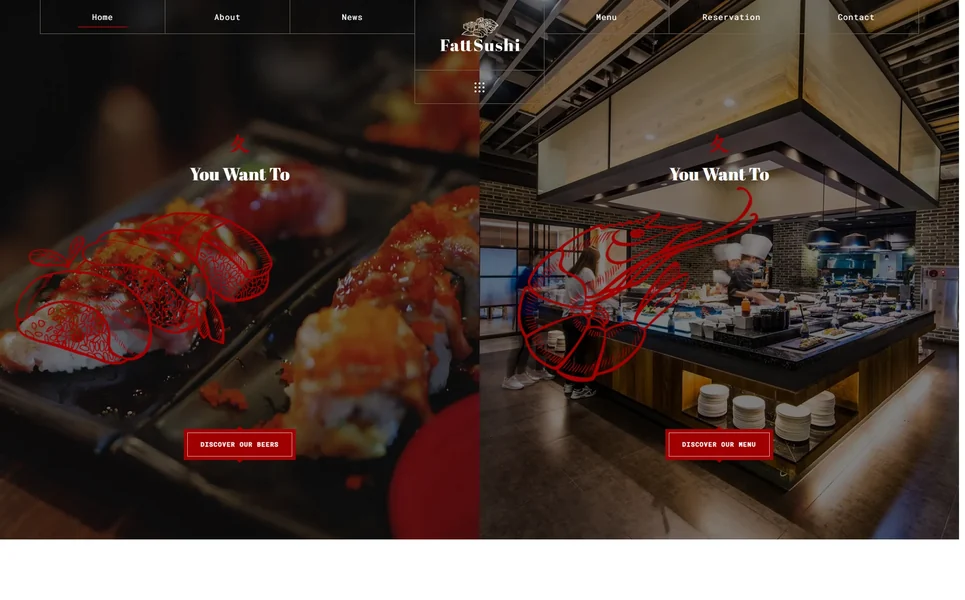
You have three paths for handling online reservations: Form-to-email is the simplest approach. The website form sends a reservation request to your email, and your staff confirms manually. This works for small sushi bars doing fewer than 30 covers per night. A well-designed HTML template like Fattsushi includes this type of form out of the box. Third-party platforms like OpenTable, Resy, or Tock handle everything: the booking widget embeds on your site, manages availability, sends confirmations, and even handles deposits for omakase seatings. The trade-off is cost — typically $1-3 per seated diner or a monthly fee of $200-500. Custom booking systems give you full control but require development investment. Most independent sushi restaurants do not need this level of complexity. For the majority of sushi restaurant owners, starting with a form-to-email setup through a quality template and upgrading to a third-party widget as your volume grows is the most sensible progression.Chef Profiles and the Itamae Showcase
In no other cuisine is the chef as central to the dining experience as in Japanese cooking. The itamae — the sushi chef who has trained for years in the art of knife work, rice preparation, and fish selection — is not a behind-the-scenes operator. They are the performance. Your website should treat them accordingly.What to Include in a Chef Profile
A strong chef profile page includes:- A professional portrait. Not a candid shot in a stained apron. A composed photograph, ideally at the sushi counter with knives or fish, that conveys both skill and approachability.
- Training and background. Where they trained, how many years of experience, any notable restaurants or mentors. For Japanese-trained chefs, mentioning their apprenticeship lineage carries significant weight with knowledgeable diners.
- Signature dishes. What are they known for? A particular roll, a unique preparation method, a seasonal specialty that regulars request?
- Philosophy. A short paragraph in their voice about their approach to sushi. Do they prioritize traditional Edomae-style techniques, or do they embrace modern fusion? This is not marketing fluff. It is a genuine differentiator that helps the right customers find you.
Food Photography for Sushi: Getting It Right
Sushi is among the most photogenic foods on the planet, but photographing it for a website is different from posting to Instagram. Website images need to be high-resolution, consistently styled, properly lit, and optimized for fast loading.Common Mistakes to Avoid
Flash photography kills sushi photos. The reflective surface of raw fish, the sheen of soy-glazed eel, the translucence of fresh tuna — all of these textures disappear under direct flash. Use natural light from a window or a continuous LED panel with a diffuser. Cluttered backgrounds distract from the food. The best sushi photos use simple, dark backgrounds — a slate plate, a dark wood counter, a single leaf garnish — that let the colors of the fish speak for themselves. Dark backgrounds also align with the premium aesthetic that most sushi restaurants want to project. Inconsistent styling is what separates professional food photography from a collection of random phone shots. Choose a consistent plate, consistent background, consistent angle (45-degree overhead works best for sushi platters; straight-on works best for single pieces of nigiri), and shoot everything in the same session. Unoptimized file sizes are a technical issue with real business consequences. A beautiful 8MB photo that takes six seconds to load on mobile costs you visitors. Compress images to under 200KB each for web use, use WebP format where possible, and implement lazy loading so images only download as the user scrolls to them.What to Photograph
At minimum, your website needs professional photos of:- Three to five hero shots of your best sushi presentations for homepage sliders and header backgrounds
- One photo per specialty roll on your menu
- The sushi counter and dining room atmosphere
- Your chef at work
- Key appetizers, desserts, and sake service
- The restaurant exterior at night, when the signage is lit and the space looks most inviting
Google Maps and Local SEO for Sushi Restaurants
Eighty-seven percent of consumers used Google to evaluate local businesses last year. For restaurants, local search visibility is not a marketing bonus. It is survival.What Your Website Needs for Local SEO
Name, address, and phone number (NAP) must be identical everywhere: your website footer, Google Business Profile, Yelp, TripAdvisor, and every directory listing. Even small differences, like “Street” versus “St.” or a missing suite number, can fragment your local search authority. Embedded Google Map on your contact page with a pin on your exact location. This does two things: it helps customers find you, and it sends a geo-relevance signal to Google about where your business operates. Schema markup is structured data in your website code that tells Google exactly what your business is. For a sushi restaurant, you want LocalBusiness or Restaurant schema with your cuisine type (Japanese, Sushi), price range, hours, reservation URL, and aggregate rating. A well-coded HTML template includes the structure for this out of the box. Google Business Profile optimization works hand-in-hand with your website. Your website content should reinforce what your GBP says. If your GBP lists “omakase” and “sake bar” as attributes, your website should have pages or sections that use those same terms. Review signals matter. Embedding or linking to your Google reviews from your website creates a feedback loop. Customers who visited your site, saw your reviews, and booked a table are more likely to leave a review themselves, which improves your local ranking, which drives more website traffic.Introducing Fattsushi: A Sushi Restaurant Website Template Built for Japanese Dining
After covering everything a sushi restaurant website needs to accomplish, let us look at a template that actually delivers all of it. Fattsushi is an HTML5 template designed specifically for sushi restaurants, Japanese dining establishments, ramen bars, and Asian fusion eateries. It is not a generic restaurant template with the word “sushi” slapped on top. Every page, every section, every design decision reflects the aesthetics and operational needs of Japanese cuisine.What You Get With Fattsushi
18 professionally designed pages covering every aspect of your restaurant’s online presence: six homepage variations, a structured menu page, a filterable photo gallery, chef profiles, team page, restaurant history timeline, reservation form, blog with three layout options, contact page, and typography reference. Six homepage variations give you real choices. A dramatic hero shot of your best sashimi platter. A video loop of chopsticks lifting a piece of nigiri. A featured omakase section with pricing and a booking call-to-action. Each variation is designed to convert first-time visitors into reservations. A menu page organized the way sushi should be. Categories for nigiri, sashimi, maki rolls, specialty rolls, appetizers, and beverages — each with space for descriptions, pricing, and mouthwatering photography. No PDFs. No single-page walls of text. Clean, scannable, mobile-friendly menu presentation. Chef and team showcase pages. Spotlight your itamae with a professional bio section that includes training background, signature dishes, and philosophy. The team page introduces your front-of-house staff with photos and roles, building the personal connection that turns one-time visitors into regulars. An online reservation form with fields for date, time, party size, seating preference, and special occasions. Ready to connect to your email or integrate with a third-party booking platform. A filterable gallery with lightbox viewing for showcasing your plated sushi, your chef’s counter in action, and your dining ambiance. This is your visual proof that the experience matches the promise.The Design Language
Fattsushi uses a dark-and-gold color scheme that projects the same exclusivity and craftsmanship your restaurant embodies. The design draws from Japanese minimalism — clean negative space, dramatic food photography, and refined typography with Playfair Display for headlines and Poppins for body text. Parallax scrolling effects add subtle depth without being distracting. CSS3 entrance animations and hover interactions mirror the elegance of an omakase presentation, where each element is revealed with intention. The template is built on Bootstrap with jQuery, which means it renders perfectly on every device from 4K desktop monitors to compact smartphones. Cross-browser tested on Chrome, Firefox, Safari, Edge, and Opera.Who Fattsushi Is Built For
- Sushi restaurants and omakase counters building a premium online presence
- Japanese restaurants including izakayas, ramen shops, and teppanyaki grills
- Asian fusion eateries blending Japanese techniques with global flavors
- Sushi delivery services that need an appetizing digital menu display
- Restaurant design agencies building websites for Japanese dining clients
Cost Comparison: Template vs. the Alternatives
Let us talk money, because every sushi restaurant owner thinks about margins.Option 1: SaaS Website Builders ($192 – $2,388 per year)
Platforms like Squarespace, Wix, and dedicated restaurant builders like UpMenu or BentoBox charge monthly fees. Squarespace runs $16-49 per month. Dedicated restaurant platforms with reservation management charge $99-199 per month. Over three years, that is $576 to $7,164 in website costs alone. You get convenience and built-in features, but you never own your website. If you stop paying, everything disappears. And your design options are limited to their template library.Option 2: Custom Web Development ($3,000 – $15,000+)
Hiring a developer or agency to build a custom sushi restaurant website gives you exactly what you want, but at a significant cost. A mid-range custom restaurant website runs $5,000-8,000, and you will need to pay for hosting, maintenance, and updates on top of that. Timeline is typically 4-8 weeks. For a restaurant group with multiple locations and complex reservation needs, custom development makes sense. For a single sushi bar, it is usually overkill.Option 3: Premium HTML5 Template ($49 one-time)
A template like Fattsushi costs $49 once. You own the code. You host it wherever you want, typically $5-15 per month for quality shared hosting. You customize the content, colors, and images to match your brand. Total first-year cost: approximately $109-229 including hosting. Over three years, the template approach costs roughly $229-589 total. Compare that to $576-7,164 for SaaS platforms or $3,000-15,000+ for custom development. The trade-off is that you need basic HTML knowledge or a freelancer willing to customize the template for you. But with clean, well-commented code and thorough documentation, even a restaurant owner who has only edited a WordPress page before can handle text and image swaps.The Bottom Line
For independent sushi restaurants, a premium template delivers 90% of what a custom website offers at 3% of the cost. The math simply works.Setting Up Your Sushi Restaurant Website: A Practical Roadmap
Once you have your template, here is how to get your sushi restaurant online efficiently: Week 1: Content preparation. Write your menu with descriptions and pricing. Schedule a professional photo shoot covering food, staff, interior, and exterior. Write your chef bio and restaurant story. Gather your address, hours, phone, email, and social media links. Week 2: Template customization. Replace placeholder text with your content. Swap demo images with your professional photographs. Update colors if your brand uses something different from the template default. Set up your reservation form email recipient. Add your Google Maps embed code. Week 3: Technical setup. Purchase your domain name (yoursushibar.com). Set up hosting. Upload your files. Install an SSL certificate for security. Submit your sitemap to Google Search Console. Create or update your Google Business Profile with your new website URL. Week 4: Launch and promotion. Go live. Share across your social media. Update your Yelp, TripAdvisor, and Google Business Profile links. Ask regular customers to visit and leave a Google review mentioning your new website. This is not a six-month project. A motivated restaurant owner can go from no website to a fully functional, beautiful sushi restaurant website in under 30 days.Mobile Responsiveness: Non-Negotiable in 2026
More than 60% of restaurant website visits happen on mobile devices. For sushi restaurants, that percentage is even higher because the majority of searches happen in the moment: someone is hungry, pulls out their phone, and searches for sushi nearby. A sushi restaurant website template that is not fully responsive is not a website template. It is a liability. What mobile responsiveness means in practice:- Menu items reflow into single-column layouts that are easy to scroll with a thumb
- Reservation forms have large tap targets so customers are not pinching and zooming to pick a date
- Images scale without cropping the food off the frame
- Navigation collapses into a clean hamburger menu that does not obscure content
- Phone numbers are tap-to-call so mobile users can ring you with a single touch
- Maps are interactive and open in the device’s native maps app for turn-by-turn directions
Seasonal Content and Blog Strategy for Sushi Restaurants
A blog might seem unnecessary for a restaurant, but for sushi restaurants specifically, it is a powerful SEO tool that most competitors ignore.Why Sushi Restaurants Should Blog
Japanese cuisine is inherently seasonal. The concept of shun — eating ingredients at their peak season — is central to traditional sushi. This gives you a natural content calendar:- Spring: Cherry blossom season specials, spring fish like sayori (halfbeak) and hotaru-ika (firefly squid)
- Summer: Light, refreshing sushi options, cold soba pairings, summer sake recommendations
- Fall: Fatty tuna (toro) season, sanma (Pacific saury) specials, warm sake pairings
- Winter: Fugu (blowfish) season, hearty ramen additions, holiday omakase menus
Blog Topics That Drive Traffic
Beyond seasonal content, these topics consistently perform well for sushi restaurant websites:- Sake pairing guides for specific sushi dishes
- Behind-the-scenes content about your fish sourcing
- Explanations of sushi terminology for curious diners
- Event announcements for omakase nights and tasting events
- Neighborhood guides that link your restaurant to the local dining scene
Frequently Asked Questions
You can technically use any restaurant template, but a sushi-specific design saves significant customization time. Generic restaurant templates are built around Western dining concepts with different layout needs. A sushi template already has the right menu structure for nigiri, sashimi, and rolls, the right visual tone for Japanese cuisine, and design elements that reflect Japanese dining culture. You would spend hours trying to make a generic pizza restaurant template look appropriate for a sushi bar.
The template itself costs $49. Web hosting runs $5-15 per month depending on the provider, and a domain name costs $10-15 per year. Your total first-year investment is approximately $129-249. If you hire a freelancer to customize the template with your content and images, expect to pay an additional $200-500. Compare this to $3,000-15,000 for custom development or $576-2,388 per year for SaaS website builders.
Yes. While an HTML5 template does not include a built-in ordering backend, you can integrate third-party ordering widgets from services like Square Online, GloriaFood, or ChowNow. These services provide an embed code or link that you add to your template. Most offer free tiers for basic ordering functionality. For sushi restaurants, this is actually preferable because specialized ordering platforms handle the complexity of sushi customization (spice level, sauce choices, no wasabi) better than a generic form ever could.

Display prices inline with each item, aligned to the right of the item name or description. For individual pieces of nigiri, show per-piece and per-pair pricing. For rolls, show one price per roll. For omakase or tasting menus, show the total per-person price with a note about what is included (number of courses, duration, whether sake pairing is additional). Avoid using price ranges like “$12-18” without explanation, as this creates uncertainty that discourages booking.
It is not important — it is mandatory. More than 60% of restaurant website traffic comes from mobile devices, and for sushi restaurants the share is even higher because most searches are “near me” queries from people on their phones deciding where to eat right now. A website that is difficult to navigate on mobile loses more than half its potential customers before they ever see your menu.
Strongly recommended, yes. Sushi is one of the most visually driven cuisines, and the quality of your food photography directly affects whether visitors make a reservation. A professional food photographer charges $300-800 for a half-day restaurant shoot that covers menu items, interior atmosphere, and chef action shots. This is a one-time cost that pays for itself through increased reservations. If budget is extremely tight, use natural window light, a dark background, and a modern smartphone camera on its highest quality setting.
Absolutely. A template designed for Japanese dining works across sushi bars, ramen shops, izakayas, teppanyaki grills, and Asian fusion restaurants. The menu structure adapts easily — instead of nigiri and sashimi categories, you would have ramen varieties, side dishes, and toppings. The dark, sophisticated aesthetic and Japanese-inspired design elements are appropriate for any Japanese dining concept. Fattsushi was specifically designed with this versatility in mind, serving sushi restaurants, ramen bars, and fusion eateries.