What Is a Cycling Shop Website Template?
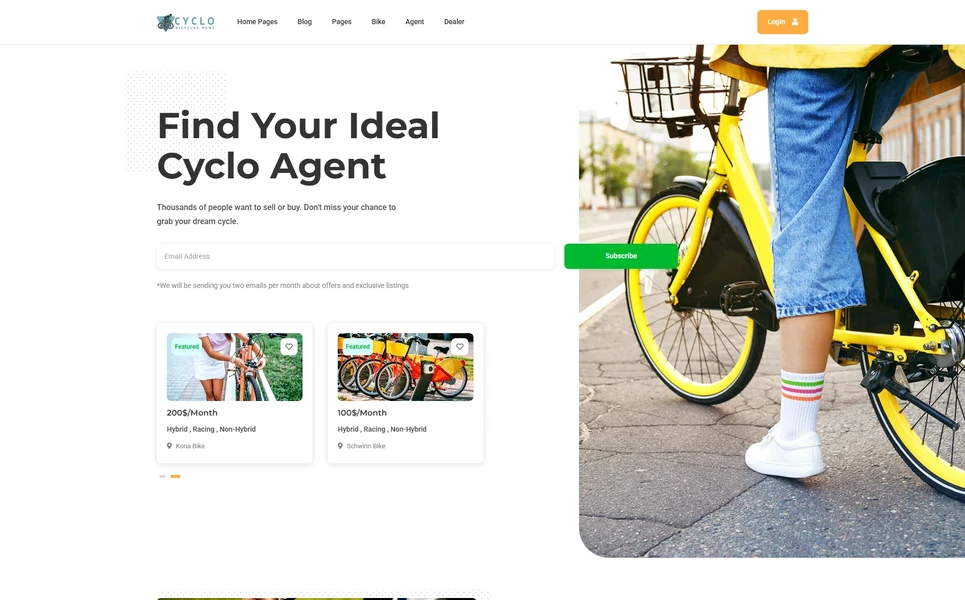
A cycling shop website template is a pre-designed, fully coded website built specifically for bicycle retailers, cycling gear shops, bike rental businesses, cycling marketplace platforms, local bike dealers, and cycling community hubs. It includes every page a cycling business needs — homepage with featured bike listings and dealer highlights, bicycle and product listings in grid, list, and interactive map views, individual listing detail pages with full specifications, side-by-side comparison tools for model evaluation, dealer and agent directory pages with individual profiles, user account management with saved listings, blog for cycling news and maintenance guides, gallery for event and ride photography, and contact page with location map — all designed, responsive, and ready for your brand.
For cycling businesses that need a professional web presence without paying $8,000 to $25,000 for a custom marketplace build or $200 to $500 per month for a managed listing platform, a template delivers the most practical path to a fully featured cycling marketplace. But cycling shop websites face a unique challenge: cycling customers are highly informed, specification-driven buyers who compare models obsessively before purchasing. Your website must accommodate this comparison-heavy browsing behaviour with listing views, filtering tools, and side-by-side comparison features that respect how cyclists actually shop. This guide covers what cycling customers expect from your website, what technical features drive sales, and how to choose the right template for your cycling business.
Template vs Marketplace Platform vs Custom Build
| Factor | Marketplace Platform (BikeExchange, ProBikeKit) | Cycling Shop Website Template | Custom Website Build |
|---|---|---|---|
| Upfront Cost | $0–500 | $29–69 | $8,000–25,000 |
| Monthly Cost | $99–399/month + commissions | $3–10/month (hosting only) | $100–300/month |
| Sales Commission | 5%–15% per transaction | None | None |
| 3-Year Total Cost (at $5K/mo revenue) | $3,564–14,364 + $9,000–27,000 commissions | $137–429 | $11,600–35,800 |
| Code Ownership | No — you rent it | Yes — you own it forever | Yes — you own it |
| Listing Views (Grid/List/Map) | Platform-controlled | 3 views with Isotope filtering | Custom development |
| Bike Comparison Tool | Platform-dependent | Built-in side-by-side comparison | Custom development required |
| Dealer Directory | Platform-controlled | Agent + dealer archive with profiles | Any format |
| Vendor Lock-in | High — customer data locked | None | None |
Marketplace platforms charge listing fees, monthly subscriptions, and sales commissions that compound dramatically. A cycling retailer processing $5,000 in monthly revenue loses $3,000 to $9,000 annually in commissions alone on platform marketplaces — funds that could stock additional inventory, sponsor local rides, or invest in workshop space. A template provides a brand-owned marketplace with zero commissions, while marketplace platforms can serve as supplementary sales channels for additional visibility.
What Cycling Customers Expect From Your Website
Cycling customers are among the most research-intensive buyers in retail. Whether purchasing a first commuter bike, upgrading to a carbon road frame, shopping for children’s bikes, or comparing e-bike models, cyclists invest significant time comparing specifications, reading reviews, and evaluating options before committing. Here is what they evaluate when visiting a cycling shop website:
Multiple Listing Views for Different Browsing Styles
Cyclists browse inventory differently depending on their stage in the buying journey. Early-stage browsers want a visual grid view showing bike images, price ranges, and key specifications at a glance. Comparison shoppers prefer a list view with detailed specifications aligned in columns for easy side-by-side scanning. Local shoppers searching for nearby dealers want a map view showing inventory locations geographically. Providing all three listing views — grid, list, and interactive map — within a single website accommodates every browsing style and purchase stage, keeping visitors on your site regardless of how they prefer to shop.
The map view is especially powerful for cycling businesses with multiple dealer locations or marketplace models aggregating inventory from multiple shops. A cyclist searching for a specific model can see which dealers have it in stock, sorted by proximity. This geographic discovery function is what distinguishes a cycling marketplace from a static product catalogue and directly competes with the location-based search features that large marketplace platforms provide.
Side-by-Side Comparison Tools
Cycling purchase decisions are specification-driven. Frame material, wheel size, gear ratio, brake type, suspension travel, weight, drivetrain components, tyre clearance, and frame geometry all influence the buying decision. A comparison tool that lets visitors select multiple bikes and view their specifications side-by-side replicates the evaluation process that cyclists naturally follow. Without this feature, visitors resort to opening multiple browser tabs, copying specifications into spreadsheets, or visiting competitor sites that offer comparison functionality — all friction points that increase bounce rates and lost sales.
The comparison feature also serves sales staff in physical stores. When a customer visits the shop after online research, the sales team can pull up the comparison page on a tablet and walk through specification differences with the customer present. This bridges online research with in-store conversion, creating a seamless purchasing journey.
Dealer and Agent Directory
Cycling customers want to know who they are buying from. Whether your site represents a single multi-location business or a marketplace connecting multiple independent dealers, a dealer directory with individual profile pages builds trust and facilitates local connections. Each dealer profile showing their specialisations (road bikes, mountain bikes, e-bikes, children’s bikes), service capabilities (fitting, repairs, custom builds), location with map, operating hours, and customer reviews helps buyers choose not just a bike but a dealer relationship that extends beyond the initial purchase through maintenance, upgrades, and community connection.
Agent profiles serve a different function — representing individual sales specialists or brand ambassadors who guide customers through the selection process. Agent detail pages with expertise areas, customer ratings, and direct contact information create personal connections that commodity marketplaces cannot match. A customer who finds an agent specialising in bike fitting for tall riders or e-bike conversions for commuters gains confidence that their specific needs will be understood.
User Profile and Saved Listings
Cycling purchases are rarely impulsive — the research-to-purchase cycle for a bicycle can span weeks or months. User profile management with saved listings, listing history, and submitted listings (for marketplace sellers) respects this extended decision timeline. When a cyclist saves three mountain bikes to their profile, compares them over several visits, reads blog reviews of each model, and finally makes a purchase decision — that entire journey happened on your platform rather than being split across multiple competitor sites. The profile system transforms one-time visitors into returning users.
Content-Rich Blog and Gallery
Cycling customers consume substantial content before and between purchases. Maintenance guides, model comparisons, ride route recommendations, gear reviews, fitting advice, and seasonal preparation articles all attract organic search traffic from cyclists in research mode. A blog with grid, list, sidebar, and single-post formats provides the editorial flexibility for different content types — quick gear tips in grid format, in-depth model reviews in sidebar format with table of contents, and ride reports in single-post format with full-width imagery. A gallery page showcasing group rides, cycling events, shop atmosphere, and customer bikes builds community connection and brand personality.
Pricing Plans for Marketplace Models
If your cycling website operates as a marketplace connecting multiple dealers, pricing plan pages are essential for seller acquisition. Two pricing layout variants allow you to present different subscription tiers — basic listings for small shops, premium listings with featured placement for larger dealers — with clear feature comparisons and value propositions. This commercial infrastructure turns your cycling website from a single-store presence into a scalable marketplace platform.
Seasonal Promotions and Event Countdown
Cycling retail follows strong seasonal patterns. Spring brings the biggest inventory turnover as riders upgrade or purchase new bikes for the season. Summer drives accessory and gear sales. Autumn sees clearance promotions on current-year models. Winter shifts focus to indoor training equipment, workshop services, and early-order discounts for next season’s models. A countdown timer feature creates urgency for seasonal sales, limited-availability model launches, and event registrations — ticking down to spring sale start dates, group ride registration deadlines, or cycling expo appearances that drive both online and in-store traffic.
Service Pages for Workshop Revenue
Bicycle service and repair represents a significant revenue stream that many cycling shop websites underserve. Two service layout variants allow you to present your workshop offerings comprehensively — basic tune-ups, full overhauls, wheel building, suspension servicing, bike fitting, electric bike diagnostics, and custom builds. Each service can be presented with clear descriptions, pricing tiers, turnaround times, and booking functionality. For marketplace models, service pages present the platform’s value-add services like listing management, photography support, and premium dealer placement that differentiate the marketplace from simple classified listings.
Legal and FAQ Compliance Pages
Cycling marketplaces processing transactions or collecting user data require proper legal infrastructure. Terms of service, privacy policy, and cookie policy pages protect both the operator and users. A comprehensive FAQ page addresses common questions about listing procedures, payment processing, return policies, shipping for large items like bikes, warranty coverage, and dispute resolution. These compliance and support pages reduce customer service inquiries, build trust with cautious first-time buyers, and satisfy regulatory requirements for platforms handling user data and financial transactions.
Essential Features for a Cycling Shop Website
Cycling shop websites require specific technical features that general e-commerce templates cannot provide. Here are the elements that directly impact sales and marketplace functionality:
Three Listing View Modes With Isotope Filtering
Grid, list, and interactive map views with Isotope filtering allow visitors to browse inventory in their preferred format while filtering by category, price range, brand, bike type, or location. The filtering system must be fast and intuitive — cyclists filter by mountain, road, hybrid, e-bike, gravel, BMX, and children’s categories as a baseline, with additional filters for frame size, wheel diameter, price range, and condition (new, used, refurbished). Isotope provides smooth animated transitions between filter states, creating a polished browsing experience.
Three Listing Detail Page Styles
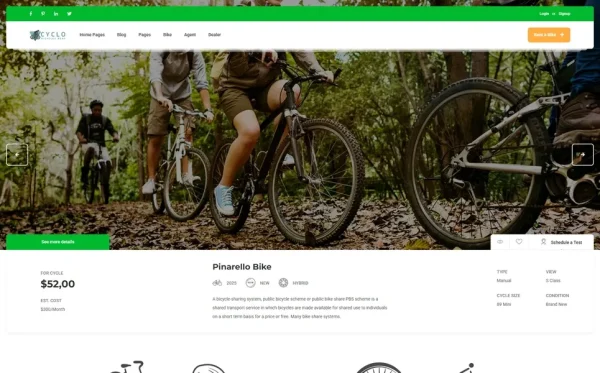
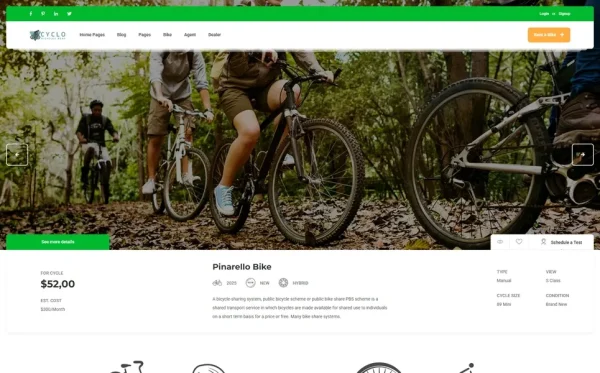
Different listing types benefit from different presentation layouts. A premium road bike listing may use a photo-heavy layout with large hero images and a specification table. A commuter bike listing may prioritise practical features and pricing. A children’s bike listing may emphasise safety features and sizing guidance. Three listing detail page style variants provide this presentation flexibility, allowing each listing to be presented in the format that best showcases its appeal.
Submit Listing Form
For marketplace models, a submit listing form enables dealers, shops, and individual sellers to add their own inventory to your platform. This form should capture all the specification fields that comparison-shopping cyclists expect — brand, model, frame material, wheel size, groupset, brake type, condition, price, location, and high-resolution photographs. A well-designed submission form reduces the editorial workload required to maintain listing quality and enables the platform to scale beyond what a single operator could manually manage.
Select2 Enhanced Dropdowns and Masonry Grid
Select2 enhanced dropdowns transform standard HTML select elements into searchable, multi-select filter controls — essential for cycling marketplaces where visitors need to filter by multiple brands, sizes, or categories simultaneously. Masonry grid layouts provide dynamic, Pinterest-style listing arrangements that accommodate listings with varying image ratios and description lengths, creating a visually engaging browsing experience that static grid layouts cannot match.
How Much Does a Cycling Shop Website Cost?
| Cost Component | Template Approach | Custom Build |
|---|---|---|
| Website Template / Design | $29–69 (one-time) | $8,000–25,000 |
| Domain Name (.com) | $10–15/year | $10–15/year |
| Web Hosting | $5–15/month | $30–100/month |
| SSL Certificate | Free (Let’s Encrypt) | Free–$200/year |
| Map API (Google Maps) | $0–28/month (free tier covers most) | $0–28/month |
| Payment Processing | 2.9% (Stripe/PayPal) | 2.9% + custom integration |
| Inventory Photography | $0–500 (DIY smartphone) | $500–2,000 |
| Year 1 Total | $250–1,500 | $10,000–30,000 |
| Annual Maintenance (Year 2+) | $200–600 | $1,500–6,000 |
Common Mistakes in Cycling Shop Web Design
Offering Only Grid View
Many cycling websites display inventory only in a grid card format. While grid view works for visual browsing, specification-driven cyclists need list view for detailed comparison scanning and map view for geographic discovery. A single listing view forces visitors to adapt to your website’s format rather than shopping in their preferred style. Grid, list, and map views together accommodate every stage of the research-to-purchase journey and every type of cycling customer.
Missing Comparison Functionality
Without a side-by-side comparison tool, cyclists must open multiple browser tabs, screenshot specifications, or manually build comparison spreadsheets. Every one of these workarounds takes the customer’s attention away from your website and introduces opportunities to discover competitor sites. Built-in comparison functionality keeps the entire evaluation process within your platform, increasing time on site and conversion probability.
Neglecting the Dealer Relationship
Cycling is a relationship-driven purchase. Customers who buy from a local dealer return for maintenance, fitting adjustments, component upgrades, and community ride connections. Websites that present inventory without dealer context reduce bikes to commodity listings. Dealer and agent directory pages with individual profiles, specialisations, and customer reviews transform transactions into relationships and increase lifetime customer value dramatically.
Ignoring the Mobile Cycling Shopper
Cyclists frequently browse inventory on mobile devices — during lunch breaks, at cycling events, while visiting physical shops, or on the trainer during winter rides. A responsive mobile-first framework ensures that Isotope-filtered listings, interactive maps, comparison tools, and dealer profiles function flawlessly on smartphones. Touch-friendly navigation, swipeable listing carousels, and mobile-optimised forms are essential for capturing the significant mobile traffic that cycling websites receive.
How to Evaluate a Cycling Shop Template
Listing View Variety
Does the template provide grid, list, and map listing views? A template with only grid view cannot serve specification-driven cycling customers effectively. The map view is especially critical for multi-dealer marketplaces and local shop discovery. All three views should include filtering controls for category, price, and location.
Comparison and Profile Management
Does the template include a side-by-side listing comparison page and user profile management? These two features together support the extended research-to-purchase cycle that cycling customers follow. Without comparison, cyclists leave to compare elsewhere. Without profiles, saved listings disappear between sessions.
Dealer Directory Depth
Does the template include both agent and dealer directories with individual profile pages? A flat listing of dealer names without profile pages provides no competitive advantage. Individual profiles with specialisations, locations, reviews, and contact information create the dealer trust layer that drives cycling purchases.
Cyclo: A Cycling Shop Website Template Built for Marketplace Success
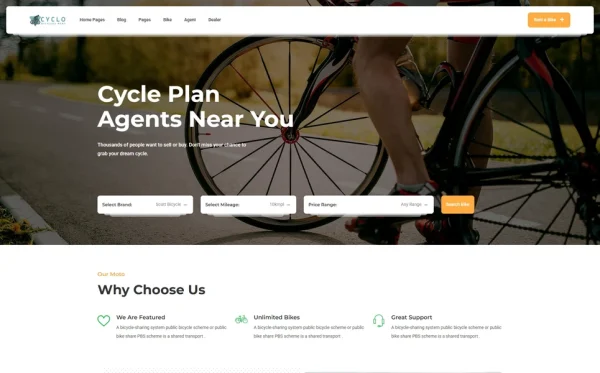
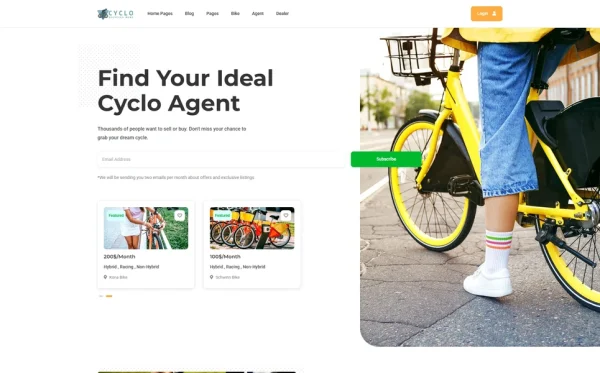
Cyclo is a 35-page HTML5 template designed for bicycle retailers, cycling marketplaces, local bike shops, cycling gear platforms, and cycling community hubs. Built on Bootstrap 5 with Slick carousels, Isotope filtering, jQuery Countdown, Select2 enhanced dropdowns, Masonry grid, and Magnific Popup lightbox, Cyclo delivers one of the most comprehensive cycling marketplace templates available.
The template centres on a triple-view listing system — grid, list, and interactive map — with Isotope filtering that lets visitors browse inventory in their preferred format while filtering by bike type, brand, price range, and location. Three listing detail page style variants accommodate different presentation needs, from photo-heavy premium bike showcases to specification-focused comparison-friendly layouts. A side-by-side comparison page allows cyclists to evaluate multiple models against each other, keeping the entire research process within your platform.
A complete dealer ecosystem — agent directory, dealer directory, individual agent profiles, individual dealer profiles, submit listing form — creates the marketplace infrastructure that supports multi-vendor cycling platforms. User profile management with submitted listings, saved listings, and profile pages respects the extended research cycle that cycling customers follow, transforming one-time visitors into returning platform users.
- 35 HTML pages across listings, dealer directories, blog, profile, and utility pages
- 3 unique homepage layouts with distinct cycling showcase arrangements
- Triple listing views: Grid, List, and interactive Map with Isotope filtering
- 3 listing detail page style variants for different presentation needs
- Side-by-side listing comparison page
- Submit listing form for dealers and marketplace sellers
- Agent directory + individual agent profile pages
- Dealer directory + individual dealer profile pages
- User profile management: profile page, submitted listings, saved listings
- Services module in 2 layout variants + pricing plans in 2 layouts
- Gallery page for cycling events and community photography
- Blog in 4 formats: grid, left/right sidebar, list, and single post
- FAQ and legal compliance pages
- Select2 enhanced dropdowns + Masonry grid + jQuery Countdown
- Login and registration + coming soon and 404 pages
- Bootstrap 5 responsive mobile-first framework
How Cyclo Serves Different Cycling Businesses
Independent Bike Shops
Local bike shops use Cyclo’s triple-view listings to present their complete inventory — road bikes, mountain bikes, hybrids, e-bikes, and children’s bikes — with the comparison tool helping customers evaluate models during their research phase. The blog publishes maintenance guides, local ride routes, and gear reviews that position the shop as a cycling authority. Service pages present repair, fitting, and custom build services. The gallery showcases group rides and community events that the shop organises or sponsors.
Multi-Dealer Cycling Marketplaces
Cycling marketplace operators use Cyclo’s complete dealer ecosystem to onboard multiple shops. The submit listing form lets each dealer add inventory independently. Pricing plans present subscription tiers for different dealer sizes. The map view shows listings geographically, helping customers find inventory at nearby dealers. Agent and dealer profiles build trust by presenting each participating business with their specialisations, credentials, and customer reviews. User profile management allows shoppers to save and compare listings across multiple dealers within a single platform.
Bike Rental and Tour Businesses
Cycling rental and tour businesses use listings to present their available fleet with specifications and daily/weekly rates. The map view shows rental pick-up locations. The services module presents guided tour packages, multi-day cycling holiday itineraries, and corporate team-building rides. The countdown timer creates urgency for seasonal promotions and limited-availability tour dates. The blog publishes route guides, destination features, and cycling tips that attract tourists planning cycling holidays.
Cycling Community Platforms
Community cycling platforms use Cyclo as a hub connecting local cyclists with shops, events, and resources. The dealer directory serves as a trusted shop finder. The blog aggregates cycling news, route recommendations, and event coverage. The gallery documents community rides and events. User profiles allow community members to save favourite shops and listings. Pricing plans can offer premium community memberships with benefits like dealer discounts and early event registration.
Frequently Asked Questions
Need Help Launching Your Cycling Shop Website?
MetropolitanHost provides professional web development services for HTML template deployments. Our team understands cycling marketplace requirements and delivers feature-rich, conversion-optimised implementations.
- Template Installation — live in under 24 hours
- Full Website Package — complete front-to-back deployment
- Colour Customisation — match your cycling brand across all pages
- Website Speed Optimisation — Core Web Vitals improvements
- Accessibility Compliance — WCAG audit and remediation