What Is a Music Band Website Template?
A music band website template is a pre-designed, fully coded website built specifically for bands, solo musicians, musical groups, touring artists, independent performers, and music collectives. It includes every page a musical act needs — homepage with an immersive animated hero and featured content, albums archive with individual album detail pages, artist and band member profiles, ticket and event dates page, photo and video gallery, blog for tour news and music announcements, and contact page — all designed, responsive, and ready for your sound.
For bands and musicians who need a professional web presence without paying $3,000 to $10,000 for a custom build or $20 to $50 per month for a managed music platform like Bandzoogle or Squarespace, a template delivers the most practical path to a professional online presence that you fully own. But band websites face a unique creative challenge: your website must translate the energy, identity, and emotion of your music into a visual experience. A generic business website redesigned with dark colours does not communicate musicianship. This guide covers what fans and industry contacts expect from a band website, what technical features drive engagement, and how to choose the right template for your musical project.
Template vs Music Platform vs Custom Build
Musicians typically face three options when establishing their online presence:
| Factor | Music Platform (Bandzoogle, Squarespace) | Music Band Website Template | Custom Website Build |
|---|---|---|---|
| Upfront Cost | $0 | $29–69 | $3,000–10,000 |
| Monthly Cost | $8–30/month | $3–10/month (hosting only) | $50–150/month |
| 3-Year Total Cost | $288–1,080 | $137–429 | $4,800–15,400 |
| Code Ownership | No — you rent it | Yes — you own it forever | Yes — you own it |
| Design Uniqueness | Same themes as every other band | Fully customisable source code | Fully custom |
| Animated Hero Effects | None or basic | Particles.js animated backgrounds | Custom development required |
| Album Archive | Basic player | Full archive with detail pages | Any format |
| Event Date Scheduling | Basic calendar | DatePicker with interactive scheduling | Any format |
| Vendor Lock-in | High — content trapped | None | None |
Music platforms like Bandzoogle offer convenience but lock your content, fan base, and creative control into a rented framework. If Bandzoogle changes pricing, removes features, or shuts down, your website disappears. An HTML template gives you permanent ownership of your band’s digital identity — every page, every asset, every line of code belongs to you, hosted wherever you choose, for as long as you choose.
What Fans Expect From a Band Website
Fans visiting a band website are not casual browsers. They are invested in your music and looking for specific content that deepens their connection to your project. Your website must satisfy that curiosity while converting passive listeners into active followers, ticket buyers, and merch customers. Here is what fans evaluate:
An Immersive Visual Experience
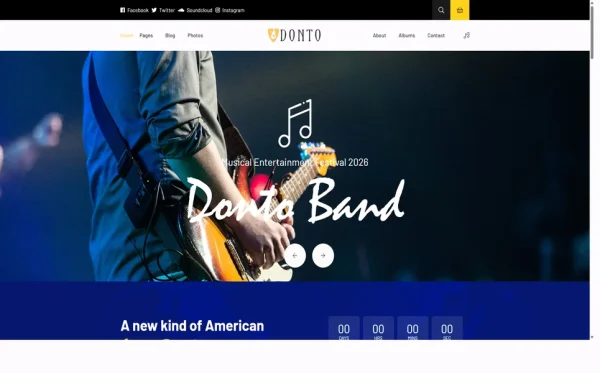
Your homepage must create an immediate emotional impact. Fans who discover your website through social media, a Spotify link, or a Google search form their first impression in under three seconds. A static hero image with a text overlay fails to communicate the energy of live music. Animated hero backgrounds — particle effects, video loops, or dynamic visual elements — create the cinematic first impression that signals “this is an artist website, not a small business page.” The homepage sets the creative standard that every subsequent page must maintain.

Music Discovery and Album Browsing
Fans want to explore your discography. An albums archive page that displays all releases with cover art, release dates, and track listings — plus individual album detail pages with liner notes, credits, and streaming links — creates a comprehensive musical catalogue. This is substantially more engaging than a simple embedded Spotify player. Your album pages become the definitive source of information about your recordings, which strengthens your authority with both fans and industry contacts who research your catalogue.
Band Member and Artist Profiles
Fans connect with individuals, not brands. Artist profile sections that showcase each band member — their instrument, background, musical influences, and personality — humanise your project and create multiple points of fan connection. A lead vocalist might attract some fans while a bassist’s side project interests others. Profile pages also serve press and promoters who need quick access to band member information for posters, articles, and festival billing. Well-designed artist profiles reduce the volume of “can you send me a bio” enquiries you receive.
Tour Dates and Ticket Information
Fans visiting your website during an album cycle or tour announcement want to know one thing: when and where can they see you live? A dedicated tickets page with upcoming show dates, venue names, cities, and ticket links is essential. DatePicker integration lets fans select specific dates to check availability, which is particularly useful for bands with extensive tour schedules. A countdown timer to the next show builds anticipation and creates urgency — both psychological drivers that increase ticket sales.
Visual Gallery of Live Performance
Live performance photography is the most powerful marketing asset a band possesses. A gallery page with high-energy stage shots, festival crowd photos, backstage moments, and studio sessions tells the story of your music beyond audio. Fans share these images on social media, extending your visual reach. Press and promoters use them for event marketing. A well-curated gallery page does ongoing marketing work that a social media feed — where posts disappear in hours — cannot sustain.
Mobile Experience for On-the-Go Fans
Fans discover bands on their phones — through Instagram stories, shared playlist links, or messages from friends. When they tap through to your website, every page must load fast, scroll smoothly, and display correctly on mobile screens. Album artwork must be legible. Tour dates must be tappable. The gallery must be swipeable. If your website requires pinching, zooming, or horizontal scrolling on a phone, you are losing fans at the moment of discovery — the most critical moment in building a fanbase.
What Industry Contacts Expect From a Band Website
Beyond fans, your website serves as a digital press kit for promoters, booking agents, labels, press contacts, and festival programmers. These professionals evaluate dozens of band websites weekly, and they make snap judgments based on professionalism:

Professional Presentation
A promoter considering your band for a festival slot will check your website within 30 seconds. They are looking for signs of professionalism: clean design, quality photos, organised discography, and easy-to-find contact information. A cluttered website with broken layouts, low-resolution images, or a Wix free-tier subdomain signals an amateur project. A polished, custom-domain website with animated hero elements, structured album pages, and dedicated artist profiles signals an act that takes their career seriously — and is worth booking.
Quick Access to Press Materials
Journalists and bloggers reviewing your music need band bios, high-resolution photos, album descriptions, and contact information — accessible within two clicks from your homepage. Your artist profiles, album detail pages, and gallery serve as a distributed electronic press kit. Blog posts about your creative process, recording sessions, and tour stories provide quotable content that journalists can reference in reviews and features. Every piece of content on your website potentially feeds into press coverage.
Technical Features That Drive Music Fan Engagement
Beyond content and design, specific technical components determine whether a band website captures and retains fan attention. These features transform a static page into an immersive music experience:
Particles.js Animated Hero Background
Particles.js creates a dynamic, animated particle field behind your hero content — floating dots, connecting lines, and reactive motion that responds to mouse movement. This creates a living, breathing homepage that immediately communicates creative energy. Unlike a static background image that fans see once and ignore, particle animations create continuous visual interest that holds attention during the critical first seconds of a website visit. The effect is lightweight, performant, and works across all devices, including mobile.
Swiper Carousel for Featured Content
Swiper provides touch-enabled, responsive carousels for showcasing featured artists, album highlights, gallery collections, and testimonials. On mobile devices, fans naturally swipe through content — Swiper makes this gesture feel native and smooth. For band websites, carousels are ideal for cycling through album artwork on the homepage, rotating featured live shots in the gallery, and presenting press quotes or fan testimonials. The touch-optimised interaction keeps mobile fans engaged without requiring page navigation.
DatePicker Event Scheduling
DatePicker integration on your tickets and events page adds interactive date selection that lets fans find specific show dates quickly. Rather than scrolling through a long list of tour dates, fans click a calendar interface and see shows highlighted on specific dates. This is particularly valuable for bands with packed touring schedules where fans need to find their city’s show date within a dense calendar. The visual calendar format also communicates touring activity — a calendar full of highlighted dates signals a busy, in-demand act.
Countdown Timer
A countdown timer on your homepage creates anticipation for album releases, tour kickoffs, single drops, or festival appearances. The ticking clock creates psychological urgency that drives fans to mark dates, share announcements, and return to your website to check progress. For album launches, a countdown timer combined with a pre-save link or ticket purchase button converts anticipation into measurable action — pre-orders, pre-saves, or early ticket sales that demonstrate demand to promoters and labels.
Cost Breakdown: Music Band Website Options
Musicians operate on tight budgets. Understanding the true cost of each website approach helps artists invest wisely in their digital presence:
| Cost Component | HTML Template | Music Platform (Bandzoogle) | Custom Build |
|---|---|---|---|
| Template / License | $29–69 (one-time) | $0 | N/A |
| Hosting | $36–120/year | Included | $120–600/year |
| Platform Fee | None | $96–360/year | None |
| Animated Hero | Built-in (Particles.js) | Not available | $500–2,000 custom |
| Album Archive | Built-in | Basic player | $1,000–3,000 custom |
| Design Customisation | $0–500 | $0–100 | $3,000–8,000 |
| Total Year One | $65–689 | $96–360 | $4,620–13,600 |
| 3-Year Total | $137–929 | $288–1,080 | $4,860–14,800 |
Revenue Per Dollar Invested: A band paying $30/month for a music platform spends $360 per year — equivalent to selling 36 t-shirts at $10 profit each. Over three years, that is $1,080 spent on website rental alone — funds that could cover recording sessions, music video production, or tour fuel. An HTML template at $29–69 provides a more visually impactful website with Particles.js hero animations, a full album archive, and artist profiles that no platform template matches — and you own it permanently. No monthly drain on your music budget.
How to Choose the Right Music Band Template
Not all templates serve musicians effectively. Here is what to evaluate specifically for band and artist use:
Check for Visual Impact on Load
Open the template demo and measure your emotional reaction in the first three seconds. Does the homepage create an immediate sense of energy and creative identity? Or does it look like a corporate website with a dark colour scheme? Band websites must communicate artistry through visual design — animated heroes, bold typography, dynamic layouts, and atmospheric colour palettes. If the demo homepage does not make you feel something, it will not make your fans feel anything either.
Evaluate the Album and Music Section
A band template without dedicated album archive pages is simply a generic template marketed to musicians. Look for an album listing page that displays all releases with cover art and metadata, plus individual album detail pages with track listings, credits, and descriptive content. These pages form the core content hub of any band website — they are what fans bookmark, share, and reference when discussing your music. A simple embedded player does not provide the discography depth that builds fan loyalty.
Count the Page Depth
A band website needs more than a homepage and contact page. Albums, artist profiles, tickets, gallery, blog, and event pages are all essential. A template with 6 pages will leave you designing critical sections from scratch — which defeats the purpose of buying a template. A template with 13+ dedicated music pages provides the complete band web presence without requiring additional design investment or custom page building.
Test the Events and Tour Section
Live performance is where most bands earn their income. Your event and ticket pages must display cleanly, load quickly, and make it obvious how fans can buy tickets. Check for date-picker interaction, countdown timer integration, and clear call-to-action layout on event listings. If the tour date section feels like an afterthought in the demo, it will feel the same to fans trying to find your next show.
Common Mistakes When Building a Band Website
Treating It Like a Business Website
Bands are not businesses — at least not in how fans perceive them. A website with corporate stock photos, formal language, and button-down layouts repels the fans you are trying to attract. Your website should feel like an extension of your live show — energetic, visually bold, and authentically reflective of your musical identity. Use live performance photos, band-specific language, and design elements that align with your genre aesthetic. A punk band’s website should not look like an accounting firm’s.
Burying Tour Dates Below the Fold
Tour dates should be accessible from the homepage within one click. Fans who visit your website during a tour announcement cycle are looking for one thing — when and where is the show in their city? If they have to scroll through three sections, click into a submenu, and navigate to a separate page to find tour dates, you have lost ticket sales. Feature upcoming shows prominently on the homepage or in the main navigation, with direct ticket links visible without additional clicks.
No Album Detail Pages
Embedding a Spotify player and calling it a “music page” is not a discography strategy. Fans who are serious about your music — the ones who buy vinyl, attend multiple shows, and recommend you to friends — want deep album content: track listings, liner notes, recording details, and the story behind each release. Album detail pages provide this depth while also creating SEO-rich content that ranks for album-name searches and drives organic discovery of your music.
Ignoring Press and Booking Needs
Your website serves two audiences: fans and industry contacts. A website built exclusively for fans — heavy on visual flair, light on practical information — frustrates the promoters, journalists, and booking agents who need quick access to bios, photos, technical riders, and contact details. These professional visitors make booking decisions that directly affect your income. Ensure your website serves both audiences through well-organised navigation, accessible artist profiles, and clear contact pathways.
Donto — A Music Band Template Built for Stage Energy
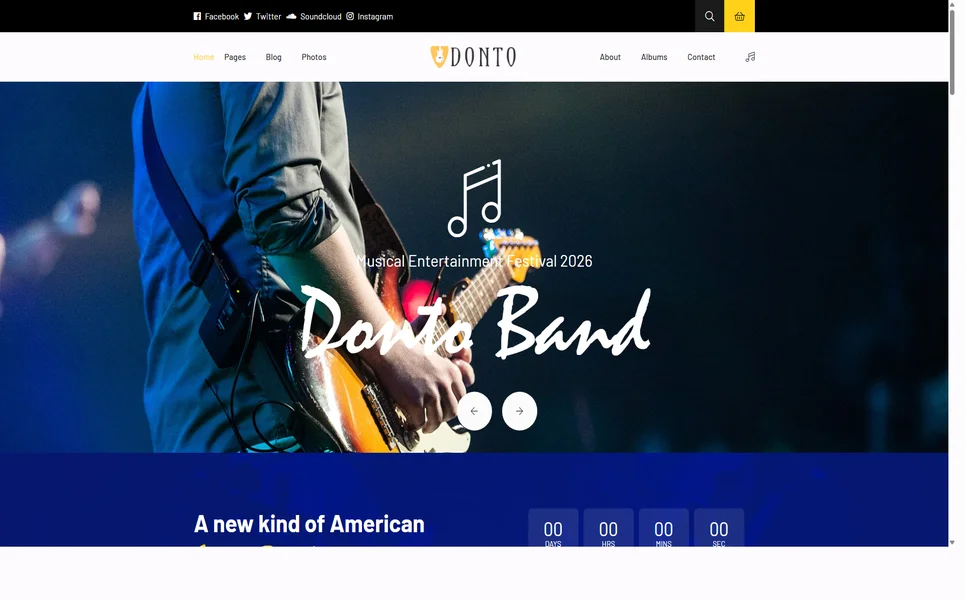
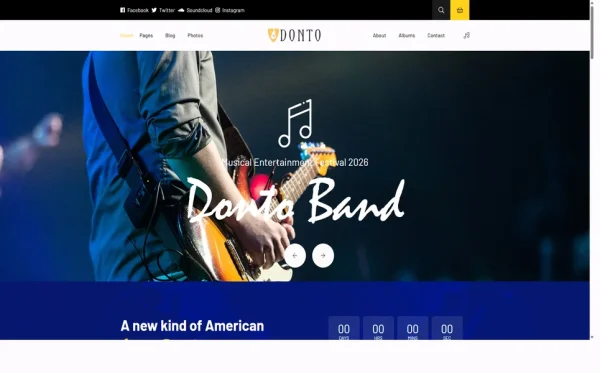
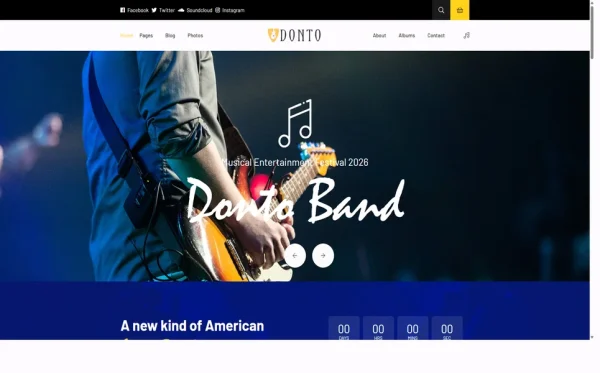
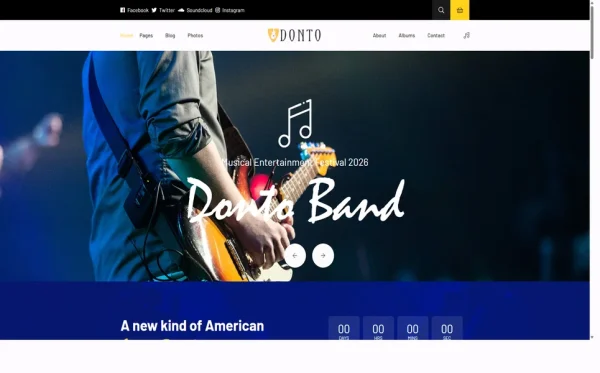
Every feature discussed in this guide exists in a single template. Donto is a Bootstrap 5 HTML5 template with 13 fully designed pages built specifically for bands, musicians, and live music projects — not repurposed from a business template, but designed from the ground up for the music industry.
What Donto Includes
- Striking home layout — immersive hero with Particles.js animated background that creates instant visual impact
- Albums module — music album archive page plus individual album detail pages with full discography support
- Artist profiles — band member and performer showcase with individual bios and images
- Tickets page — festival dates, event schedule, and ticket information with DatePicker integration
- Gallery — live performance and studio photography showcase
- Blog module — music news and tour updates in grid, sidebar, and full article formats
- Countdown timer — build anticipation for album releases, tour kickoffs, and festival appearances
- Contact page — booking and press enquiry form
Technical Foundation
- Bootstrap 5 — responsive grid with mobile-first breakpoints
- Particles.js — animated particle hero background for dynamic stage energy
- Swiper Carousel — touch-enabled featured artist and highlight sliders
- DatePicker — interactive date selection for tour dates and events
- Countdown Timer — release and event anticipation builder
- Cross-browser tested — Chrome, Firefox, Safari, Edge, Opera
Customisation Roadmap for Musicians
After purchasing Donto, follow this implementation sequence to launch your band website:
- Brand your visual identity — update colours, typography, and imagery to match your genre aesthetic and band personality
- Build your discography — populate album archive and detail pages with all releases, including cover art, track listings, and streaming links
- Create artist profiles — write compelling bios for each band member with quality photos
- Set up tour dates — add upcoming shows to the tickets page with venue details and ticket purchase links
- Curate your gallery — select your strongest live performance and studio photos for maximum visual impact
- Configure the countdown — set the timer for your next major release, show, or announcement
- Launch with content — publish an initial blog post announcing the new website and upcoming plans to drive first traffic
Frequently Asked Questions
Need Help Launching Your Band Website?
MetropolitanHost provides professional web development services for HTML template deployments. Our team understands music industry website requirements and delivers clean, visually impactful implementations.
- WordPress Theme Installation — live in under 24 hours
- Full Website Package — complete front-to-back deployment
- Colour Customisation — match your band identity across all pages
- Website Speed Optimisation — Core Web Vitals improvements
- Accessibility Compliance — WCAG audit and remediation