
What Is an Online Marketplace Website Template?
An online marketplace website template is a pre-designed, fully coded website built specifically for niche e-commerce marketplaces, product-based businesses, specialty stores, and multi-category retail platforms. It includes every page a marketplace needs — homepage with promotional features and newsletter capture, complete e-commerce shop with product archive, individual product pages with zoom view, shopping cart, checkout flow, and wishlist, category filtering and price range tools, countdown timers for promotional events, multi-step forms for complex enquiries, and blog for content marketing — all designed, responsive, and ready for your marketplace brand.
For entrepreneurs launching a niche marketplace without paying $15,000 to $80,000 for a custom-built marketplace platform or $99 to $299 per month for a marketplace SaaS subscription, a template delivers the most practical path to a professional e-commerce presence. But marketplace websites have unique requirements beyond a basic shop. Your product system must handle categories, variations, and price ranges across diverse inventory. Your checkout must inspire trust in first-time buyers. Your promotional tools must drive urgency and repeat purchases. This guide covers what marketplace buyers expect, what technical features drive conversions, and how to choose the right template for your niche marketplace.
Template vs Marketplace SaaS vs Custom Build
Marketplace founders typically face three options when launching their platform:
| Factor | Marketplace SaaS (Sharetribe, Arcadier) | Marketplace Website Template | Custom Marketplace Build |
|---|---|---|---|
| Upfront Cost | $0–500 | $29–69 | $15,000–80,000 |
| Monthly Cost | $99–299/month | $3–10/month (hosting only) | $100–500/month |
| 3-Year Total Cost | $3,564–11,264 | $137–429 | $18,600–98,000 |
| Code Ownership | No — you rent the platform | Yes — you own it forever | Yes — you own it |
| Design Flexibility | Limited to platform templates | Fully customisable | Fully custom |
| Transaction Fees | Platform fee + payment processing | Payment processing only (2.9%) | Payment processing only |
| Time to Launch | 1–2 weeks | 1–2 weeks | 3–6 months |
| Vendor Lock-in | High — migration is painful | None | None |
Marketplace SaaS platforms offer built-in vendor management but charge recurring fees that compound into thousands annually. A custom build delivers complete control but costs tens of thousands and takes months to launch. A marketplace website template provides the e-commerce infrastructure, product management tools, and promotional features needed to validate a niche marketplace concept at minimal cost — then scale with custom development once the concept is proven. For first-time marketplace founders, the template path minimises financial risk while maximising speed to market.
What Marketplace Buyers Expect From Your Website
Online marketplace buyers have been trained by Amazon, Etsy, and niche platforms to expect specific features and experiences. Your marketplace must meet these expectations from day one or buyers will abandon their carts and shop elsewhere. Here is what marketplace buyers look for:
Product Discovery That Matches How People Shop
Buyers do not browse marketplaces sequentially — they filter, search, and narrow. A marketplace selling pet supplies might carry hundreds of products across food, toys, accessories, grooming, and health categories. A buyer looking for dog toys does not want to scroll through cat food to find them. Category-based filtering with Isotope grid technology lets buyers click a category and instantly see only relevant products. Price range filtering with a slider control lets buyers set their budget — $10 to $50 — and see only products within that range. These filtering tools transform a cluttered product dump into a curated shopping experience.

Product Detail That Builds Purchase Confidence
Each product page must provide enough information for a buyer to commit without hesitation. High-quality images with zoom view capability let buyers inspect product quality at close range. Product variations — size, colour, type — must be clearly selectable. Quantity selectors must be intuitive. Product descriptions must cover specifications, materials, sizing information, and usage guidance. Customer reviews on product pages provide social proof that reduces first-time buyer anxiety. Every missing detail is a reason to hesitate, and hesitation kills conversion.
Shopping Experience From Browse to Checkout
The path from product page to completed purchase must be frictionless. Add to cart should be a single click. The cart page must display all selected items with images, quantities, and prices with a clear total. The checkout flow should minimise form fields and present information in logical steps — shipping details, payment method, order review. A multi-step checkout that breaks the process into manageable stages reduces abandonment by making each step feel simple rather than presenting buyers with a wall of form fields on a single page.
Promotional Tools That Drive Urgency
Marketplaces need promotional mechanics to drive traffic and conversions during key selling periods. Countdown timers create urgency for flash sales, seasonal promotions, and limited-time offers. Newsletter popups capture email addresses from visitors who are not ready to buy today but may convert with targeted follow-up. These promotional tools — countdown timers, newsletter capture, featured product carousels — are not optional extras. They are the conversion infrastructure that separates profitable marketplaces from those that attract browsers but not buyers.


Wishlist for Considered Purchases
Not every marketplace visit ends in a purchase. Buyers browse, compare, and often return later to complete a transaction. A wishlist function lets buyers save products they are considering, creating a personal shortlist that reduces the friction of returning to complete a purchase. For marketplace operators, wishlists provide valuable data about which products attract interest even when they do not convert immediately — information that informs inventory decisions, pricing strategy, and promotional targeting.
Mobile Shopping Experience
More than half of all e-commerce transactions now happen on mobile devices. Your marketplace must provide a seamless mobile shopping experience — product grids that display cleanly on small screens, touch-friendly filtering, product images that zoom on tap, a cart that is easy to modify, and a checkout that auto-fills where possible. Marketplace buyers who encounter friction on mobile do not switch to desktop — they switch to a competitor whose mobile experience works.
Technical Features That Drive Marketplace Conversions
Beyond visual design, certain technical features specifically drive marketplace conversion rates and distinguish a professional e-commerce presence from an amateur online shop.


Price Range Slider
ion.rangeSlider provides an intuitive price filtering tool with a draggable slider that lets buyers set their minimum and maximum budget. Unlike dropdown menus with fixed price brackets, a slider provides continuous filtering — a buyer can set $15 to $45 with precision rather than choosing between “$10–$25” and “$25–$50” brackets. This granular control respects the buyer’s actual budget rather than forcing them into predefined ranges. For marketplaces with products spanning wide price ranges, the slider is essential for product discovery.
Product Zoom View
jQuery Zoom provides close-up product image zoom on hover, letting buyers inspect product quality, materials, and details at a level that builds purchase confidence. For physical products where texture, stitching, finish quality, and material detail matter — clothing, accessories, handcrafted goods, specialty items — zoom functionality is the digital equivalent of picking up a product in a store and examining it closely. Marketplaces with zoom view consistently see higher conversion rates than those with static images only.
Multi-Step Checkout
jQuery Steps powers a streamlined multi-step checkout that breaks the purchase flow into logical stages — shipping information, payment details, order review, and confirmation. Single-page checkouts with twenty or more form fields overwhelm buyers and drive cart abandonment. Multi-step checkout presents three to five fields at a time, each step with a clear progress indicator. Buyers feel they are making progress rather than facing a wall of required information. This structured approach reduces checkout abandonment by making each step feel manageable.
Countdown Timer for Promotions
A countdown timer creates urgency for flash sales, seasonal promotions, product launches, and limited-stock events. The ticking clock triggers loss aversion — the psychological principle that people respond more strongly to the fear of missing out than the prospect of gaining something. For marketplaces running weekly deals, seasonal clearances, or limited-edition product drops, countdown timers are a proven conversion tool that drives immediate action rather than “I’ll come back later” behaviour.
Newsletter Popup for List Building
A newsletter popup triggered on the homepage captures email addresses from visitors who arrive, browse, but are not ready to buy. This first-visit traffic is the most expensive to acquire — through advertising, SEO, or referrals — and a newsletter popup ensures you can re-engage these visitors through email marketing without paying to acquire them again. For marketplaces, the email list becomes the highest-ROI marketing channel, driving repeat purchases and promotional engagement at near-zero marginal cost.
Conversion Stack: The most effective marketplace websites layer multiple conversion tools — price filtering narrows the selection, product zoom builds confidence, wishlist saves intent, countdown timers create urgency, and multi-step checkout reduces friction. Each tool addresses a different point in the buyer journey. A marketplace with all five conversion tools active typically outperforms a basic shop that relies on product images and an add-to-cart button alone.
Choosing Your Marketplace Niche
Niche Marketplaces vs General Stores
The most successful online marketplaces in 2026 are niche-focused rather than general-purpose. A pet supply marketplace that becomes the go-to destination for premium dog food and accessories outperforms a general store that sells everything poorly. Your niche determines your product catalogue, your audience, your marketing strategy, and your competitive positioning. Choose a niche where you have genuine expertise or passion — pet supplies, artisan crafts, specialty food, outdoor gear, baby products, or any category where knowledgeable curation adds value that Amazon’s algorithm cannot replicate.
Category Structure Planning
Before building your marketplace, map out your category taxonomy. A pet marketplace might organise by animal type (dogs, cats, birds, fish), then by product type within each (food, toys, accessories, health, grooming). This two-level hierarchy provides the filtering structure your template needs. Isotope filtering handles the front-end category navigation, and a well-planned taxonomy ensures buyers can find products in two clicks or fewer. Plan your categories before you start adding products — restructuring a taxonomy after launch is significantly more work.
Pricing Strategy for New Marketplaces
Price transparency builds trust in new marketplaces. Display prices clearly on every product. Use the price range slider to help buyers navigate your price spectrum. Consider introductory promotions with countdown timers to drive early sales and build purchase history. Free shipping thresholds — “Free shipping on orders over $50” — increase average order value while giving buyers a psychological incentive to add more items. Your pricing strategy and how it is communicated through your website directly impacts both conversion rate and average order value.
How to Evaluate a Marketplace Template Before You Buy
Walk Through the Complete Purchase Flow
In the template demo, add a product to cart, proceed to checkout, and examine every step. Does the cart display clearly with product images, quantities, and totals? Is the checkout a single overwhelming page or a structured multi-step flow? Can you modify quantities and remove items easily? The complete purchase path from product page to order confirmation must be smooth and professional — this is where revenue either converts or abandons.
Test the Filtering System
Navigate to the shop page and test the category filters and price range slider. Do products filter instantly without page reloads? Is the price slider responsive and precise? Can you combine category filtering with price filtering? These filtering tools are what distinguish a professional marketplace from a basic product grid — buyers who cannot filter efficiently leave without purchasing.
Check Product Page Depth
Examine individual product pages. Is there space for multiple images? Does zoom view work on hover? Are product variations (size, colour, type) selectable? Is there a reviews section for social proof? Does the page include related products or cross-sell suggestions? Product pages that lack these features require significant additional development to reach marketplace-standard functionality.
Cost Breakdown: Launching an Online Marketplace
| Component | DIY with Template | Marketplace SaaS | Custom Build |
|---|---|---|---|
| Design/Platform | $29–69 (one-time) | $0–500 (setup) | $15,000–80,000 |
| Monthly Cost | $3–10/month (hosting) | $99–299/month | $100–500/month |
| Payment Processing | 2.9% + $0.30/transaction | 2.9% + platform fee | 2.9% + $0.30/transaction |
| Year 1 Total | $65–189 | $1,188–4,088 | $16,200–86,000 |
| Year 2+ Annual | $36–120 | $1,188–3,588 | $1,200–6,000 |
| 3-Year Total | $137–429 | $3,564–11,264 | $18,600–98,000 |
The template path is the lowest-risk option for marketplace validation. Invest $29 to $69 in the template, $36 to $120 annually in hosting, and you have a professional marketplace to test your niche, validate product-market fit, and generate early revenue. If the marketplace concept proves viable, reinvest revenue into custom features and vendor management tools. If the concept needs pivoting, you have lost under $200 rather than $15,000 or more.
Asvva — A Template Built for Niche Marketplaces
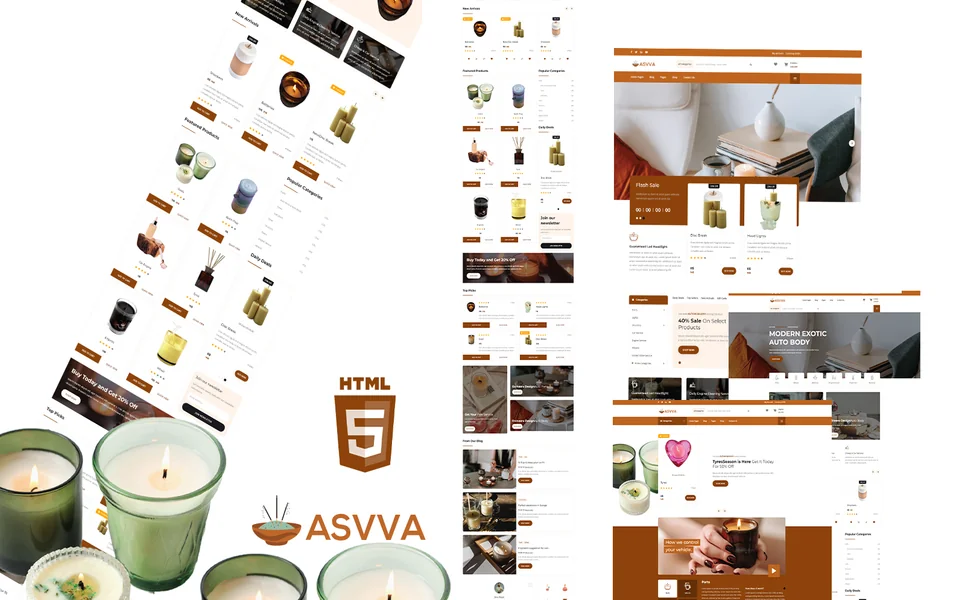
Asvva is a fully featured e-commerce HTML5 template designed to meet every requirement outlined in this guide. Built with a complete shop system, advanced filtering, product zoom, multi-step checkout, promotional countdown timers, and newsletter capture, it delivers the conversion infrastructure that niche marketplaces need — demonstrated through a pet store concept that translates to any product-based marketplace niche.
What Asvva Includes
- Full E-Commerce Shop — shop archive, product single with zoom, cart, checkout, and wishlist
- Category Selection System — filter and browse by product category or type
- Price Range Slider — ion.rangeSlider for filtering products by budget
- Product Zoom View — close-up product image zoom on hover for detail inspection
- Product Variations and Quantity Selectors — size, type, colour, and amount selectors per product
- Multi-Step Checkout — jQuery Steps powered streamlined purchase flow
- Newsletter Popup — email capture modal for list building
- Countdown Timer — flash sale and promotional event urgency tool
- Isotope Filtering — category-based product grid navigation
- Slick Carousels — featured product and testimonial showcases
- Blog Module — content marketing, product guides, and category education
- Contact Page — customer enquiries and support
Technical Foundation
Asvva is built on Bootstrap 4 with jQuery 3.4.1, Slick carousels for featured product showcases, Isotope grid filtering for category-based browsing, ion.rangeSlider for price filtering, jQuery Zoom for product detail inspection, jQuery Steps for multi-step checkout flow, Magnific Popup lightbox for full-screen product viewing, and responsive design across all pages. Every e-commerce component is production-ready and built for the conversion performance that marketplace businesses require.
Niche Marketplace Ready: Asvva demonstrates its e-commerce capabilities through a pet store concept, but the entire template system — product grids, category filtering, price slider, zoom view, multi-step checkout, countdown promotions, and newsletter capture — translates directly to any niche marketplace. Whether you are building a specialty food marketplace, an artisan craft store, an outdoor gear shop, or a baby products destination, Asvva provides the full conversion stack without requiring custom development.
Customisation Roadmap for Marketplace Founders
Week One — Products and Categories: Define your product catalogue and category taxonomy. Photograph products with consistent lighting and backgrounds. Write product descriptions with specifications, materials, and sizing information. Plan your price range and set up the ion.rangeSlider with appropriate minimum and maximum values. Replace all placeholder content and adjust the colour scheme to match your marketplace brand.
Week Two — E-Commerce and Launch: Configure the shop with products organised by category. Set up product variations where applicable. Configure the multi-step checkout flow. Integrate your payment processor (Stripe, PayPal). Set up the newsletter popup with your email marketing platform (Mailchimp, ConvertKit). Create a launch promotion with the countdown timer. Test the complete purchase flow on desktop and mobile. Deploy, announce, and begin driving traffic through social media and content marketing.
Frequently Asked Questions
Need Help Launching Your Marketplace?
MetropolitanHost provides professional web development services for HTML template deployments. Our team understands e-commerce requirements and delivers clean, well-structured marketplace implementations.
- WordPress Theme Installation — live in under 24 hours
- Full Website Package — complete front-to-back deployment
- Colour Customisation — match your marketplace branding across all pages
- Website Speed Optimisation — Core Web Vitals improvements
- Accessibility Compliance — WCAG audit and remediation