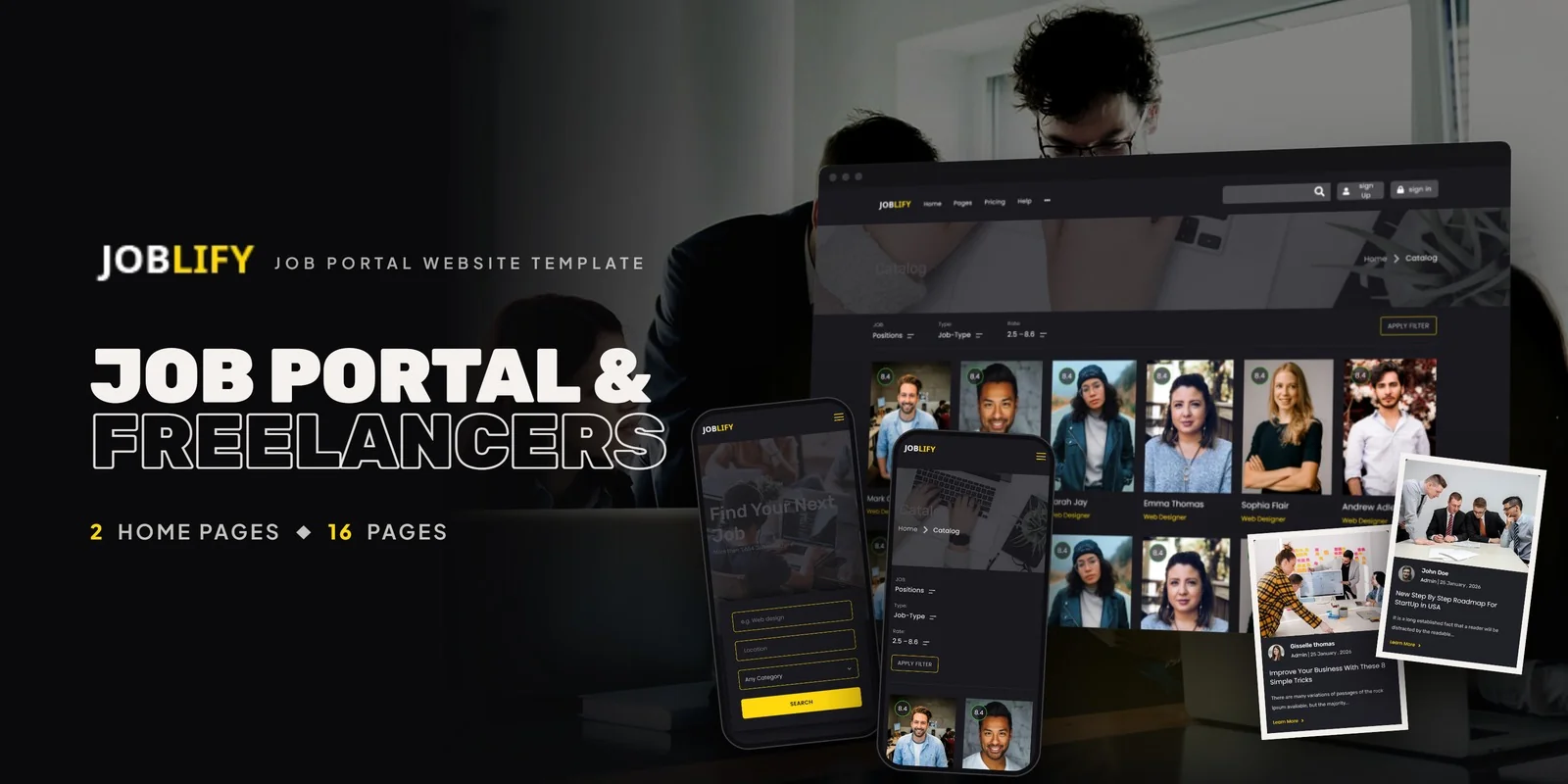
What's in the box.
A Tailwind CSS portal template that gives a job board a vacancy catalog, a resume builder and an employer posting form, Joblify runs on Tailwind CSS 4. It totals 18 pages with a choice of two homepages, so you can launch a hiring site without drawing each screen yourself.
It suits job boards, career management portals, resume creation services, freelance talent platforms and employment marketplaces. Agencies building a recruitment site for a client can also start here.
Tailwind CSS Portal Template Pages for Candidates and Employers
The Tailwind CSS portal template includes sign in and sign up pages, so candidates and employers can each reach their own account area. Employers get an Add Job form for posting vacancies. Candidates get a Create Resume page, a User Profile page and a Settings page.
- Job seekers: browse the Job Catalog, open a vacancy, then build a resume.
- Employers: submit a listing through Add Job and manage the account in Settings.
- Board owners: show subscription plans on one of 2 pricing pages.
Job Catalog, Job Details and Resume Pages
The Job Catalog lists vacancies as an archive. Each vacancy then opens on one of 2 Job Details styles, so you can choose the layout that fits your listings. The Create Resume page lets a candidate enter a CV in a dedicated form.
- Two homepages that differ in hero style and showcase arrangement
- Job Catalog, Job Details v1 and Job Details v2
- Add Job and Create Resume
- User Profile and Settings
- Pricing v1 and Pricing v2
- Sign In and Sign Up
- Blog, Blog Detail and Contact Us
Pricing, Statistics and Career Blog
A board that sells listing plans can use either of the 2 pricing pages. CounterUp statistics show jobs posted, placements and client numbers on the home pages. Owl Carousel sliders present featured job categories and testimonials, while Magnific Popup opens media in a lightbox. The Blog uses a Masonry grid for career tips and industry news, and Blog Detail shows a full article.
Editing Joblify Styles With Tailwind CSS 4
Each hover and focus effect is written directly on the element beside its normal styling, so you can see how a job card or a button behaves without opening another file. The theme holds the colors, fonts and spacing in a single definition. Edit it there and the change reaches the Job Catalog, the Add Job form and every other page.
First Edits for a Job Board Launch
A typical first pass sets brand colors, fonts and spacing in the theme. Next come the Job Details layout and the Pricing page you keep, then the vacancy text and the Create Resume fields. The icon sets are Flaticon and FontAwesome, while Google Fonts handles the type. You can open the pages straight away, and the included Tailwind source lets you change the styles and compile the CSS again. The photos from the live preview are left out of the download, and neutral placeholders mark their spots until your own pictures go in. A documentation guide walks through setup and customisation, and the pages work in Chrome, Firefox, Safari, Edge and Opera.
Image credits for the preview go to Freepik and Unsplash.
Buyer’s guideLepracti — Lawyer Directory Website Template | Bootstrap 5 (37 Pages, 5 Attorney Layouts & Blog) — see how Joblify compares with the alternatives.
Joblify in other formats
The same design, built natively in each stack. Every format is its own product with its own demo, documentation, download and reviews.
-
JoblifyHTML5
$19
$49View HTML5 → -
This page JoblifyTailwind CSS $24
$54You are viewing it -
JoblifyReact
$19
$49View React → -
JoblifyVue.js
$22
$49View Vue.js → -
JoblifyAngular
$24
$49View Angular → -
JoblifyWordPress
$69
$109View WordPress → -
JoblifyPHP
$22
$49View PHP → -
JoblifyAI Smart Website
$1,599
$1,759View AI Smart Website → -
Save 20%
Developer bundleAll 6 code formats
$140
$175View bundle →
What's changed.
- First release of Joblify with Tailwind CSS 4 styling.
- 18 pages with 2 home layouts and 2 pricing pages.
- Job catalog, 2 job detail styles, Add Job form and Create Resume page.
Need Joblify installed or customized?
Fixed prices, done by the developers who built this template. Pick a service and we take it from there.
- Theme installation
- Color scheme customization
- Speed optimization
- 1-hour web development



Reviews
There are no reviews yet.