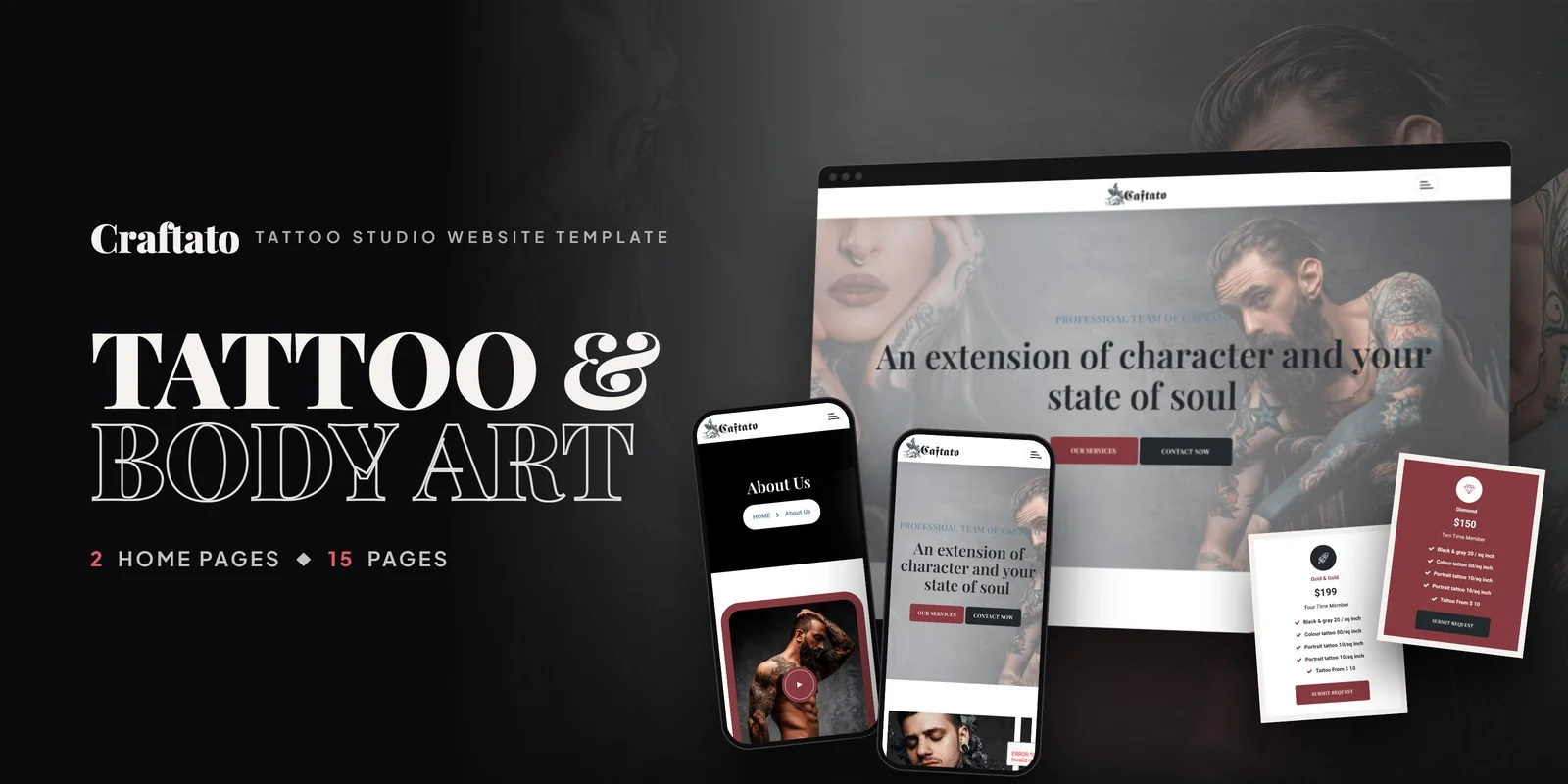
What's in the box.
Craftato gives a tattoo studio a complete website built with Tailwind CSS 4, so artists can show their work and clients can find answers fast. It is a Tailwind CSS tattoo shop template with 15 pages, 2 home layouts and a portfolio that filters by style.
Tattoo studios, solo artists, body art galleries, piercing shops and ink culture brands can all use it. Freelancers and agencies can also deliver it to a client as a ready site.
Tailwind CSS Tattoo Shop Template Built Around the Portfolio
A Tailwind CSS tattoo shop template should let clients browse flash and finished work before they ever call, and the portfolio here does that. The archive page filters artwork by tattoo style or category, so a visitor looking for one look can skip the rest. Each piece also opens in a detail page, and a lightbox shows images full screen.
Counters then show tattoos completed, happy clients and years in business, while carousels rotate featured artwork and testimonials.
Tattoo Artist Profiles, Services and Pricing Pages
Because this Tailwind CSS tattoo shop template ships a services module, a studio can list each style with its own detail page. The team section works the same way: a grid of artists, then a profile with bio and portfolio for each one.
- Home: two hero and artwork layouts.
- About Us: studio story, philosophy and values.
- Services and Service Detail: every tattoo and body art offer.
- Portfolio and Portfolio Detail: filterable archive and single projects.
- Team and Team Detail: artist grid and individual profiles.
- Gallery: studio atmosphere and ink artwork.
- Blog, Blog Grid and Blog Detail: tattoo culture news in three formats.
- FAQ: aftercare and process questions.
- Contact Us: form, address and map.
Pricing tables cover tiered memberships and per-square-inch tattoo rates, so clients see costs before booking.
Tailwind CSS 4 on the Portfolio, Team and Blog Pages
Breakpoint prefixes written into the markup resize each layout from phone to desktop. The portfolio grid, the artist profiles and the blog cards therefore resize on phones without separate rules. The compiled CSS holds just the classes these pages call, so leftover rules stay out.
What a Studio Would Change First
The first edit is usually the portfolio categories, where the sample style names give way to your own, followed by the services list and the pricing tables. After that they swap in artist bios and the FAQ answers on tattoo care.
The finished pages run straight from the folder. The Tailwind source sits alongside them, so restyling means changing classes and compiling again. The preview photos are not included, and neutral placeholders mark where your own artwork goes. Icons come from FontAwesome and Flaticon, fonts load from Google Fonts, and the package includes step-by-step documentation.
The template is also cross-browser compatible, covering Chrome, Firefox, Safari, Edge and Opera.
Buyer’s guideArt Gallery Website Template: Complete Buyer’s Guide (2026) — see how Craftato compares with the alternatives.
Craftato in other formats
The same design, built natively in each stack. Every format is its own product with its own demo, documentation, download and reviews.
-
CraftatoHTML5
$17
$49View HTML5 → -
This page CraftatoTailwind CSS $22
$54You are viewing it -
CraftatoReact
$20
$49View React → -
CraftatoVue.js
$19
$49View Vue.js → -
CraftatoAngular
$27
$49View Angular → -
CraftatoWordPress
$53
$93View WordPress → -
CraftatoPHP
$17
$49View PHP → -
CraftatoAI Smart Website
$2,399
$2,639View AI Smart Website → -
Save 20%
Developer bundleAll 6 code formats
$122.40
$153View bundle →
What's changed.
- First release of the Tailwind CSS edition with 15 pages and 2 home layouts.
- Includes portfolio, services, team, gallery, FAQ and three blog formats.
- Adds Isotope filtering, counters, carousels and a lightbox.
Need Craftato installed or customized?
Fixed prices, done by the developers who built this template. Pick a service and we take it from there.
- Theme installation
- Color scheme customization
- Speed optimization
- 1-hour web development








Reviews
There are no reviews yet.