What's in the box.
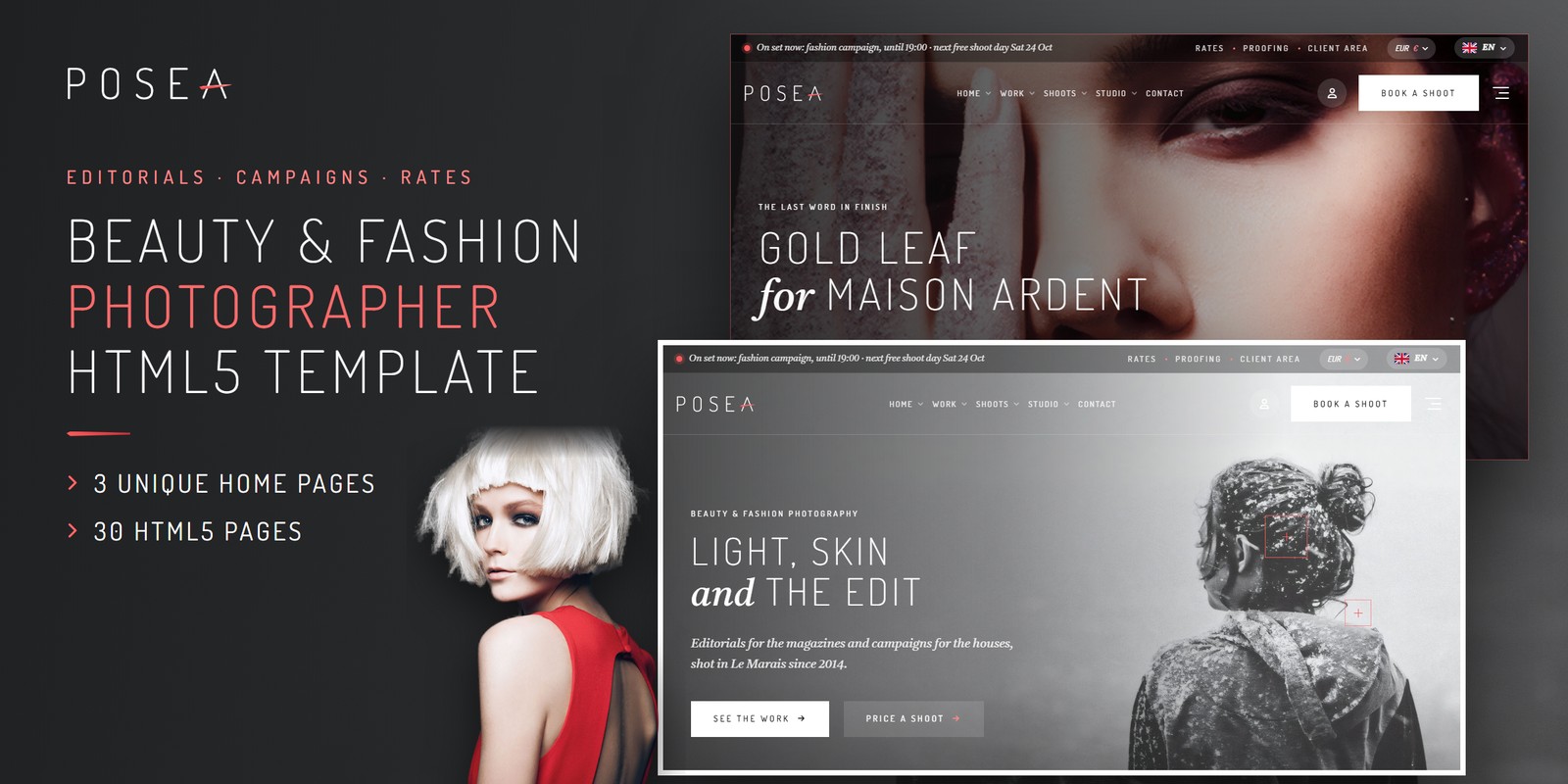
Beauty and fashion photographers who sell editorials, campaigns and lookbooks to clients can build their site on Posea, a Tailwind CSS 4 edition and a Tailwind CSS photographer template with 30 pages. The design is quiet and monochrome. It uses thin Dosis capitals, a grey italic lead in Castoro and one lipstick coral, so the photographs stay in front.
Three Home Pages for Studios, Campaigns and Beauty Editorials
- The Studio: a full-bleed slider, a mosaic of recent stories, three shoot types with rates, a quick quote, the team, client voices and tear sheets. A magazine cover also builds around the portrait as you scroll.
- Campaigns: a dark slider, stepped campaign tiles, testimonials and usage licensing. A light table with a loupe shows 35 mm transparencies, and the next free shoot days appear below.
- Beauty Editorials: a boxed page with a split hero slider and six shoot types. A square mosaic shows beauty details, and a magazine opens across its gutter. A film from the set and a rate card with a half-day switch follow.
Editorials, Campaigns and Tear Sheets
The work section holds 14 stories for 11 clients. Visitors can filter by type, client and year, or search, and a count updates as they do. Three story layouts exist: big images with credits, a wide slider with the campaign licence, and a small masonry beside the text. Each ends with its tear sheets and the next story.
Clients are listed A to Z. The 12 tear sheets are drawn as magazine covers and pages, sorted by magazine, year and page type, and open in a lightbox.
Why This Tailwind CSS Photographer Template Prices Shoots
This Tailwind CSS photographer template runs its quote, calendar and proofing from one block of studio data, so the rate card and the booking form always agree. The data covers:
- 6 shoot types priced by the day or the half day
- looks and retouched images added over what a day includes
- three retouching levels and rush delivery
- the usage licence by media, territory and term
- the team, the studio, VAT and the deposit
The quote adds everything up as the client chooses. It can be saved to the client area or booked straight away. A currency switch also repaints every price in euros, pounds or dollars.
Book a Shoot and Client Proofing Pages
Book A Shoot is a six-step enquiry: the shoot, a free day on a live calendar, the brief, the team, your details and a review. Continue never blocks, and only Send checks the form. Client Proofing then lets a client pick frames to retouch. The count follows their picks against the images the shoot includes, so extra retouches are priced by level.
Thirty Pages, Themes and Motion
The inner pages include Editorials & Campaigns, Beauty Gallery, Editorial Story, Campaign Story, Beauty Story, Clients, Client Page and Tear Sheets. They also include Shoot Types, Shoot Details, Rates & Quote, Book A Shoot, How A Shoot Runs, Client Proofing and About. The Team, Journal and FAQ with search follow. Contact has a working form and a map. Client Area, Login, Register, Forgot Password, Coming Soon and 404 complete the set.
- A light theme by default and a dark theme on one switch, remembered between visits
- Right-to-left support and a flag language picker
- WebGL layers tinted by the theme colours, including a Moire of two fine line screens and a pixel-sorting logo in the footer
- Swiper sliders, Fancybox video popups and lightbox galleries
Rate Card and Accent Colour Edits
Buyers usually start with the rate card and the coral accent. With Tailwind CSS 4, styling sits as utility classes in the HTML, so a section’s look can be read and changed where it is. Hover and focus states also sit in the markup next to the base styles. A change to the Rates & Quote cards therefore stays in one place.
The finished pages open as they are, and the Tailwind source is included for anyone who wants to edit and rebuild the styles. The preview images are not in the download, and neutral placeholders replace them. Documentation is included, and Font Awesome Free loads locally. Fonts are Dosis and Castoro from Google Fonts.
Buyer’s guideArt Gallery Website Template: Complete Buyer’s Guide (2026) — see how Posea compares with the alternatives.
Posea in other formats
The same design, built natively in each stack. Every format is its own product with its own demo, documentation, download and reviews.
-
PoseaHTML5
$16
$22View HTML5 → -
This page PoseaTailwind CSS $21
$27You are viewing it -
PoseaReact
$16
$22View React → -
PoseaVue.js
$16
$22View Vue.js → -
PoseaAngular
$16
$22View Angular → -
PoseaWordPress
$66
$88View WordPress → -
PoseaAI Smart Website
$1,319
$1,759View AI Smart Website → -
Save 20%
Developer bundleAll 5 code formats
$104
$130View bundle →
What's changed.
- First release of the Tailwind CSS edition with 30 pages and 3 home page designs.
- Includes 6 shoot types, 14 stories, 12 tear sheets, booking calendar and client proofing.
- Light and dark themes, right-to-left support and a currency switch.
Need Posea installed or customized?
Fixed prices, done by the developers who built this template. Pick a service and we take it from there.
- Theme installation
- Color scheme customization
- Speed optimization
- 1-hour web development

Reviews
There are no reviews yet.