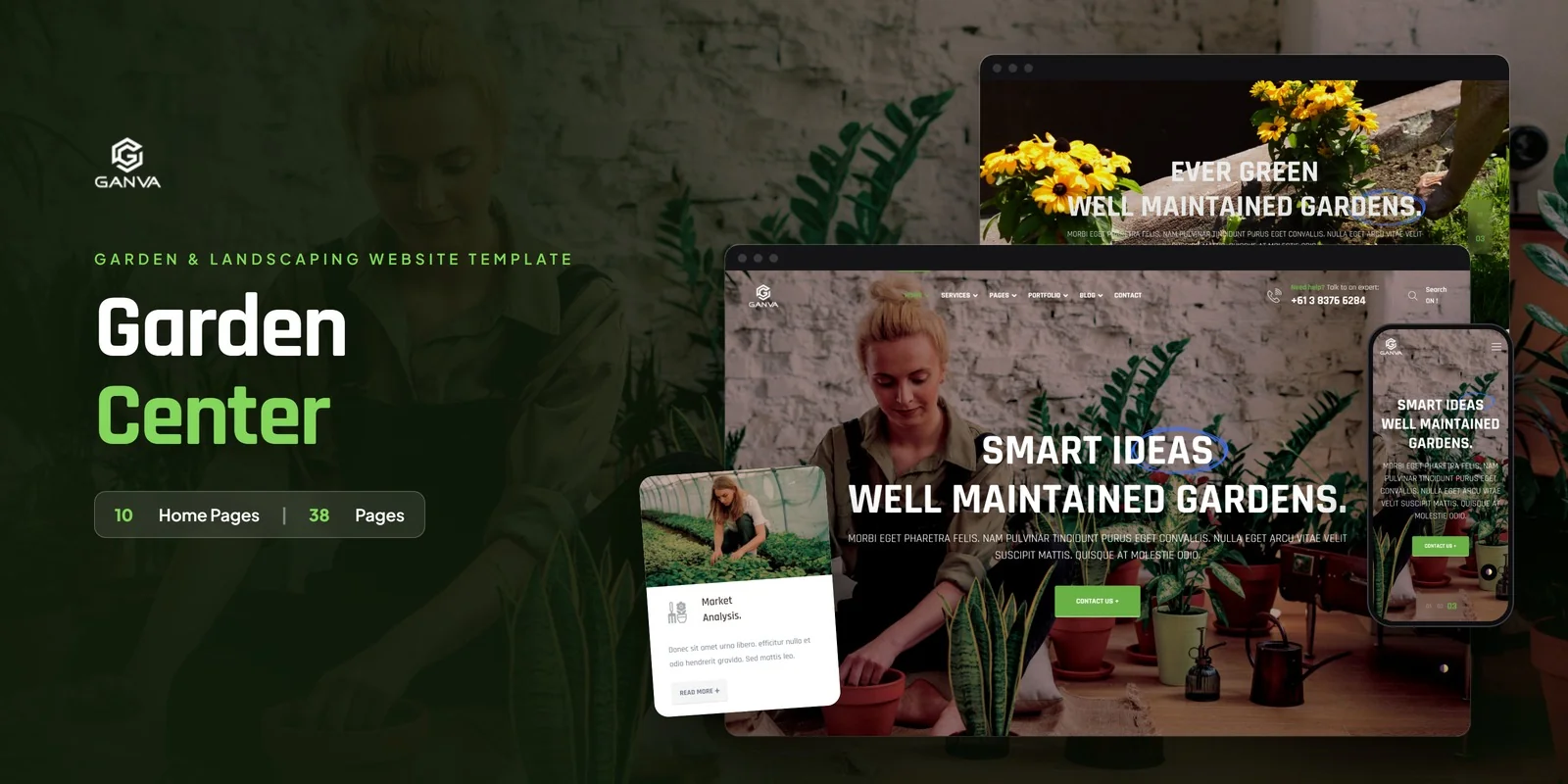
What's in the box.
Seasonal plants, landscaping projects and gardener profiles each get their own page in Ganva, a Tailwind CSS garden center template made with Tailwind CSS 4. It has 39+ pages and 10 home layouts. They suit garden centers, plant nurseries, landscaping services, florists and gardening businesses.
Tailwind CSS Garden Center Template Pages for Nurseries and Landscapers
This Tailwind CSS garden center template includes ten home layouts, so a nursery can try several hero styles before it picks one. Each layout arranges the plant showcase differently. So you can match the page to your stock.
Beyond the homes, the template covers the jobs a garden business does every week. It presents services, shows finished projects, introduces staff and publishes growing advice.
Services, Portfolio and Team Pages for Garden Businesses
- Services: an overview page plus a Service Detail page for each garden service.
- Portfolio: a project archive with Isotope filtering, so visitors can sort work by type, and a Portfolio Detail page for each case study.
- Team: a grid of gardeners and florists, plus a Team Detail page with a profile and bio.
- Testimonials: one page for client reviews.
Swiper sliders and a Masonry grid handle the project carousels and image layouts, while GSAP, Jarallax and WOW.js add scroll animation and parallax backgrounds.
Blog Formats for Gardening Tips
The blog comes in nine formats: gallery, audio, video, link, quote, left sidebar, right sidebar, list and masonry, plus a full article page. A florist can post a planting video. A nursery can publish a seasonal care list, so this Tailwind CSS garden center template covers both. Also included are FAQ, a Contact Us page with a form and map, Coming Soon, a custom 404 Error page and a Typography reference.
How the Plant and Garden Pages Use Tailwind CSS 4
Layouts adapt to screen size, because the markup carries mobile-first breakpoint prefixes. So a plant grid or portfolio archive can change its column count on phones and tablets. No separate stylesheet is needed. Hover and focus states also sit right beside the default classes. Reading a service card or team member shows how it behaves.
First Edits to Make After You Buy
The usual first edit is content. Change the plant names, service descriptions, gardener bios and portfolio project photos. Then pick one of the ten home layouts and delete the rest. After that, adjust colors and spacing in the markup itself. The Typography page helps you check headings and text styles.
Inside the download you get ready pages that open in a browser, plus the Tailwind source if you plan to adjust colors or spacing and rebuild the CSS. The preview photos are swapped for neutral placeholders, so your own plant and project pictures go in their place. Icons use FontAwesome, typefaces come from Google Fonts, and the written documentation guides you through setup and customisation.
Ganva works across Chrome, Firefox, Safari, Edge and Opera. Its image credits go to Freepik and Unsplash.
Buyer’s guideBest Landscaping Website Designs & Templates (2026) — see how Ganva compares with the alternatives.
Ganva in other formats
The same design, built natively in each stack. Every format is its own product with its own demo, documentation, download and reviews.
-
GanvaHTML5
$19
$49View HTML5 → -
This page GanvaTailwind CSS $24
$54You are viewing it -
GanvaReact
$22
$49View React → -
GanvaVue.js
$24
$49View Vue.js → -
GanvaAngular
$29
$49View Angular → -
GanvaWordPress
$76
$116View WordPress → -
GanvaPHP
$19
$49View PHP → -
GanvaAI Smart Website
$2,699
$2,969View AI Smart Website → -
Save 20%
Developer bundleAll 6 code formats
$151.20
$189View bundle →
What's changed.
- First release with 39+ pages and 10 home layouts built on Tailwind CSS 4.
- Services, portfolio and team modules, each with detail pages.
- Nine blog formats plus testimonials, FAQ, contact, coming soon and 404 pages.
Need Ganva installed or customized?
Fixed prices, done by the developers who built this template. Pick a service and we take it from there.
- Theme installation
- Color scheme customization
- Speed optimization
- 1-hour web development






Reviews
There are no reviews yet.