What Is a Real Estate Agency Website Template?
A real estate agency website template is a pre-designed, fully coded website built specifically for real estate brokerages, independent agents, interior design studios, architecture firms, and property service providers. Unlike property listing portals that aggregate thousands of listings from multiple brokerages, or property management templates that focus on construction portfolios and maintenance services, a real estate agency template is designed around brand presentation — showcasing the agency’s property portfolio, agent team, neighbourhood expertise, and client services through polished, visually rich layouts that communicate professionalism and local market authority.
For real estate agencies and independent agents who need a website that positions them as the market authority in their area — without investing $10,000 to $25,000 in a custom agency build or surrendering brand control to a platform like Zillow or Realtor.com — a purpose-built agency template provides the most practical path to a sophisticated web presence. But real estate agency websites have demanding requirements. Your property listings must be visually stunning with multiple viewing options. Your agent profiles must build personal connection. Your map integration must place properties in geographic context. Your blog must demonstrate local expertise. This guide covers everything real estate professionals need to evaluate before choosing a template.
Agency Template vs Listing Portal vs Custom Build
Real estate professionals face three fundamentally different website strategies, and choosing the wrong one can undermine years of brand building:
| Factor | Listing Portal (Zillow, Realtor.com) | Real Estate Agency Template | Custom Agency Build |
|---|---|---|---|
| Primary Focus | Aggregate listings from all agents | Showcase your agency’s brand and listings | Fully custom to brief |
| Upfront Cost | $0 (agent profile) | $19–69 | $10,000–25,000 |
| Monthly Cost | $20–60/month for ads | $3–10/month (hosting) | $150–400/month |
| 3-Year Total | $720–2,160 | $127–429 | $15,400–39,400 |
| Brand Control | Zero — portal’s brand dominates | Full — your brand, your design | Full — custom branding |
| Lead Ownership | Portal sells leads to competitors | All leads are yours | All leads are yours |
| Property Display | Standard portal format | 9+ layout variants with sidebars | Unlimited formats |
| Map Integration | Basic pin on map | Google Maps with marker clustering | Custom mapping |
| Agent Profiles | Generic profile card | Full profile page with listings | Custom profiles |
The critical difference is brand ownership. On listing portals, your properties appear alongside competing agents’ listings, and the portal sells your leads to other agents in your market. Your own website — built on an agency template — ensures that every visitor sees only your brand, every lead belongs only to you, and every interaction builds your agency’s authority rather than the portal’s traffic metrics. For agencies building long-term brand value in their local market, brand-controlled digital presence is not optional — it is foundational.
What Homebuyers and Sellers Expect From an Agency Website
Real estate website visitors arrive with high intent and specific expectations. They are making the largest financial decision of their lives, and your website must demonstrate that your agency is qualified to guide them through it.
Property Listings With Rich Visual Display
Homebuyers want to browse properties visually before scheduling showings. Your listing pages must support high-quality imagery — hero photos that capture the property’s best angle, gallery views with multiple images, detail pages with room-by-room photography, and lightbox popups for full-screen viewing. But a single listing layout serves only one browsing preference. Some buyers scan grid views for thumbnail browsing. Others prefer list views with more property details visible. Some want sidebar navigation for filtering while others want full-width immersion.
Nine portfolio listing variants — grid, list, and detail views each available with left sidebar, right sidebar, and no sidebar — give visitors the browsing experience that matches their preference. This layout flexibility is a hallmark of professional real estate agency websites and is rarely available in basic templates.
Interactive Maps for Geographic Context
Real estate is local. Every property exists in a geographic context — neighbourhood, school district, commute distance, proximity to amenities. Interactive Google Maps with property markers give buyers geographic orientation that photo galleries alone cannot provide. Marker clustering keeps the map readable when displaying multiple properties in dense areas. Infobox popups on each marker show property details without leaving the map view. For agencies serving multiple neighbourhoods, map integration is the single most impactful feature for helping buyers understand your coverage area and property locations.
Agent Profiles That Build Personal Trust
Homebuyers and sellers choose agents personally. An agent profile page with professional headshot, areas of specialisation, neighbourhood expertise, transaction history, client testimonials, and a direct contact form allows prospects to evaluate and connect with the specific agent who matches their needs. A user profile page structure that supports detailed agent or client account information creates the personal connection that generic contact forms cannot match.
Rich Blog Content for Local Authority
Real estate agencies that publish local market content — neighbourhood guides, market reports, buying and selling tips, renovation advice, and community event coverage — establish themselves as the local experts. Blog content in multiple formats — standard, gallery, video, and single post layouts with sidebar variants — supports the range of content types that effective local real estate marketing requires. A market report benefits from a standard layout. A neighbourhood guide benefits from a gallery layout. A virtual tour benefits from a video layout. Multiple blog formats let you match content presentation to content type.
Visual Depth Through Parallax and Carousels
Real estate is a visual industry. Properties must be presented with maximum visual impact. Jarallax parallax scrolling on hero sections and background images creates depth and movement that static pages cannot match. Swiper and Slick carousels showcase featured properties, agent testimonials, and neighbourhood highlights in smooth, touch-friendly formats. These visual technologies combine to create the premium browsing experience that luxury and mid-market buyers expect from a professional agency website.
Brand Ownership Advantage: Real estate agencies using their own branded websites capture leads exclusively — no sharing with competing agents, no portal selling your prospects to your competitors. A template with 9 portfolio listing layouts, Google Maps integration, and agent profile pages gives you the visual impact of a listing portal with the brand control and lead ownership that portals strip away. Every visitor, every inquiry, every lead belongs to your agency alone.
Essential Features for Real Estate Agency Websites
Multiple Property Listing Layouts
A single listing page layout forces all buyers into the same browsing experience. Nine layout variants — grid, list, and detail views each with left sidebar, right sidebar, and no sidebar options — let you present properties in the format that best serves each buyer’s preference. Grid views for visual scanners. List views for detail-oriented researchers. Full-width detail views for immersive property showcases. Sidebar options for filtering, agent contact, or mortgage calculator widgets.
Google Maps With Marker Clustering
Interactive property maps with Google Maps integration, Infobox popups for property details on marker click, and MarkerClusterer for managing dense listing areas provide the geographic context that homebuyers need. Maps transform your listings from a photo gallery into a location-aware property discovery experience. For agencies with properties across multiple neighbourhoods, the map becomes the primary navigation tool for geographically-oriented buyers.
Rich Blog Formats
Four blog formats — standard, gallery, video, and single post — each available with left and right sidebar variants give you the content flexibility that real estate marketing demands. Neighbourhood guides with photo galleries. Market reports with data visualisations. Virtual tours with embedded video. Buying tips with sidebar mortgage tools. Each content type finds its natural format within the blog module.
Parallax and Carousel Technologies
Jarallax parallax creates visual depth on hero sections and property showcases. Swiper carousels display featured properties and testimonials in smooth, responsive formats. Slick carousels provide additional carousel options for gallery and agent showcase sections. Magnific Popup lightbox enables full-screen property image viewing. Together, these technologies create the visual richness that real estate presentations demand.
Coming Soon and 404 Pages
A coming soon page is valuable during initial website development, new neighbourhood page launches, or pre-launch marketing campaigns. A branded 404 page guides visitors who follow outdated property links to active listings rather than losing them to a generic error message. Both pages contribute to professional brand presentation and traffic retention.
Cost Comparison: Real Estate Agency Web Presence
| Cost Component | Agency Template | Listing Portal Profile | Custom Agency Build |
|---|---|---|---|
| Template/Design | $19–69 (one-time) | $0 (basic profile) | $10,000–25,000 |
| Monthly Cost | $3–10 (hosting) | $20–60 (ads/premium) | $150–400 |
| Year 1 Total | $55–189 | $240–720 | $11,800–29,800 |
| 3-Year Total | $127–429 | $720–2,160 | $15,400–39,400 |
| Lead Ownership | 100% yours | Shared with competitors | 100% yours |
| Brand Control | Full customisation | Portal format | Fully custom |
| Property Layouts | 9 variants | 1 standard format | Unlimited |
| Map Integration | Google Maps with clustering | Basic pin | Custom mapping |
How to Evaluate a Real Estate Agency Template
Count the Listing Layout Variants
Open the template demo and navigate through all property listing pages. Count the distinct layout options — grid vs list, sidebar vs full-width, compact vs detailed. A template with two or three listing layouts offers basic functionality. Nine or more variants indicate a template designed for the visual diversity that real estate marketing demands. Each layout variant represents a different browsing experience you can offer your visitors.
Test the Map Integration
Interact with the map feature. Do markers display property information on click? Does the map support clustering for dense areas? Can you zoom and navigate smoothly? Is the map integrated into property listing pages or isolated on a separate page? Effective map integration embeds geographic context throughout the property browsing experience, not as a standalone feature disconnected from listings.
Evaluate the Blog Formats
Navigate to the blog section and check for format variety — standard posts, gallery posts, video posts. Check for sidebar options on blog pages. A real estate agency blog that supports only one post format limits your content strategy. Multiple formats with sidebar variants give you the flexibility to publish neighbourhood guides, market reports, virtual tours, and buying tips — each in the format best suited to its content type.
Bestate — A Template Built for Real Estate Agencies
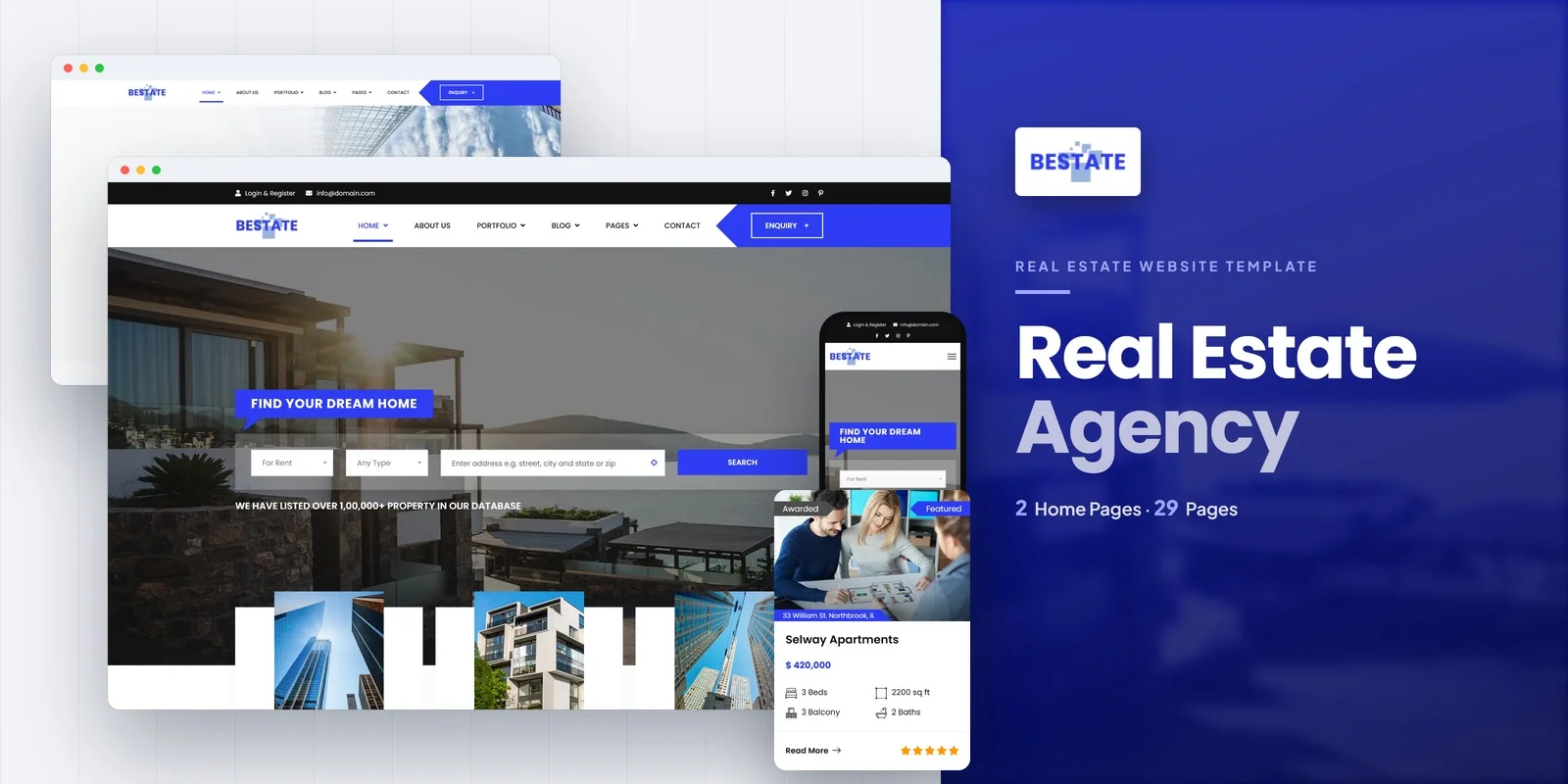
Bestate is a real estate and property listing HTML5 template designed specifically for real estate agencies, independent agents, interior design studios, and architecture firms. With 29 fully crafted pages, 9 portfolio listing variants, Google Maps with marker clustering, rich blog formats, and parallax visual effects, it delivers the comprehensive web presence that professional real estate agencies require.
What Bestate Includes
- 2 Unique Homepage Layouts — distinct hero styles and featured property arrangements for different agency presentations
- 9 Portfolio Listing Layouts — Grid, List, and Detail views each with left sidebar, right sidebar, and no-sidebar variants
- Portfolio Detail Classic — full-width property showcase without sidebar for immersive presentations
- Google Maps Integration — interactive property maps with Infobox popups and MarkerClusterer for dense areas
- Rich Blog Formats — Standard, Gallery, Video, Single plus left and right sidebar variants for diverse content
- User Profile Page — agent or client account profile page for personalised experiences
- Services Page — real estate services overview for buyer, seller, and rental services
- FAQ Page — common buyer, seller, and tenant questions with structured answers
- Jarallax Parallax — smooth parallax scrolling on hero and section backgrounds for visual depth
- Swiper and Slick Carousels — featured property and testimonial showcases in responsive formats
- Magnific Popup Lightbox — full-screen property image viewing with gallery navigation
- Coming Soon Page — pre-launch page for new website or neighbourhood launches
- 29 Fully Designed Pages — complete page set for a comprehensive real estate web presence
Why Bestate Fits the Real Estate Agency Niche
Bestate is designed for real estate agencies that want to own their brand online — not surrender it to listing portals. The 9 portfolio listing layouts provide the visual diversity that property marketing requires, letting agencies present homes in the format that best showcases each property. Google Maps with marker clustering and Infobox popups provides the geographic context that property portals offer but within your own branded environment. The rich blog module with four formats and sidebar options supports the local content strategy that builds agency authority in specific neighbourhoods and markets.
With 29 fully designed pages, Bestate offers the most comprehensive real estate template in the MetropolitanHost catalogue — enough pages to serve the complex needs of multi-agent brokerages while remaining manageable for independent agents who need a polished, professional presence without template bloat.
29-Page Agency Depth: Bestate’s 29 fully designed pages with 9 listing layouts, Google Maps integration, 4 blog formats, user profiles, and parallax effects deliver the most comprehensive real estate agency template available. When every property listing layout has sidebar variants, every blog post format has its own style, and every property marker on the map opens an Infobox popup — your agency website competes visually with portals that cost thousands per year while keeping every lead exclusively yours.
Customisation Roadmap for Real Estate Agencies
Week One — Listings and Photography: Photograph or gather professional photos of your current listings. Prepare property descriptions with specifications — bedrooms, bathrooms, square footage, price, neighbourhood, and key features. Configure Google Maps with your property locations. Choose your primary listing layout from the nine available variants. Prepare agent headshots and bios for profile pages. Replace all placeholder content and adjust the colour palette to match your agency branding.
Week Two — Content and Launch: Populate the blog with two to three initial posts — a neighbourhood guide, a buying tips article, and a market update. Set up the FAQ page with common buyer and seller questions. Configure the services page with your agency’s service offerings. Set up contact forms and agent contact pages. Test across mobile, tablet, and desktop — property photos must load quickly and display beautifully on every device. Deploy to your hosting environment and submit to search engines.
Frequently Asked Questions
Need Help Launching Your Real Estate Agency Website?
MetropolitanHost provides professional web development services for HTML template deployments. Our team understands real estate website requirements and delivers clean, visually polished implementations.
- Template Installation Service — live in under 24 hours
- Full Website Package — complete front-to-back deployment with listings and maps
- Colour Customisation — match your agency branding across all 29 pages
- Website Speed Optimisation — Core Web Vitals improvements for image-heavy listings
- Accessibility Compliance — WCAG audit and remediation



