What's in the box.
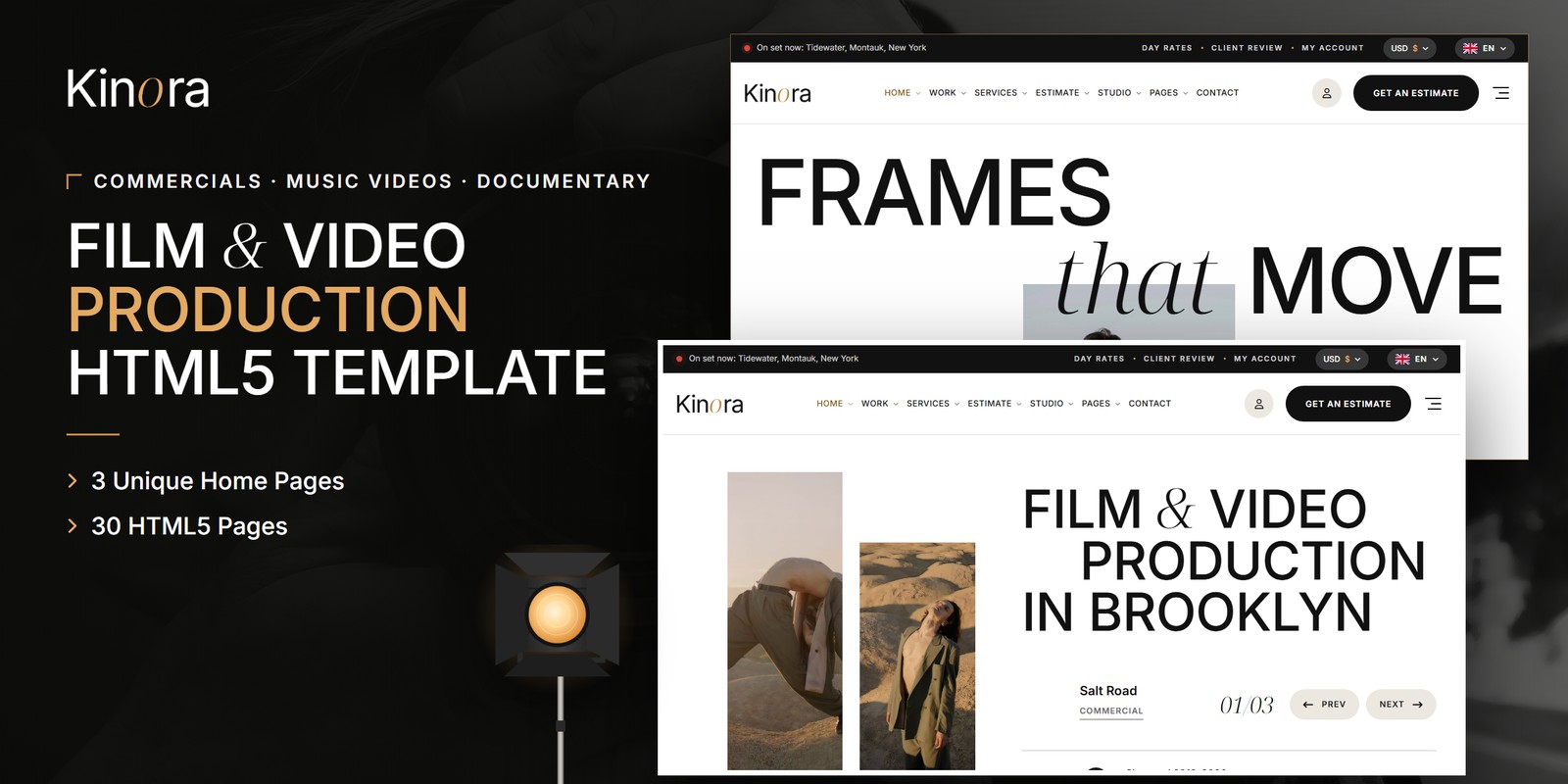
Kinora gives commercial, music video and documentary studios a quiet editorial site built as a Tailwind CSS video production template on Tailwind CSS 4. It uses white paper, ink, large Inter capitals with one italic serif word, hairline rules and a single tungsten accent. Behind that calm look sit real production tools, so a client can price a shoot before anyone picks up the phone.
Tailwind CSS Video Production Template Pages for Commercial, Music Video and Documentary Work
The Tailwind CSS video production template carries 30 pages, three home page designs and a light and dark theme. Each page of this Tailwind CSS video production template maps to a step a client takes before booking a crew. The pages below matter most, and here is why.
- Shoot Estimate: the client picks the kind of film, shoot days, crew size, camera package, edit days, grade and extras. A live total shows the cost per shoot day and a bar of where the money goes. They can keep it in an account or send it as a brief.
- Start A Project: a six-step brief covers the film, the dates, the crew and kit, the post, the client’s details and a summary, with the estimate beside it. Continue never blocks, and only Send checks the details, so the brief gets a reference.
- Day Rates: the Documentary Unit, the Music Video Day and the Commercial Unit are priced per shoot day by the same engine, with a full rate card.
- Client Review Room: a code opens the room. Clients scrub the cut frame by frame, pin notes to the timecode, jump to a note and approve the cut.
- Showreel: the reel plays, and every cut in it is listed with its timecode, plus earlier reels.
Three Home Pages for a Film Studio
Home 01 opens with two tall strips of stills beside a three-line title. A three-slide hero follows, then numbered services with day rates and the work in stepped tiles. In The Cut, showreel clips snap onto an edit timeline as you scroll.
Home 02 puts a two-line title over a centred still slider. The work then cascades down the page by kind. In Every Film, Its Frame, one picture widens from the square Academy frame to anamorphic scope. A short shoot estimate follows.
Home 03 uses a split hero and a production board of four films, each with its stage and day. Push Into The Set is a dolly push through a layered set. The kit list, the crew and the brief close the page.
Work, Crew and Kit List Pages
Our Work lists sixteen films with type tabs and search. Three project layouts cover a commercial with deliverables, a music video with behind-the-scenes frames, and a documentary with chapters by timecode.
The Crew pages show people with day rates and a profile. The Kit List groups gear by category with search, quantities and packages, and Kit Details goes deep on one camera.
The remaining pages are Services, Service Details, How We Work, About Us, Journal, FAQ, Contact with a working form and map, My Account, Login, Register and 404.
Themes, Language and Motion
- A light theme by default and a dark theme on one switch, remembered between visits.
- Right-to-left stylesheets for every page, plus a flag language picker.
- A currency switch for dollars, euros and pounds that repaints every price and estimate.
- WebGL film grain with light leaks, and a film reel in an ASCII shader in the footer.
- A slate clap preloader and photo reveals.
Changing Colors, Type and Sections in Kinora
Each section’s styling travels with its HTML, so you can copy the Day Rates block or a Showreel row to another page and it keeps its look. Colors, fonts and spacing are set once in the Tailwind theme, so changing the tungsten accent reaches all 30 pages. Hover and focus states sit in the markup beside the base styles, which makes the review room controls easy to adjust.
The finished pages open as they are, and the Tailwind source is included if you want to edit and rebuild the styles. Preview images are not part of the download, so neutral placeholders replace them. Font Awesome Free loads locally, and the type uses Inter and Noto Serif Display. Documentation is included, and the contact form ships with optional invisible reCAPTCHA v3.
Buyer’s guideContent Creator Website Template: Complete Buyer’s Guide (2026) — see how Kinora compares with the alternatives.
Kinora in other formats
The same design, built natively in each stack. Every format is its own product with its own demo, documentation, download and reviews.
-
KinoraHTML5
$16
$22View HTML5 → -
This page KinoraTailwind CSS $21
$27You are viewing it -
KinoraReact
$16
$22View React → -
KinoraVue.js
$16
$22View Vue.js → -
KinoraAngular
$16
$22View Angular → -
KinoraWordPress
$66
$88View WordPress → -
KinoraAI Smart Website
$1,319
$1,759View AI Smart Website → -
Save 20%
Developer bundleAll 5 code formats
$104
$130View bundle →
What's changed.
- First release of the Tailwind CSS edition with 30 pages and 3 home page designs.
- Includes the shoot estimate, six-step brief, day rates and client review room.
- Light and dark themes, right-to-left support and a currency switch.
Need Kinora installed or customized?
Fixed prices, done by the developers who built this template. Pick a service and we take it from there.
- Theme installation
- Color scheme customization
- Speed optimization
- 1-hour web development



Reviews
There are no reviews yet.