What Is a Content Creator Website Template?
A content creator website template is a pre-designed, fully coded website built specifically for YouTubers, TikTok creators, podcast hosts, music artists, event-focused creators, and entertainment personalities. It includes every page a modern content creator needs — immersive homepage with animated hero effects, content portfolio with filterable galleries, creator profile and bio pages, event or appearance scheduling, blog for long-form content, and contact page for brand collaboration enquiries — all designed, responsive, and ready for your personal brand.
For content creators who need a website that matches the production quality of their content without paying $5,000 to $15,000 for a custom build or $30 to $100 per month for a creator platform, a template delivers the most practical path to a professional online hub. But content creator websites carry a unique challenge: your website must feel as dynamic and immersive as the content you produce. A static, corporate-looking website instantly undermines your creative credibility. This guide covers what audiences, brands, and collaborators expect from your creator website, what technical features create the immersive experience you need, and how to choose the right template for your content brand.
Template vs Creator Platform vs Custom Build
Content creators typically face three options when establishing their web presence:
| Factor | Creator Platform (Linktree, Stan Store) | Content Creator Website Template | Custom Website Build |
|---|---|---|---|
| Upfront Cost | $0–50 | $29–69 | $5,000–15,000 |
| Monthly Cost | $5–49/month | $3–10/month (hosting only) | $50–150/month |
| 3-Year Total Cost | $180–1,814 | $137–429 | $6,800–20,400 |
| Design Uniqueness | Identical to every other creator | Fully customisable source code | Fully custom |
| Page Count | 1 page (link list) | Full multi-page website | Any number |
| Visual Immersion | Minimal — link list only | Particle effects, full-screen carousels, animations | Any format |
| Portfolio/Gallery | None | Filterable Isotope gallery | Any format |
| SEO Capability | None — not indexed | Full SEO control | Full SEO control |
| Brand Ownership | Platform controls your presence | You own everything | You own everything |
Creator platforms like Linktree and Stan Store serve one purpose: aggregating links on a single page. They are not websites. They cannot showcase your content portfolio, tell your story, rank in search engines, or create the immersive brand experience that separates professional creators from amateur hobbyists. A content creator website template gives you a full multi-page website with animated heroes, portfolio galleries, event scheduling, blog capabilities, and complete brand ownership — the difference between a link list and a legitimate digital presence.
What Audiences and Brands Expect From Your Creator Website
Content creators serve two audiences through their website: fans who want to engage deeper with the creator behind the content, and brands looking to evaluate collaboration potential. Both audiences have specific expectations:
Visual Impact That Matches Your Content Quality
If your YouTube videos have cinematic production quality, your TikToks have polished editing, or your podcast has professional sound design — your website must match that production standard. A plain white page with text and stock photos creates a jarring disconnect between your content and your web presence. The most effective creator websites use immersive visual elements: animated particle backgrounds that create atmospheric depth, full-screen image carousels that showcase your best visual moments, dark overlays that command attention, and smooth scroll animations that keep visitors engaged as they explore.
Particles.js hero animations — dynamic, floating particle effects on the hero section — create an immediately immersive first impression that tells visitors “this creator takes their visual brand seriously.” Combined with full-screen Swiper carousels for showcasing content highlights, the experience matches the production quality that audiences expect from professional creators.
Content Portfolio With Depth and Organisation
Your content is your portfolio. Whether you create music, video, photography, podcasts, or multi-format entertainment, your website must present your best work in an organised, browsable format. A random dump of YouTube embeds is not a portfolio. An effective content portfolio organises work by category — video series, podcast episodes, photography sets, music releases, collaborative projects — using filterable navigation that lets visitors find exactly what interests them.
Isotope filtering provides this category-based browsing. A brand evaluating you for a music-related campaign can filter to music content. A fan exploring your work can browse by format or theme. Gallery pages with Magnific Popup lightbox viewing let visitors experience your visual content at full resolution without leaving the browsing interface.
Creator Profile That Builds Personal Connection
Audiences follow creators, not content. Your creator profile page needs to go beyond a basic bio — it should communicate your personality, story, creative philosophy, and what makes you different from the thousands of other creators in your niche. Individual detail pages with biography, social media links, upcoming appearances, and content highlights give visitors the personal connection that drives follower loyalty and brand partnership interest.
Animated statistics — subscribers, views, collaborations, years creating — add quantifiable credibility. CounterUp animated counters that trigger on scroll transform static numbers into attention-grabbing achievements that brands and fans both respond to.
Event and Appearance Scheduling
Content creators increasingly operate offline as well as online — live events, podcast tapings, meet-and-greets, festival appearances, brand activations, workshops, and speaking engagements. Your website needs an event scheduling system that presents upcoming dates, locations, and registration options. DatePicker calendar integration lets visitors browse available dates and express interest in events. Past event galleries demonstrate your real-world presence and community engagement — which is increasingly valuable for brand partnership evaluations.
Brand Collaboration Information
Every content creator who works with brands needs a professional contact pathway that goes beyond a DM link. A dedicated contact page with collaboration enquiry forms, audience demographics summary, content categories, and previous partnership examples positions you as a professional business partner rather than a hobbyist hoping for free products. Brands evaluating potential partners check websites — a professional web presence with organised portfolio, clear statistics, and structured contact process signals that you are ready for professional collaborations.
Mobile Experience for Social Media Traffic
The vast majority of traffic to a content creator’s website comes from social media bio links — Instagram, TikTok, YouTube, Twitter — all viewed on mobile devices. Your entire website must deliver the same immersive experience on a phone as on a desktop. Swiper carousels must support touch swipe. Particle animations must perform smoothly on mobile processors. Gallery images must load quickly on mobile data connections. Navigation must be thumb-friendly. A creator whose website breaks on mobile loses the majority of their potential audience at the first click.
Technical Features That Elevate Creator Websites
Beyond visual design, certain technical features specifically enhance content creator websites and create the immersive experiences that separate professional creators from amateurs.
Particles.js Animated Hero Background
Particles.js generates dynamic, animated particle effects on the hero section — floating dots, connecting lines, and interactive particle responses to mouse movement. For content creators, this creates an immediately immersive landing experience that communicates creativity and technical sophistication. Unlike static hero images or basic video backgrounds, particle animations are lightweight, performant, and visually striking. They create atmospheric depth without the bandwidth cost of video backgrounds, making them ideal for mobile-heavy traffic.
Swiper Full-Screen Carousel
Swiper provides a full-screen, touch-enabled carousel for showcasing content highlights, event photos, and portfolio pieces. Unlike basic image sliders, Swiper supports full-viewport slides, smooth transitions, touch-swipe gestures, autoplay with pause-on-interaction, and responsive breakpoints. For content creators, Swiper typically powers the homepage content showcase — highlighting recent videos, upcoming events, or featured collaborations in a cinematic, full-screen format that matches the visual ambition of the creator’s content.
Dark Overlay Design Language
Dark overlay design uses semi-transparent dark layers over background images to create dramatic visual contrast and readable text placement. For content creators in entertainment, music, and lifestyle niches, dark overlays create a cinematic atmosphere that matches the energy of their content. This design approach makes photography and video thumbnails pop against dark backgrounds while maintaining text readability — solving the fundamental challenge of placing text over visual content.
NiceScroll Custom Scrollbar
NiceScroll replaces the default browser scrollbar with a styled, smooth-scrolling alternative. While this might seem like a minor detail, it contributes to the overall immersive experience. Default browser scrollbars visually break the dark overlay design language that creator websites rely on. A custom scrollbar maintains the visual cohesion of the design while providing smoother scrolling physics that enhance content browsing. This attention to detail — controlling every visual element visitors interact with — is what separates professional creator websites from template-looking pages.
DatePicker Event Scheduling
Bootstrap DatePicker provides calendar-based date selection for event registration and appearance scheduling. Visitors can browse upcoming events on a visual calendar, select dates, and register interest. For content creators who host live events, podcast tapings, workshops, or meet-and-greets, this provides a professional scheduling interface without requiring third-party event platform subscriptions. The calendar integrates within the template’s design language, maintaining visual consistency throughout the booking experience.
Cost Breakdown: Content Creator Website Options
Understanding the true cost of each website approach helps creators invest their content budget wisely:
| Cost Component | HTML Template | Creator Platform (Linktree, Stan Store) | Custom Build |
|---|---|---|---|
| Template / License | $29–69 (one-time) | $0 | N/A |
| Hosting | $36–120/year | Included | $120–600/year |
| Platform Fee | None | $60–588/year | None |
| Design Customisation | $0–500 | $0 (limited options) | $3,000–8,000 |
| Development | $0 (ready to deploy) | $0 | $2,000–7,000 |
| Total Year One | $65–689 | $60–588 | $5,120–15,600 |
| 3-Year Total | $137–929 | $180–1,764 | $5,360–16,800 |
Platform vs Website Reality: Linktree gives you a single page with a list of links. A website template gives you a full multi-page website with Particles.js animated heroes, full-screen Swiper carousels, filterable content galleries, event scheduling, blog, and complete brand ownership. For the same or lower cost, you get a legitimate digital presence that can rank in search engines, impress brands evaluating partnerships, and give fans a deeper connection to your creative world. The choice between a link list and a real website is not even close.
How to Choose the Right Content Creator Template
Not all creator templates deliver the immersive experience your brand requires. Here is a systematic evaluation framework:
Evaluate Visual Immersion Quality
Open the template demo and experience the first impression. Does the hero section create an immersive, atmospheric entrance? Is there animated motion — particles, parallax, full-screen carousels — that matches the energy of professional content? Does the design use dark overlays that create cinematic depth? A content creator template that looks like a corporate brochure fails the fundamental requirement of reflecting creative energy.
Check Portfolio and Gallery Depth
Navigate to the gallery or portfolio section. Does it use filterable grid technology (Isotope) for category-based browsing? Does the lightbox support full-resolution viewing? Can you envision your content — videos, photos, podcast artwork — looking impressive in this gallery format? A creator website without a proper portfolio display is just a bio page with links — which is exactly what Linktree already provides for free.
Test Event and Scheduling Features
If you host or appear at events — and most professional creators eventually do — verify that the template includes event listing pages, individual event detail pages, and calendar-based scheduling. Retrofitting event functionality into a template that does not include it requires custom development that adds cost and complexity.
Verify Individual Profile Page Depth
Check the artist or creator detail page. Does it provide enough space for a comprehensive bio, social media links, content highlights, and upcoming appearances? For solo creators, this is your primary profile page. For creator collectives, each member needs their own detail page. Templates that offer only a brief bio section without individual detail pages limit your ability to tell your full creative story.
Common Mistakes When Building a Content Creator Website
Content creators often make predictable mistakes when building their web presence. Avoiding these pitfalls maximizes audience engagement and brand partnership opportunities:
Settling for a Link-in-Bio Page Instead of a Website
Linktree, Stan Store, and similar tools have their place — as a temporary link aggregator in your social bio. But they are not a website. They cannot tell your story, showcase your portfolio, rank in search engines, or create the immersive brand experience that separates professional creators from hobbyists. Treating a link page as your “website” limits your growth, undermines brand partnership pitches, and leaves you entirely dependent on social media platforms that can change algorithms, reduce reach, or suspend accounts overnight.
Using a Generic Business Template
A corporate business template adapted for a content creator looks exactly like what it is — a corporate template with your name on it. Content creators need templates designed for visual immersion, entertainment energy, and personal brand storytelling. Dark overlay design, particle animations, full-screen carousels, and atmospheric visual language are not cosmetic extras — they are essential elements that communicate creative professionalism to audiences and brands alike.
Neglecting SEO and Discoverability
Most creators rely entirely on social media for traffic. A website that ranks in search engines — “best music content creator,” “podcast host [city],” “entertainment creator for brand events” — creates an inbound discovery channel that social algorithms cannot control. Blog content, properly structured pages, and SEO-optimised metadata turn your website from a passive brochure into an active audience acquisition tool.
Ignoring Event and Scheduling Capabilities
As content creators grow, offline opportunities multiply — live events, brand activations, speaking engagements, workshops, meet-and-greets. A website without event listing and scheduling capabilities forces you to manage these through social media posts that disappear from feeds within hours. Dedicated event pages with calendar integration provide permanent, shareable URLs for every event — and demonstrate to brands that you have an active, engaged offline community.
Bombo — A Content Creator Template Built for Entertainment Brands
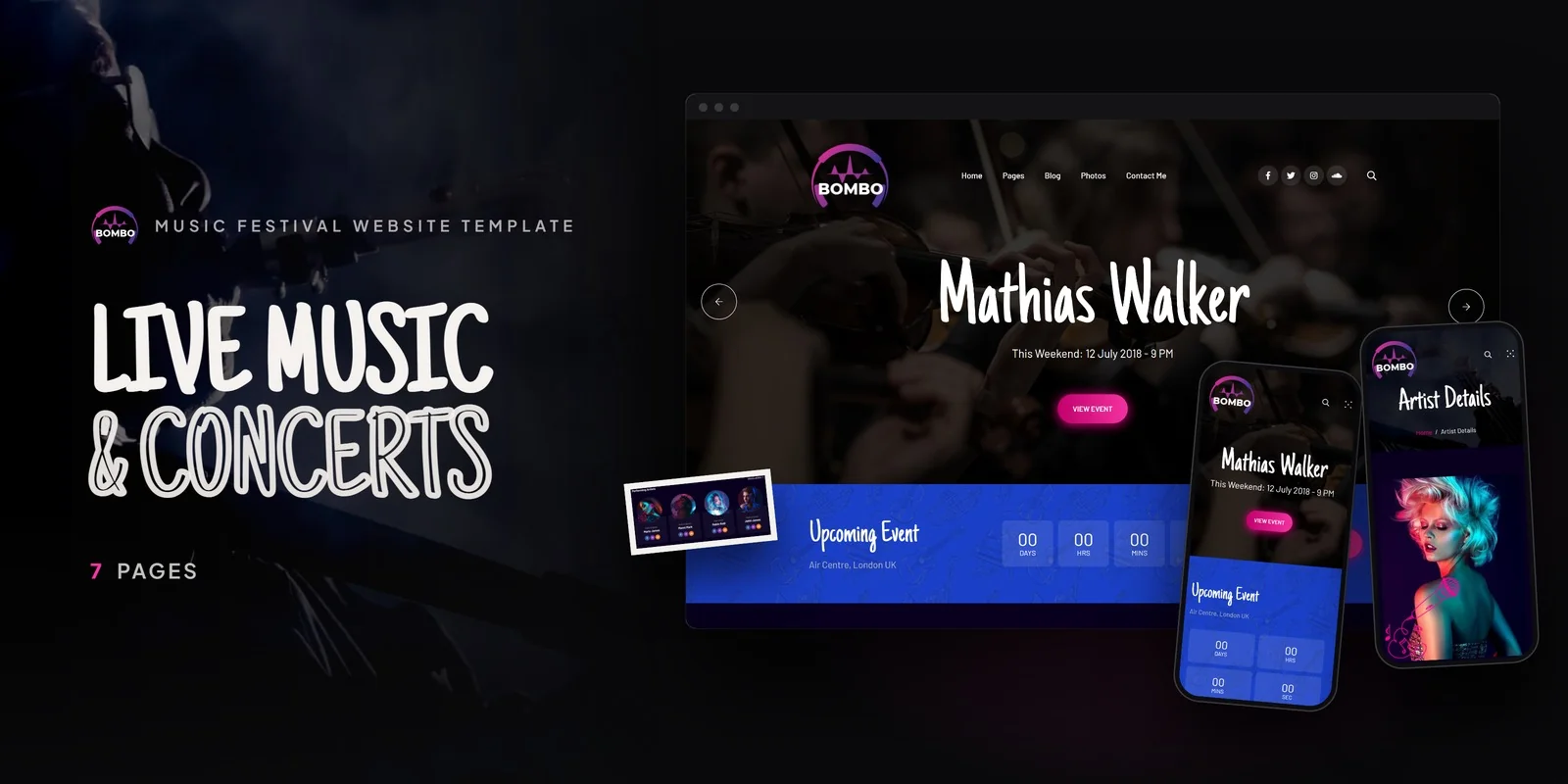
Bombo is a content creator and entertainment HTML5 template designed to meet every requirement outlined in this guide. Built for YouTubers, TikTok creators, podcast hosts, music artists, event promoters, and entertainment personalities, it delivers the essential components for an immersive, high-energy creator web presence — with Particles.js animated heroes, full-screen Swiper carousels, and event scheduling that create the visual impact no link-in-bio page can match.
What Bombo Includes
- 7 Focused HTML5 Pages — high-impact page set covering home, content lineup, creator profile, gallery, blog, and contact
- Particles.js Animated Hero — dynamic floating particle background creating immersive first impressions
- Swiper Full-Screen Carousel — cinematic full-viewport content and event image showcase
- Creator Lineup Page — content directory for showcasing collaborators, series, or roster members
- Individual Creator Detail Page — comprehensive profile with bio, social links, and upcoming appearances
- Isotope Filterable Gallery — content portfolio with category-based filtering and Magnific Popup lightbox
- DatePicker Event Scheduling — calendar-based date selection for events, appearances, and meet-and-greets
- Dark Overlay Design — dramatic cinematic visual language throughout all pages
- NiceScroll Custom Scrollbar — smooth, styled scrolling maintaining visual cohesion
- CounterUp Animated Statistics — subscribers, views, events hosted, collaborations completed
- WOW.js Scroll Animations — energetic entrance animations across all sections
- Blog Section — behind-the-scenes content, creator stories, and long-form articles
Technical Foundation
Bombo is built on Bootstrap 5 with Particles.js for animated hero backgrounds, Swiper for full-screen content carousels, Isotope grid filtering for portfolio gallery browsing, Magnific Popup lightbox for full-screen content viewing, Bootstrap DatePicker for event scheduling, CounterUp for animated achievement statistics, NiceScroll for custom smooth scrolling, and WOW.js for scroll-triggered entrance animations. The dark overlay design language creates cinematic depth throughout every page, matching the production quality that professional creators deliver in their content.
Immersive by Design: Bombo is one of the few creator templates that includes Particles.js animated hero backgrounds and Swiper full-screen carousels as core design elements — not optional plugins. Combined with dark overlay design language, NiceScroll smooth scrolling, and DatePicker event scheduling, Bombo creates the kind of atmospheric, immersive web experience that matches the production quality of professional content. This is not a corporate template with a creator’s name pasted on top — it is an entertainment-grade digital experience built from the ground up.
Customisation Roadmap for Content Creators
Week One — Content Curation and Brand Identity: Select your strongest content pieces for the portfolio gallery — best video thumbnails, podcast artwork, photography highlights, event photos. Organise them into Isotope filter categories that match your content pillars. Write your creator bio with personality and story depth. Replace all placeholder content, adjust accent colours to match your brand palette, and update the Particles.js colour scheme to complement your visual identity.
Week Two — Events, Blog, and Launch: Populate the events section with upcoming appearances, live events, or content release schedules. Set up the DatePicker for event registration. Write your first three blog posts — behind-the-scenes content, creative process insights, or event recaps. Configure contact forms for brand collaboration enquiries. Integrate analytics, test across all devices — particularly mobile since most of your traffic arrives from social media bio links — and deploy.
Frequently Asked Questions
Need Help Launching Your Creator Website?
MetropolitanHost provides professional web development services for HTML template deployments. Our team understands content creator website requirements and delivers immersive, performance-optimised implementations.
- WordPress Theme Installation — live in under 24 hours
- Full Website Package — complete front-to-back deployment
- Colour Customisation — match your creator branding across all pages
- Website Speed Optimisation — Core Web Vitals improvements
- Accessibility Compliance — WCAG audit and remediation



