What Is an Architecture Firm Website Template?
An architecture firm website template is a pre-designed, fully coded website built specifically for architecture practices, interior design studios, construction companies, and design consultancies. It includes every page a design firm needs — homepage with visual authority, project portfolio with filterable gallery and individual case study pages, services breakdown with detail pages, team profiles, blog for thought leadership, and contact page — all designed with the minimal, whitespace-driven aesthetic that architecture clients expect.
For architecture firms that need a website reflecting the quality of their built work without paying $8,000 to $35,000 for a custom build or $50 to $200 per month for a platform subscription, a template delivers the most practical path to a professional online presence. But architecture websites have unique requirements. Your portfolio must let the work speak through photography and structured case studies. Your layout must be as refined and intentional as the spaces you design. Your services must communicate expertise without overselling. This guide covers what architecture clients expect from your website, what technical features matter, and how to choose the right template for your practice.
Template vs Platform vs Custom Build
Architecture firms typically face three options when establishing their digital presence:
| Factor | Website Platform (Squarespace, Wix) | Architecture Website Template | Custom Website Build |
|---|---|---|---|
| Upfront Cost | $0–50 | $29–69 | $8,000–35,000 |
| Monthly Cost | $16–49/month | $3–10/month (hosting only) | $50–200/month |
| 3-Year Total Cost | $576–1,814 | $137–429 | $9,800–42,200 |
| Code Ownership | No — you rent it | Yes — you own it forever | Yes — you own it |
| Design Uniqueness | Limited — same templates as competitors | Fully customisable | Fully custom |
| Portfolio System | Basic grid layout | Filterable gallery + case study pages | Any format |
| Page Speed | Platform-dependent | Lightweight HTML — fastest option | Varies |
| Time to Launch | 1–3 days | 3–7 days | 6–16 weeks |
| Vendor Lock-in | High — export is limited | None | None |
Website platforms like Squarespace offer convenience, but every architecture firm on Squarespace shares the same two or three portfolio templates — Radian and Utica appear on hundreds of competitor websites. A custom build delivers total creative control but costs ten to fifty times more than a template and takes months to deliver. An HTML template provides the design refinement architecture firms require, full code ownership, the fastest page speed of any option, and launches in days rather than months.
What Architecture Clients Expect From Your Website
Potential clients visiting an architecture firm’s website are making a high-stakes decision. They are about to invest significant capital in a building project — residential, commercial, or institutional — and they need confidence that your firm can deliver on vision, budget, and timeline. Your website must communicate competence, aesthetic sensibility, and professional reliability within seconds. Here is what architecture clients look for:
Portfolio That Proves Design Excellence
The portfolio is the single most important element on an architecture firm’s website. Potential clients want to see completed projects — not renders, not concepts, but built work photographed professionally. Each project should tell a story: the client brief, the site constraints, the design response, the materials chosen, and the final result. A portfolio that displays eight to twelve strong projects with high-quality photography and structured case study pages communicates more about your firm’s capability than any amount of written copy.
Equally important is how the portfolio is organised. A client looking for residential work should be able to filter to see only residential projects. A developer evaluating your commercial experience should filter to commercial. Category-based filtering transforms a static photo grid into an interactive portfolio that proves depth of expertise in each project type. Without filtering, clients scroll through irrelevant projects to find relevant ones — and many will leave before they find what they need.
Project Case Studies With Depth
Beyond the portfolio grid, individual project pages must provide depth. Each case study should include project location, completion date, budget range, project type, and any awards or publications. The narrative should describe the brief, your design approach, materials and construction methods, and the outcome. Clients evaluating your firm are comparing you against two or three competitors — the firm whose project pages provide the most thorough, confidence-building information wins the enquiry.
Services That Communicate Scope
Architecture clients need to understand what you offer. Do you handle only design, or also project management and construction administration? Do you work on residential, commercial, or both? What scale of projects do you take on? A services section with both an overview page and individual detail pages for each service type — architectural design, interior design, project management, feasibility studies, planning applications — answers these questions before the client makes contact. This pre-qualification saves both parties time and ensures enquiries come from clients whose needs match your capabilities.
Team Profiles That Build Personal Trust
Architecture is a personal business. Clients hire people, not firms. Team profiles with professional headshots, qualifications, project experience, and design philosophy help potential clients feel a connection before the first meeting. The principal’s profile carries the most weight — their background, registered architect status, professional memberships, and design awards all contribute to the trust equation. For mid-size firms, showing the full team communicates capacity and stability.
Minimal Design That Reflects Design Sensibility
An architecture firm’s website is itself a design statement. Cluttered layouts, busy animations, and aggressive colour schemes undermine credibility. Architecture clients expect whitespace, refined typography, and editorial composition — the same design principles they expect in your built work. The website’s visual language must demonstrate that your firm understands restraint, proportion, and clarity. A template with generous whitespace, clean grid systems, and purposeful typography communicates design sensibility before a single project is viewed.
Contact Process That Respects the Enquiry
Architecture project enquiries are not casual. A potential client reaching out is typically ready to discuss a real project with a real budget. The contact page should feel professional and considered — office address, direct email, phone number, and a contact form that captures project type, location, and timeline. This structured approach demonstrates that your firm takes enquiries seriously and begins the professional relationship from the first interaction.
Technical Features That Elevate Architecture Websites
Beyond visual design, certain technical features specifically enhance architecture firm websites and distinguish a professional practice from an amateur portfolio.
Filterable Project Portfolio
A filterable portfolio organises projects by type — residential, commercial, institutional, interior, landscape — allowing clients to navigate directly to the work most relevant to their project. A developer looking at your commercial portfolio does not want to scroll through residential projects to find relevant examples. Category-based filtering using tools like Isotope transforms the portfolio from a static gallery into an interactive, client-directed exploration of your work. This functionality is essential for firms with diverse project portfolios spanning multiple typologies.
Individual Project Case Study Pages
Each portfolio item should link to a dedicated project page with multiple images, project details, and a narrative description. This depth allows you to present the design process, material choices, site challenges, and final outcome in a format that communicates thorough professionalism. Case study pages also serve as powerful SEO assets — optimised for searches like “modern residential architecture [city]” or “commercial office design” — driving high-intent traffic directly to your strongest work.
Responsive Design With Image Priority
Architecture websites are image-heavy by nature. High-resolution project photography must display beautifully on every device — from 27-inch desktop monitors to mobile phones. Responsive design built on a mobile-first framework ensures that images scale properly, maintain aspect ratios, and load efficiently. Architecture clients increasingly research firms on tablets and phones during site visits, meetings, and commutes. A portfolio that breaks on mobile loses the enquiry.
Clean Typography and Whitespace
Typography in architecture website design is not decorative — it is structural. Clean, legible typefaces with generous line spacing and calculated whitespace create the visual breathing room that architecture clients associate with quality design. The template’s typographic system should support hierarchy — project titles, section headings, body text, and captions — each at appropriate sizes and weights. This typographic discipline mirrors the precision that architecture clients expect in drawings and specifications.
Portfolio Impact: Architecture clients spend an average of 45 seconds on a firm’s portfolio page before deciding to explore further or leave. A filterable portfolio that lets them immediately navigate to their project type — residential, commercial, interior — eliminates the scroll fatigue that causes prospects to abandon generic grid layouts. When a client sees five strong projects in their specific category within seconds, they are evaluating your expertise, not your website’s navigation.
SEO Strategy for Architecture Firm Websites
Local Search Dominance
Architecture is inherently local. Clients search for “architecture firm [city]” or “residential architect near me” — and your website must rank for these terms. Every page should include your city and region naturally within the content. Project case studies that mention the project’s location create additional location-based search entry points. Your contact page should include your full business address, service area, and a map embed. For firms serving multiple cities, creating location-specific landing pages for each market area amplifies local search visibility.
Project-Based Content Marketing
Each project case study is a content marketing asset. A completed residential project becomes a blog post about design decisions, material selections, and site challenges overcome. A commercial project becomes a case study about meeting business requirements through design. These project narratives rank for long-tail searches — “how to design a modern extension” or “commercial office interior design ideas” — and position your firm as a thought leader. Architecture firms that publish regularly about their projects and design thinking attract significantly more organic traffic than firms with static portfolio-only websites.
Image Optimisation for Search
Architecture photography is your strongest SEO asset beyond text content. Every project image should have descriptive alt text — not “IMG_4521” but “modern residential extension with floor-to-ceiling glazing and timber cladding.” Descriptive filenames and alt text help your project photography appear in Google Images, which drives significant traffic for visual searches like “modern house design” or “commercial office interior.” Image search is an underutilised traffic channel for architecture firms with strong photography.
How to Evaluate an Architecture Template Before You Buy
Inspect the Portfolio System
Open the template demo and navigate to the portfolio section. Does it support category-based filtering by project type? Does each portfolio item link to a full case study page with space for multiple images, project details, and descriptive text? Is the grid layout clean enough to let photography dominate? A portfolio system without filtering and without individual project pages fails the minimum requirements for an architecture firm website.
Assess the Visual Language
Does the template’s design language match what architecture clients expect? Look for generous whitespace, refined typography, and editorial composition. Avoid templates with aggressive animations, dark colour schemes, or cluttered layouts — these undermine the design sensibility you are trying to communicate. The best architecture templates are minimal without being empty, structured without being rigid, and refined without being fussy.
Check Services and Team Sections
Does the services section include both an overview page and individual detail pages? Can you present team members with enough space for qualifications, project experience, and professional headshots? Architecture clients evaluate the people as much as the work — a superficial team section with only names and titles fails to build the personal trust that drives enquiries.
Cost Breakdown: Building an Architecture Firm Website
| Component | DIY with Template | Freelancer Build | Agency Custom Build |
|---|---|---|---|
| Design/Template | $29–69 (one-time) | $2,000–5,000 | $8,000–35,000 |
| Hosting | $3–10/month | $10–30/month | $30–150/month |
| Domain | $10–15/year | $10–15/year | $10–15/year |
| Photography | $500–2,000 | $500–2,000 | $500–2,000 |
| Year 1 Total | $585–2,264 | $2,650–7,375 | $8,870–39,015 |
| Year 2+ Annual | $46–135 | $130–375 | $370–1,815 |
Photography is listed separately because it is essential regardless of which website path you choose. Architecture websites without professional photography fail — no template, platform, or custom build compensates for poor project photography. Budget for professional architectural photography first, then choose your website approach. The template path delivers the lowest total cost while providing the design refinement that architecture clients demand.
Archa — A Template Built for Architecture Practices
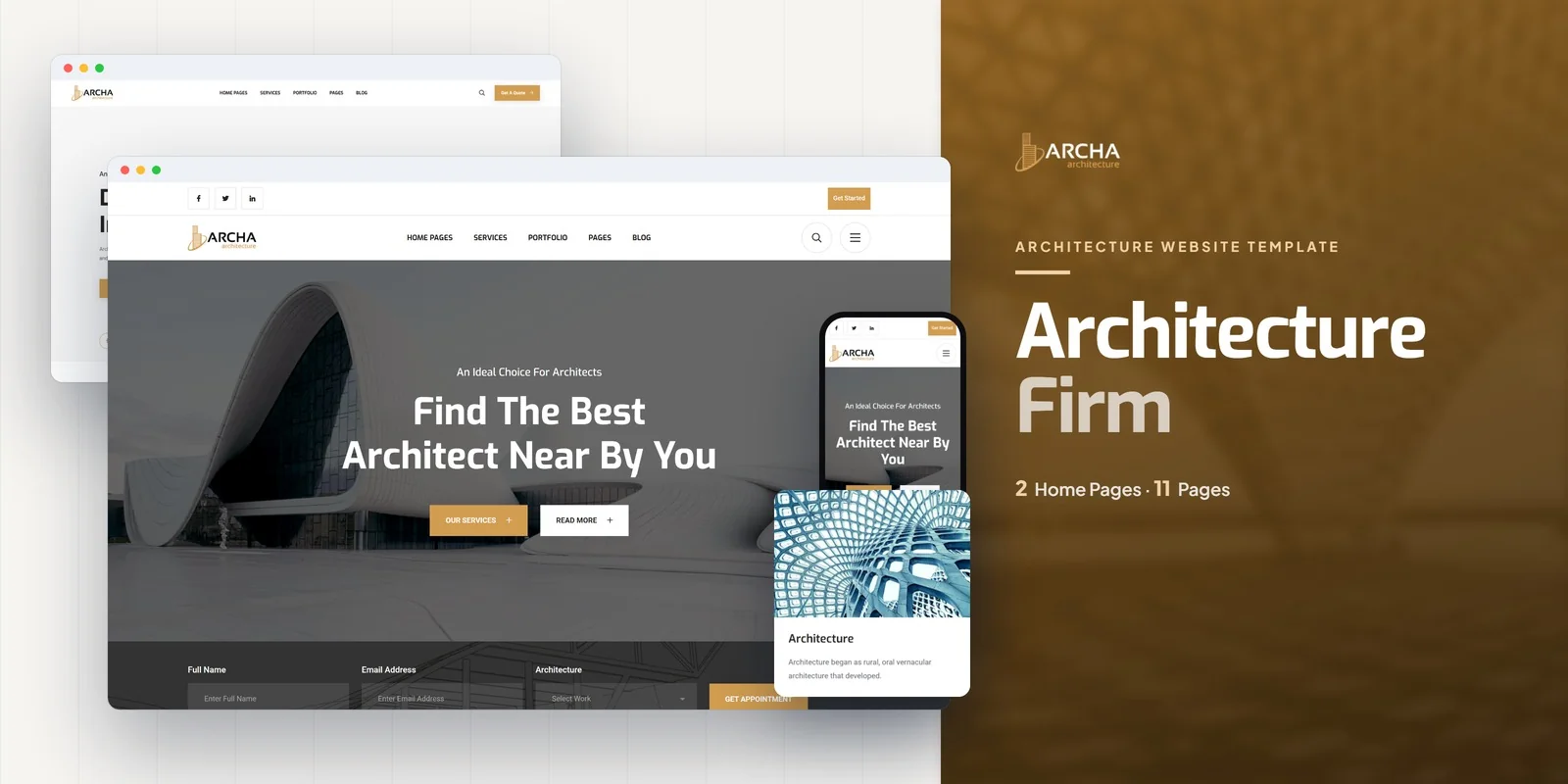
Archa is an architecture and interior design HTML5 template designed to meet every requirement outlined in this guide. Built for architecture firms, interior designers, construction companies, and design studios, it delivers the minimal, visually refined web presence that design professionals require — where the work speaks through photography and structured case studies rather than decorative embellishment.
What Archa Includes
- Portfolio Gallery — project grid with filterable categories for residential, commercial, interior, and other project types
- Portfolio Detail Page — full project case study with multiple images, project description, and specifications
- Services Module — services overview plus individual service detail pages for architectural design, interior design, project management, and more
- Team Pages — team member grid with professional bios, qualifications, and roles
- Blog Module — blog archive plus full post detail page for project narratives and design insights
- Contact Page — enquiry form with office address and direct contact details
- About Us Page — firm story, mission, design philosophy, and credentials
- Clean Minimal Design — generous whitespace, refined typography, and editorial layout that lets photography dominate
- FontAwesome Icons — clean vector icons throughout all pages
- Cross-Browser Compatible — Chrome, Firefox, Safari, Edge, Opera
Technical Foundation
Archa is built on Bootstrap 4 with a responsive, mobile-first grid system. FontAwesome provides clean vector icons throughout. The template’s design language prioritises whitespace, typographic clarity, and photographic presentation — the visual principles that architecture clients associate with design quality. Every page is fully responsive and structured for the minimal, photography-driven aesthetic that architecture firms require.
Design Language Match: Archa’s minimal design philosophy mirrors the visual restraint that architecture clients expect. Where other templates add decorative elements and aggressive animations, Archa uses whitespace and typography to frame your project photography — the same compositional approach that characterises the best architecture firm websites globally. The portfolio grid with filterable categories and dedicated case study pages provides the depth that architecture clients need to evaluate your work and make confident enquiry decisions.
Customisation Roadmap for Architecture Firms
Week One — Photography and Content: Arrange professional photography of your strongest projects — eight to twelve built works with consistent quality. Write case study narratives for each project covering brief, design approach, materials, and outcome. Prepare team headshots, bios, and qualification details. Draft your services descriptions and firm history. Replace all placeholder content and adjust typography and colour palette to match your firm branding.
Week Two — Structure and Launch: Organise the portfolio gallery with categories matching your project types — residential, commercial, interior, institutional. Configure individual project pages with images, specifications, and narratives. Set up the services section with your specific offerings. Complete team profiles. Test across all devices, paying particular attention to how project photography displays on mobile. Deploy and submit to Google Search Console for indexing.
Frequently Asked Questions
Need Help Launching Your Architecture Website?
MetropolitanHost provides professional web development services for HTML template deployments. Our team understands architecture industry website requirements and delivers clean, well-structured implementations.
- WordPress Theme Installation — live in under 24 hours
- Full Website Package — complete front-to-back deployment
- Colour Customisation — match your firm branding across all pages
- Website Speed Optimisation — Core Web Vitals improvements
- Accessibility Compliance — WCAG audit and remediation



