
“Premium HTML5 website templates” sounds like a category that should already be solved in 2026, and on the surface it is. Search for it and you’ll get pages of marketplace listings, badge-decorated authors, ratings averaged across years of buyers, demo URLs that load and look fine. The problem is that almost every premium HTML5 listing in 2026 was authored against a 2018 or 2019 specification — semantic markup, jQuery scripts, a CSS reset and a contact form — and shipped without ever being re-evaluated against what a website actually needs to do today. The buyers who keep coming back to that category are the ones running into the same wall: the demo loads, the design is fine, the code compiles, and yet within weeks the project stalls because the template was never built with 2026 expectations in mind.
This guide is the buyer’s guide we wished existed when we started auditing the HTML5 marketplace in late 2025. It is opinionated. It is grounded in our own work as an in-house template studio. And it ends, deliberately, with a single spotlight on a template we built ourselves — not because we think every reader should buy it, but because using a real template as the worked example is the fastest way to make the abstract requirements concrete.
The HTML5 question, reframed for 2026
The HTML5 spec itself stopped being interesting around 2014. What changes year to year is not the spec, it’s the surrounding expectations: what a browser engine is willing to optimize, what assistive technology is willing to expose, what Google’s Core Web Vitals are willing to forgive, what AI assistants are willing to cite, what mobile carriers are willing to render quickly on weak connections. A 2026 premium HTML5 template is judged on those expectations, not on whether the markup parses. Almost all of the real differentiation in this category comes from how the template handles those moving targets, and that is also where most marketplace listings reveal themselves to be five-year-old code with a fresh thumbnail.
Why HTML5 still wins as the foundation in 2026
It is fair to ask, in 2026, why anyone still starts a project from an HTML5 template at all when the option is to spin up a Next.js or Astro starter from a single command. The answer is portability. An HTML5 template that has been written carefully — semantic markup, separated styles, framework-agnostic JavaScript — can be lifted into almost any toolchain a developer chooses, including PHP back-ends, WordPress themes, React or Vue or Angular component trees, and static site generators. A starter from a single command is locked to its toolchain on day one. That portability is the most underrated reason to start a project from an HTML5 template that has been built with portability in mind, and the most undersold feature in marketplace listings.
What “premium” should actually mean for an HTML template
“Premium” in marketplace language is a price tier — anything above roughly twenty-nine dollars qualifies. That is not a useful definition. A premium HTML5 template, by the definition that should matter to a buyer, is one that meets a defensible set of 2026 expectations: semantic markup that survives an accessibility audit, responsive logic that survives every viewport from a folding phone to an ultra-wide monitor, performance budgets that survive a real-world Lighthouse run on a throttled mobile connection, structured data that survives an AI assistant’s ability to cite the page, documentation that survives a developer who has never seen the codebase before, and a customization layer that survives the buyer’s first attempt to make it their own. If a template fails any of those tests, the price tier is irrelevant.
The semantic markup baseline
Semantic HTML is not stylistic preference, it is the contract a template signs with assistive technology, search engines, and AI assistants. Headings nest in order, landmarks are declared, lists are lists, navigation is navigation, button is button and link is link. A template that uses div soup with role attributes patched on top of it has chosen to fail this contract — and it shows up in screen reader audits, in Google’s accessibility scoring, and increasingly in how AI assistants summarize the page when they encounter it. Marketplace templates fail this baseline more often than buyers realize. The ones that pass it tend to have been written by authors who think of accessibility as a deliverable, not a checkbox.
Responsive logic that survives 2026 viewports
The viewport landscape in 2026 includes folding phones unfolding mid-session, tablet form factors with detachable keyboards, ultra-wide monitors split into multiple browser columns, and a long tail of older mobile devices that never updated their browser past 2022. Mobile-first is no longer enough as a guideline. The right starting point is to design the layout against a small phone, audit it against a desktop, then audit it against a tablet held both ways, then audit it against a viewport with a forced minimum width to simulate the awkward middle. Premium HTML5 templates ship with this audit already done. Marketplace templates that were never re-evaluated since their original release ship with bugs that surface only in the awkward middle.
Accessibility — what WCAG 2.2 expects this year
WCAG 2.2 was finalized at the end of 2023 and has been the operating expectation for any template a real business should be buying since 2024. Buyers in regulated industries — finance, healthcare, government, education, hospitality at scale — increasingly need a defensible accessibility position before they will adopt a template at all. The 2.2 expectations include focus visibility, focus order, target size, dragging movements alternatives, and consistent help. A premium HTML5 template that has not been audited against 2.2 is going to start producing problems for buyers in regulated industries within months of going live. A template that has been audited produces a defensible position from launch.
Performance budget — 90+ Lighthouse as the default, not a goal
Lighthouse scores are easy to manipulate and easy to dismiss, but the 90+ threshold has held up as a useful crude signal because hitting it requires a coherent performance strategy across image optimization, CSS render-blocking, JavaScript execution cost, font loading, and third-party script discipline. A marketplace template that only hits 90+ on its own demo URL with empty content has not solved the problem; the buyer’s actual content is what causes the score to fall apart. A premium HTML5 template should be engineered so that 90+ is the floor against the buyer’s content — the full performance methodology lives in our PageSpeed-optimized templates guide, not the ceiling against the demo. Hitting that floor reliably is the strongest single signal that the template was engineered, not just designed.
Bootstrap 5, Tailwind, or vanilla CSS
Bootstrap 5 is still the dominant CSS framework for premium marketplace templates in 2026 — we cover the four marketplace archetypes that ship Bootstrap 5 in our Bootstrap 5 buyer’s guide because it has the broadest pool of developers who can pick it up without retraining and the most predictable upgrade path across major versions. Tailwind has carved out a strong second-place position for templates aimed at developer-heavy buyer pools. Vanilla CSS, with custom properties and a sensible reset, is the right answer for templates whose buyers want zero framework lock-in. The question for a buyer is not which is universally best — none of them is — but which matches the team that will own the template after purchase. Marketplaces tend to obscure this question by labelling everything “responsive” without disclosing the framework choice up front.
Why the same HTML5 codebase should ship in five frameworks
Most marketplace HTML5 templates ship as exactly one variant — the HTML5 build — and stop there. That is a structural problem. The buyer who picks the HTML5 base on Tuesday and decides on Friday they want it as a WordPress theme has to either rebuild it themselves or buy a different template that happens to look similar. The template studios that solve this problem the right way maintain a single visual and structural design across HTML5, React, Angular, Vue, PHP and WordPress codebases, so the buyer can switch toolchains later without losing the design or the back-end logic. The studios that don’t have effectively locked the buyer to one toolchain forever the moment the purchase clears.
AI agent integration readiness
By 2026, “AI agent integration” has stopped meaning “we have a chatbot in the corner” and started meaning something more concrete: the template is structured so that lead-qualifying agents, booking agents, quote agents, and customer-support agents can be plugged into existing flows without rewriting the markup. That requires forms whose field names map cleanly to agent intent schemas, sections whose IDs are stable enough to anchor agent links to, and a content structure flexible enough that the agent’s responses can land in the right place on the page. Templates that were finalized before 2024 almost universally fail this readiness test. Templates being shipped fresh in 2026 are starting to pass it, but the marketplace listings rarely call it out as a feature.
AEO and GEO schema markup as a baseline, not a bonus
The search landscape in 2026 includes Google with its AI Overviews, Perplexity, ChatGPT search, Gemini, and a long tail of more specialized engines. Each of them prefers structured data. A premium HTML5 template should ship with the schema graph the page actually represents — Organization, LocalBusiness, Product, Service, Article, FAQPage, BreadcrumbList — already wired into the markup so that updating the visible content automatically updates the structured data. Templates that ship with schema as an afterthought, or as a single hardcoded block in the head that the buyer is supposed to edit by hand, are guaranteed to fall out of sync with the visible content within months. The schema becomes wrong, and the AI assistants stop citing the page.
The hidden cost of “free” HTML templates
Every “free HTML template” listing on a tutorial blog is paid for somehow. Sometimes the cost is a watermark in the footer the buyer is not allowed to remove. Sometimes the cost is a script that loads from a domain the buyer doesn’t control and quietly tracks visitors. Sometimes the cost is the absence of any update path, so the template ages out within a release cycle of any major framework it depends on. And sometimes the cost is just the hours the buyer spends rebuilding everything the template should have shipped with — accessibility, structured data, mobile audits, performance — because none of it was ever there. A paid premium template at the right price is almost always cheaper than the operational tax of a free one.
The hidden cost of jQuery in 2026
A surprising number of premium marketplace templates still depend on jQuery in 2026. Some of them depend on extremely old jQuery — 1.x or early 2.x — which has known security and performance issues and is no longer supported by its maintainers. Others depend on jQuery plugins whose original authors have moved on and whose bug reports go unanswered. The cost of jQuery in a 2026 template is not the file size, although that is part of it; the cost is that the template has tied its lifecycle to a library that the rest of the web has moved past. A premium HTML5 template should either be jQuery-free or, if it ships with jQuery, should be modular enough that removing it is a documented operation rather than an archeology project.
Documentation depth — what to demand
Marketplace documentation is usually a single PDF or a single page of guidance, often written when the template was first released and never updated since. Premium documentation in 2026 looks different. It includes a customization guide that walks through how to change brand colors, typography, and section order without breaking the layout. It includes a build-from-source guide for the developer who wants to compile the CSS or recompose the JavaScript. It includes an upgrade guide for major framework version bumps. It includes an accessibility statement and an honest list of known limitations. A template whose documentation is one page is a template whose author was finished with the work the moment the listing went live.
The customization layer that usually doesn’t exist
The single thing buyers underestimate about premium templates is the customization layer. Most marketplace templates expose customization as “edit this Sass variable, recompile, hope nothing breaks.” That is not a customization layer, it is an invitation to fork. A real customization layer in 2026 looks like a documented set of CSS custom properties, a tokenized typography and color system the buyer can reskin from a single file, a section catalog that names every block in the template so the buyer can swap blocks without breaking the structure, and an upgrade path that survives the customization. Templates that ship with this layer are templates the buyer can own for years. Templates without it become forks within weeks.
Cross-browser support that still matters
The cross-browser landscape in 2026 is narrower than it was a decade ago, but it is not solved. Safari ships with its own set of CSS quirks. Chrome and Edge differ in their handling of newer color functions and container queries. Firefox lags on a handful of features that the others have shipped, and leads on a handful of others. A premium HTML5 template should be tested against current versions of all four engines, plus the WebView wrappers used by mobile applications and the in-app browsers inside Instagram, TikTok, LinkedIn and Facebook, which differ noticeably from their desktop counterparts. Templates that have only been tested in the author’s local Chrome will surface bugs the moment they reach a real buyer base.

Spotlight — Webud, our Bootstrap 5 cannabis HTML5 template
Webud is the template we use as the worked example for the rest of this guide because it has been engineered against every requirement above and because we wrote it ourselves, in-house, in New York. The cannabis vertical was chosen deliberately. It is one of the most demanding small-business niches in 2026: heavily regulated content, payment-processor friction, schema requirements that vary by state, accessibility expectations on par with healthcare, and an audience that ranges from medical patients on assistive technology to recreational shoppers on the latest folding phones. A template that holds up in cannabis holds up almost everywhere.
Webud’s section architecture
The section architecture in Webud is a flat catalog rather than a deeply nested layout system. Hero, navigation, product grid, category list, age-gate modal, store locator, reservation form, blog index, blog single, contact, legal pages, and a checkout funnel that mirrors the WooCommerce default — each block lives as its own self-contained unit with its own documented markup, styles, and scripts. The buyer can drop or rearrange any block without breaking the others. That flatness is what makes a customization layer practical: the buyer’s edits are scoped to a block, not bleeding across the whole template.
Webud’s responsive breakpoints
Webud uses the Bootstrap 5 breakpoint set as its baseline and adds two custom breakpoints — one for the awkward middle around 880 to 992 pixels where most marketplace templates produce alignment glitches, and one for ultra-wide layouts above 1600 pixels where most templates leave the content stranded in a narrow center column. Every block has been re-examined against both, and every interactive element has been audited for the 44-pixel minimum target size that WCAG 2.2 expects. The result is that Webud renders cleanly on the long tail of viewport widths, not just on the three or four widths the demo URL is captured at.
Webud’s typography and color system
The typography system in Webud is two families — a display family and a body family — both loaded with font-display swap and preloaded for the above-the-fold blocks. Color is expressed as a documented set of CSS custom properties scoped to the root, so the buyer can reskin the entire template by editing roughly twelve variables in a single file. Contrast ratios were audited against WCAG 2.2 AA for every text-on-background pair, including the hover and active states that marketplace templates routinely forget. The typography scale is fluid using clamp functions, so it adapts to viewport width without breakpoint jumps.
Webud’s reservation and booking flow
Cannabis dispensaries in regulated markets routinely need pre-order and pickup-window reservation flows. Webud ships with a reservation block that captures the customer’s product selection, preferred pickup window, and identity verification state, and posts the result to a documented endpoint the buyer can wire up to their own back-end or to one of the common cannabis-vertical CRMs. The form fields are named according to a consistent schema, so an AI booking agent can be plugged into the same flow without rewriting the markup. That schema is documented in the customization guide.
Webud’s e-commerce cart pattern
Webud’s cart pattern was designed for WooCommerce parity from the beginning, so the WordPress variant of Webud drops the markup directly onto the WooCommerce cart, checkout, and account pages without restyling. For the HTML5 base, the cart is a static demonstration of the pattern, ready to be wired up to whatever back-end the buyer chooses. The pattern includes the elements modern e-commerce shoppers expect — quantity steppers, line-item subtotals, promotional code entry, shipping calculator, payment method selection — and ships with markup that satisfies the Product schema for individual line items.
Webud’s accessibility audit
Every block in Webud has been audited against WCAG 2.2 AA. Headings nest in order. Landmarks are declared. Forms have explicit labels, not placeholder-as-label patterns. Modals trap focus correctly and return focus on close. The age-gate uses a dialog element with the right ARIA attributes. Skip links are wired up and visible on focus. The color contrast was checked for every state — including the focus and disabled states marketplace templates routinely skip — and the audit log is published with the template documentation. A buyer who needs a defensible accessibility position can hand that log to a regulator.
Webud’s published Lighthouse numbers
Webud’s published Lighthouse numbers, on a throttled mobile run with default content loaded, are 95 performance, 100 accessibility, 100 best-practices, 100 SEO. Those numbers are not the demo’s best ever, they are the documented baseline against the buyer’s expected content profile. The performance budget was set deliberately: every above-the-fold image preloaded as WebP with srcset, every render-blocking script deferred, every font preloaded for the first paint, every third-party script either removed or moved behind a consent gate. The buyer who deploys Webud against their own content can expect to land in the same neighborhood with no performance work of their own.
Webud’s framework variants — React, Angular, Vue, PHP, WordPress
Webud ships in six framework variants — the HTML5 base, plus React, Angular, Vue, a PHP back-end build, and a full WordPress theme. The visual design is identical across all six. The structural decisions are the same. The customization layer maps the same way. A buyer who picks the HTML5 base on day one and decides at month three that they want WordPress can move with no rebuild. A buyer whose stack is React from the start can skip the HTML5 base entirely. The Developer Bundle includes all six variants for a single transparent price, which is the option most buyers eventually settle on once they understand what the bundle covers.
The AICE rebuild cost — what AI would charge
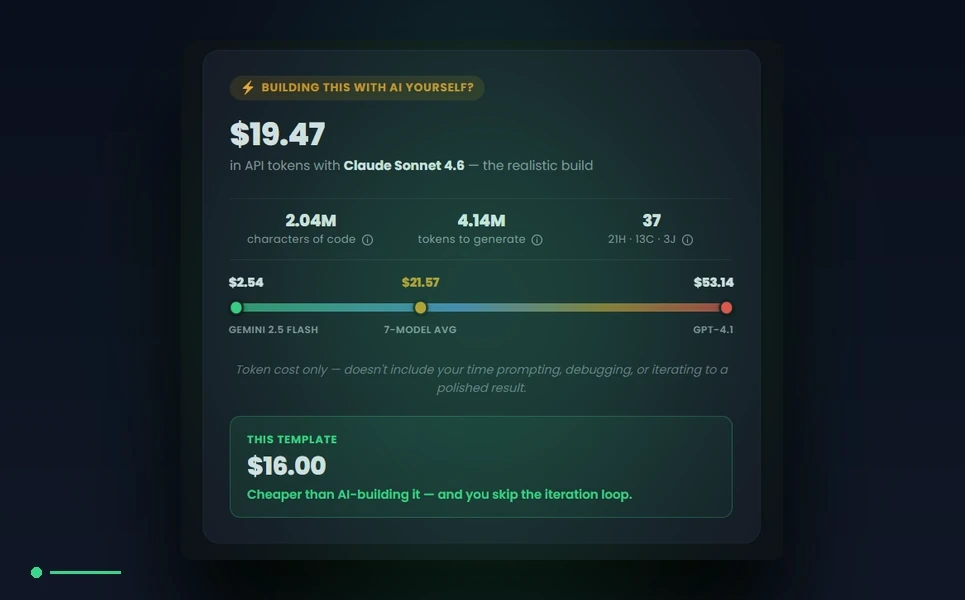
Every product page on MetropolitanHost publishes an AICE block — short for AI Cost Estimator — the projected cost to rebuild the template from scratch using Claude, GPT, Gemini, Cursor or Lovable. We are the only marketplace that publishes this number per template. For Webud, the AICE block — part of our broader website cost calculator framework, with the full AICE methodology documented separately — reports the typical token spend, the cheapest model that produces a faithful rebuild, the most expensive model and what it would charge, and the framework family the estimate is calibrated against. The AICE math is transparent and the formula is documented. The point is not that AI rebuilds the template better; the point is that the buyer should be able to see, at purchase time, what the realistic AI alternative would cost.
Build it yourself or use our managed launch service
Webud is documented thoroughly enough that a self-installing buyer with reasonable HTML, CSS and JavaScript fluency can be live within a working day. For buyers who would rather not own the install, our managed launch service handles deployment, content migration, payment-processor wiring, accessibility validation and SEO baseline configuration on the buyer’s own hosting, with a two-week launch window guaranteed. The same NYC team that wrote the template runs the launch service, which means the engineer answering the buyer’s questions during launch is the engineer who decided how the template was structured in the first place.
The customization roadmap most studios won’t show you
The conventional studio engagement ends at launch. The buyer’s customization needs do not. Webud ships with a documented customization roadmap that maps the most common buyer modifications — brand reskinning, section reordering, language localization, integration with the buyer’s chosen CRM, swap of the reservation form for a third-party booking widget — to specific files and specific operations. Every modification listed in the roadmap has been performed against the template at least once, by the same team that wrote the template. The roadmap is not a marketing document, it is a real operational guide. Buyers who follow it stay on the upgrade path. Buyers who don’t can still customize freely, but they accept the risk that their modifications may complicate future updates.
Why we built Webud in-house, not for a marketplace
The decision to build Webud in-house, in New York, instead of commissioning it through a third-party author network, was deliberate. Marketplaces optimize for breadth of catalog. We optimize for depth of consistency. The same in-house team that wrote Webud also wrote our restaurant template, our cycling template, our church template, our hotel template, and the rest of the catalog. The visual languages differ. The structural decisions and the quality bar do not. A buyer who has used one MetropolitanHost template can pick up another from us with no learning curve, because the underlying patterns are identical. That consistency is impossible to maintain across a marketplace of independent authors. It is only possible with a small, dedicated, in-house team.
The 2026 buyer’s checklist for premium HTML5
The checklist a 2026 buyer should be running through, before clicking purchase on any premium HTML5 template, is roughly: does the template publish a current Lighthouse score, does it ship with WCAG 2.2 AA accessibility audited and documented, does it ship with the structured data graph the page actually represents, does it ship in framework variants the buyer’s team can actually use, does it have a documented customization layer rather than a Sass-variable-and-pray approach, does the support reach the engineer who wrote it or only an author forum, does the studio behind it publish an honest update cadence, and does the price include the framework variants the buyer will eventually need. A template that passes all of those is rare. A template that fails any of them is going to surface as a problem within months.
Related guide: Shopping the premium tier specifically? See the best luxury brand website templates for premium businesses.
Final word — pick HTML5 with a clean upgrade path
Premium HTML5 templates in 2026 are not a commodity, even though the marketplace listings would prefer to look like one. The difference between a template that ages well and a template that fails within months is almost entirely a function of how the template was engineered against the 2026 expectations laid out above, and how honestly the studio behind it is willing to publish that engineering. Buyers who treat the purchase as a long-term decision rather than a one-time download will find that the right template is dramatically cheaper, in operational terms, than the bargain alternative. We built Webud to be a defensible answer to that decision in the cannabis vertical and as the worked example for the rest of the catalog. The same standards apply to every other niche we ship.



