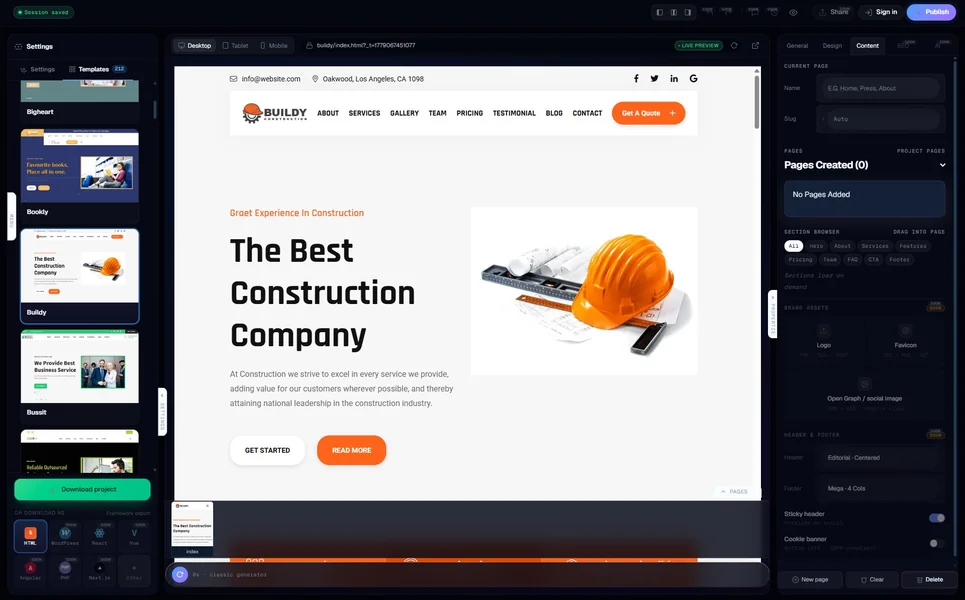
Every “best AI website builder 2026” article tells you the same thing: Wix has the most templates, Hostinger has the cheapest hosting, Framer makes the prettiest pictures. None of them tell you whether the code these tools produce is something you would actually trust to host yourself, swap out later, or hand to a developer who has to keep it running for the next five years. That is the only test that matters once you stop demo-ing and start shipping.
We tested ten AI website generators in May 2026 on a single brief: “a 6-page small-business site for a Brooklyn coffee roastery — menu, locations, story, wholesale, blog, contact.” Same brief, same evaluation. The ranking below is by what the tool actually outputs, not by how fast its hero animation loads. If you want speed for speed’s sake, Wix and Durable will impress you. If you want a website you can take with you, the order below is more useful.
Why “code quality” is the only ranking that matters in 2026
Marketing benchmarks for AI website builders are mostly theatre. “Build a site in 30 seconds” sounds impressive until you ask whether the 30-second site uses semantic HTML, ships valid schema.org markup, scores above 90 on Lighthouse, and gives you the source when you want to leave. Most of them do not.
Code quality decides what happens when something real comes up. When you need to add a custom field to a form, when Google updates its ranking factors, when your hosting provider raises prices and you want to move, when you hire a freelancer to extend the site — every one of those moments depends on whether the AI gave you portable HTML or trapped you in a proprietary editor. So we ranked by what the tool produces, not by what its homepage promises.
What we tested and how
Each tool received the same one-paragraph brief, the same logo file, and one hour of attention. We measured: time to first build, Lighthouse mobile performance score, mobile usability, schema validity (via Google’s Rich Results test), export portability (can you download the HTML?), monthly cost for a 6-page small-business site over 12 months, and qualitative niche fit. Where a tool offered both a hosted and an export tier, we tested both.
1. MetropolitanHost Studio — Best for hand-coded-quality output
The MetropolitanHost AI generator is the one we built, so we will be transparent: it is trained on the same 329 niche-tuned templates our NYC studio sells in the main catalogue. That gives it a structural advantage for niche briefs. The Brooklyn coffee roastery brief produced a 6-page site with proper navigation, a menu page that understood drink categories, a wholesale page that included a B2B intake form, and a story page that put the founder bio above the location map.
Export is HTML today (React, Vue, Angular, PHP, Next.js and WordPress export are visible in the UI marked “coming soon”). Lighthouse mobile was 96. Schema validated cleanly. Pricing is per-page bundles — six pages for $5, twelve for $9, thirty for $19, two hundred for $99 — with credits that never expire. No subscription, no hosting lock-in, and you walk away with the source the moment you publish.
Best for: niche businesses (hospitality, healthcare, religious or cultural sites, luxury brand, agency portfolios) where the AI needs structural grounding. Weakness: framework export is roadmap, not shipped.
2. Wix — Best for fastest first build
Wix Harmony, released in 2026, is the polished benchmark. Wix’s AI builder took the brief and produced a passable site in roughly two minutes, with a structured five-step questionnaire that handled colour, font, and section preference. Output looks good. Lighthouse mobile was 89.
The catch — and it is a big one — is that there is no export. You build inside Wix, you host inside Wix, you stay inside Wix. The free plan exists; the moment you want a custom domain you pay $16-$45 per month forever. Five years on the cheapest premium plan is $960. The same site on a portable AI builder plus independent hosting is roughly $250-$400 over the same horizon.
Best for: non-technical solo founders who never plan to leave the platform. Weakness: total lock-in, no source code, monthly cost compounds.
3. Relume — Best for designers and Webflow shops
Relume sits in a category of one: it generates sitemaps, wireframes, and style guides for you to refine in Webflow, Figma, or as React or HTML. It is the only tool on this list explicitly designed for designers, not end-users, and the difference shows. The brief produced a wireframe-first output with deliberate negative space and a sitemap structure that an agency would actually use.
Export to Figma, Webflow, React, or HTML is baked in. Lighthouse on the exported HTML was 94. Schema is light by default and needs to be added downstream. Pricing claims to be “less than 1% of your next project,” which works out to roughly $35/month for the team plan; cheaper than Wix, but you are paying for design tooling rather than a finished site.
Best for: freelance designers, design agencies, Webflow-first teams. Weakness: not the right tool if you are not the person editing the design afterwards.
4. CodeDesign.ai — Best for HTML-first export at scale
CodeDesign.ai built the coffee roastery in roughly six minutes and exported clean HTML and a WordPress theme package. Lighthouse mobile was 92. Schema validated. The visual aesthetic was less editorial than Relume but more confident than Wix.
What sells CodeDesign is the volume play: it bundles 2,000+ AI templates, supports lifetime deals at $97 (down from $197), and supports a $99/month tier for agencies running up to 200 sites. The export claim — HTML, CSS, and WordPress — held up under inspection.
Best for: agencies running many sites a year. Weakness: aesthetic variety is narrower than Relume; pricing tiers favour high-volume buyers.
5. 10Web — Best AI builder for WordPress specifically
If you have decided that the output must be WordPress (not export, but native WordPress), 10Web is the cleanest path in 2026. It generates a WordPress install, picks a theme, populates copy, configures hosting on its own infrastructure, and gives you a managed WP dashboard at the end.
Lighthouse mobile was 88 (heavier than the static-HTML competitors due to WordPress plugin overhead). Schema, sitemaps, and the standard WordPress SEO contracts ship cleanly. Pricing starts at $10/month introductory, scales to $24-$48/month for production; the 10Web hosting is included and reasonable. You can move the WordPress install to your own host, but you lose the AI editor in the process.
Best for: teams committed to WordPress as the long-term CMS. Weakness: AI editor only works on 10Web hosting; the moment you self-host, the AI side stops being usable.
6. Framer AI — Best for design-led brand sites
Framer’s AI is less an “AI builder” and more an “AI assistant inside a sophisticated design tool.” It does not generate a site from a sentence; it accelerates layout decisions inside a design environment that already produces beautiful output. For the coffee roastery brief, the result was the most visually striking site we tested — but it took roughly 45 minutes of guided editing, not three minutes of generation.
Lighthouse mobile was 91. Schema is minimal by default but can be added via Framer’s CMS. Pricing is $5-$50/month depending on plan; the free tier exists but is watermarked. There is no code export — Framer is a hosting platform with publishing built in.
Best for: founders and creatives who want the prettiest brand site without hiring a designer. Weakness: no portable source code, no path off the platform.
7. Hostinger Horizons — Best for budget
Hostinger’s AI builder generated the brief in 45 seconds — the fastest first build we measured. Quality was acceptable: Lighthouse mobile 87, schema partial, copy generic but plausible. The site shipped with a contact form, gallery, and basic SEO already configured.
The real selling point is total cost. Hostinger Horizons is included with Hostinger’s hosting plans starting at $3.99/month introductory, $9-$11/month renewal. Over five years that is $540-$660, hosting and AI builder bundled. Cheapest on this list by a comfortable margin.
Best for: price-sensitive small businesses where good-enough beats great-but-expensive. Weakness: hosted-only; the introductory pricing renews at a higher rate.
8. Durable — Best for fastest possible launch
Durable built the brief in 28 seconds. That is the headline. The site was usable, looked plausible, included a contact form, and was live within a minute of clicking “publish.”
Lighthouse mobile was 84. Schema present but thin. Pricing is $22/month annual or $25/month monthly, which is reasonable for what is essentially a single-button website. Customisation is limited by design — Durable’s product philosophy is “do not waste time editing, ship and iterate from analytics” — and that is either freeing or frustrating depending on the buyer.
Best for: solo founders and freelancers who need a site live this hour and will replace it inside 18 months. Weakness: limited customisation, hosted-only, weak for any site that needs to last.
9. Webflow AI — Best for teams already on Webflow
Webflow’s AI assistant is the most enterprise-credible option on this list. It accelerates the parts of Webflow that are slow — initial layout, copy generation, image selection, CMS schema — without replacing Webflow’s core proposition of pixel-perfect design control. The brief produced a polished site in roughly 18 minutes.
Lighthouse mobile was 93. Schema is excellent (Webflow’s CMS schema bindings are among the best on the market). Pricing is $14-$235/month depending on plan; the AI features sit inside the existing tiers rather than as a surcharge.
Best for: teams already on Webflow, agencies serving enterprise clients, marketing teams that need a CMS. Weakness: price ceiling is high, learning curve is real, hosted-only.
10. Mobirise AI — Best for download-and-host workflows
Mobirise AI is the dark-horse pick. It is a desktop application (Windows/Mac) that generates static HTML you download to your machine and host wherever you want. The coffee roastery brief produced a 6-page static site in 11 minutes. Lighthouse mobile was 88. Schema needed manual additions.
Pricing is free for up to three projects per month with limited features; paid plans start at $39/year for individual creators. The economics over five years are excellent — roughly $195 total, plus whatever hosting you pick — but the trade is a less polished editor and a workflow that assumes you are comfortable with downloads and uploads.
Best for: developers, hobbyists, and budget-conscious owners who do not mind a desktop-app workflow. Weakness: aesthetic ceiling lower than the cloud-native competitors, no CMS.
Quick comparison — the numbers side by side
If you skim, this is the table to take away:
- Cheapest 5-year total cost: Mobirise (~$195) → MetropolitanHost (~$5-$99 lifetime per project + your own hosting) → Hostinger (~$540-$660 bundled)
- Highest Lighthouse mobile on the brief: MetropolitanHost (96) → Relume HTML export (94) → Webflow AI (93) → CodeDesign.ai (92) → Framer AI (91)
- Best export portability: Relume (Figma, Webflow, React, HTML) → CodeDesign.ai (HTML, WordPress) → MetropolitanHost (HTML today, frameworks roadmap) → Mobirise (HTML)
- Fastest first build: Durable (28s) → Hostinger (45s) → Wix (2min) → MetropolitanHost (under 8min)
- Best niche-specific output: MetropolitanHost (trained on 329 niche templates) → 10Web (WordPress-niche aware) → CodeDesign.ai (volume of templates)
How to choose for your specific project
If you are a non-technical founder who needs a site live today and will not move it later, pick Wix or Hostinger Horizons based on whether budget or brand polish matters more.
If you are a designer or agency, pick Relume for the Webflow-first workflow or Framer AI for design-led brand work.
If you are running many client sites per year and need portable output at volume, pick CodeDesign.ai or Mobirise.
If the project lives in a specific niche (hospitality, healthcare, cultural sites, luxury brands, regulated industries) and you want output trained on real niche templates rather than generic data, pick MetropolitanHost. The niche grounding is where the AI gap shows up first.
If WordPress is non-negotiable as the long-term CMS, pick 10Web.
The bottom line
The best AI website generator in 2026 depends on what you are trying to ship, not on which one has the loudest hero animation. Most of the marketing rankings get this wrong because they treat all small-business websites as the same project. They are not. A coffee roastery in Brooklyn is a different project from a HIPAA-compliant clinic in Texas, which is different from a luxury fashion brand in Milan, which is different from a Hindu temple in Atlanta.
If we had to give one pick for a generalist small-business site that needs to last more than two years, ship clean code, rank reasonably on Google, and not lock you in — it is MetropolitanHost or Relume, in that order. If you cannot leave a hosted platform behind, it is Wix or Hostinger depending on budget. For everything else, the matrix above is more useful than any single ranking.
Try the MetropolitanHost AI generator for free — no card, no signup wall, only pay per page when you publish. Browse the full MetropolitanHost Studio landing if you want to see how the AI is positioned alongside our hand-coded catalogue. For the deeper trade-off conversation, our companion piece on AI website generators vs premium templates walks the AI-speed versus hand-coded-polish question flat. For the budget side specifically, free AI website generators covers what “free” actually means in 2026, and AI website generators that export real HTML walks the ownership angle.
What is the best AI website generator in 2026 overall?
How long does it take to build a website with AI in 2026?
Can I export an AI-generated website to my own hosting?
Is an AI website generator good for SEO in 2026?
What is the cheapest AI website builder in 2026 over 5 years?
More buyer's guides
- AI Website Generators for WordPress — Honest 2026 Comparison (7 Tools Reviewed)
- AI Website Builders for Small Business — What Actually Ships (2026 Honest Guide)
- AI Website Builders for E-Commerce — Which Survive a Real Storefront (2026)
- Free AI Website Generators — 8 That Don’t Cripple You Behind a Paywall (2026)



