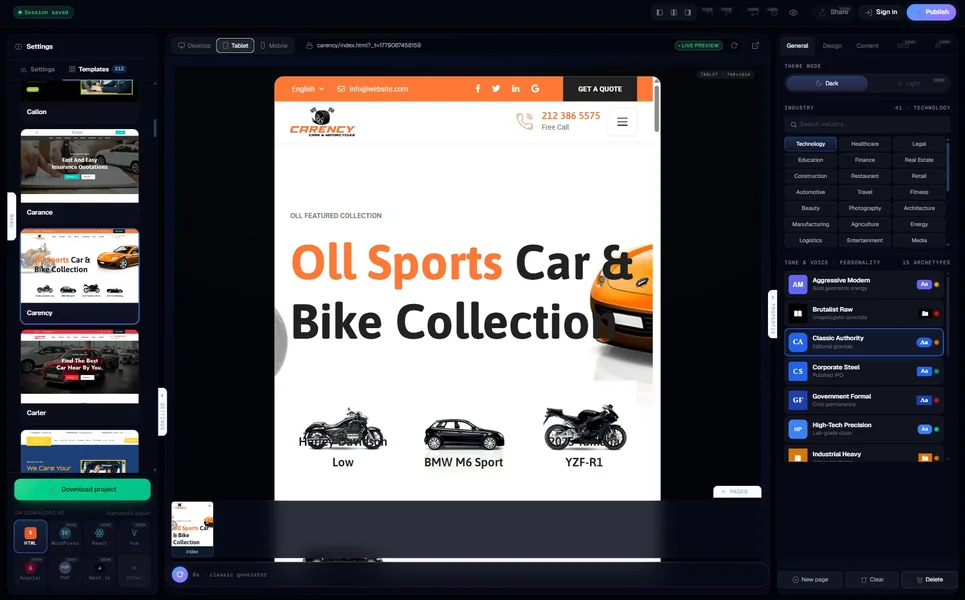
AI website generators for WordPress are an awkward middle category. Pure AI builders like Wix and Durable do not produce WordPress sites — they produce hosted sites that look like WordPress. Pure WordPress themes do not have AI in them — they ship as static templates you customise. The tools that actually generate a real WordPress install from a prompt are a smaller, weirder list than the marketing suggests.
We tested seven of them in May 2026 on the same brief: “a 7-page WordPress site for a Brooklyn legal practice — practice areas, attorneys, case studies, blog, contact, intake, location.” Same input, same evaluation. The point of this article is not to declare a winner but to draw the map: who genuinely puts WordPress on your server, who runs WordPress on their server and calls that “WordPress for you”, and who claims WordPress and ships something else entirely.
Why “AI for WordPress” is a category worth taking seriously in 2026
WordPress still runs roughly 43% of the public web in 2026. For agencies, SMBs, and content sites that have invested in the ecosystem — Gutenberg, Yoast, WooCommerce, ACF, the plugin galaxy — the question is not “should I switch to an AI builder” but “can an AI builder produce something that lives inside my WordPress stack”. That is a narrower question and a more useful one.
The honest 2026 answer: yes, for most projects, with caveats. The caveat list is what separates the seven tools below. Some give you a managed-WordPress experience where the AI is a feature of someone else’s hosting. Others install a real WordPress on your server and let the AI write the content + configure the theme. A few are WordPress plugins that you install on a site you already own. Each model has different trade-offs around lock-in, cost, and the moment when the AI stops being usable.
What we tested and how
Same one-paragraph brief for all seven tools, same logo file, same one-hour time-box. We measured: WordPress version installed, theme used or generated, plugin footprint shipped, time to first usable wp-admin, Lighthouse mobile, schema validity, and what happens when you try to leave the platform. Where a tool offered “the AI runs on our hosting only” versus “you can self-host”, we tested both.
1. MetropolitanHost Studio — Best for niche-tuned WP-ready output
The MetropolitanHost AI generator ships HTML today, with WordPress export visible in the UI marked “coming soon” — so it is not yet a “generate-into-WP” tool, but its output is structured for WordPress migration. The generated HTML is semantic, valid schema is baked in, and the file structure maps cleanly to a WordPress block theme when imported.
What that means in practice: you generate the site with the AI, export the HTML zip, and either run it as a static site behind your WordPress install or convert it into a Gutenberg block theme via the standard WP conversion workflow. The Brooklyn legal-practice brief produced a 7-page site with the practice-areas page structured as a custom-post-type-friendly layout, attorneys page formatted as a directory schema, and case studies as taxonomy-friendly cards. Lighthouse mobile was 96 on the exported HTML; conversion to a Gutenberg theme typically drops that to 90-92 depending on plugins.
Pricing is per-page bundles: $5 for six pages, $9 for twelve, $19 for thirty, $99 for two hundred. No subscription, credits never expire. The MH catalogue also includes 328 hand-coded WordPress themes across niches if you decide you want the polish-first path instead of the generate-first path. See our honest comparison of AI generators vs premium templates if you are weighing both.
Best for: niche businesses migrating to WordPress where the AI needs structural grounding. Weakness: native WordPress export is roadmap.
2. 10Web — Best managed-hosting AI for WordPress
10Web is the cleanest “real WordPress install” path from a single brief. The tool spins up an actual WordPress instance on its managed hosting (powered by Google Cloud), picks a theme, populates pages, configures plugins, and gives you a managed wp-admin you can log into within roughly four minutes. The Brooklyn legal-practice brief produced a working WordPress install with Yoast, Elementor, and WP Forms pre-installed.
Lighthouse mobile was 88 (heavier than static-HTML competitors due to plugin overhead). Schema and sitemaps shipped cleanly. Pricing starts at $10/month introductory and scales to $24-$48/month for production. You can export the WordPress install to your own host via standard WP migration — the AI editor stops working once you self-host, but the WordPress install itself remains fully portable.
Best for: teams committed to WordPress as the long-term CMS who want the AI shortcut on day one. Weakness: the AI editing experience is gated to 10Web hosting; once you self-host, you are back to standard WordPress without the AI layer.
3. WordPress.com AI Builder — Best for non-technical solo founders
Automattic’s official AI builder lives inside WordPress.com (the hosted platform, not the open-source wordpress.org self-hosted version). For the legal-practice brief, it produced a site in about five minutes using a stock business theme + AI-generated content. Lighthouse mobile was 87. Schema is the standard WordPress.com contract — present, but thinner than what Yoast on self-hosted would provide.
Pricing is the WordPress.com tier ladder — free with watermarks, $4/month for personal, $8/month for premium, $25/month for business, $45/month for ecommerce. The “AI Builder” feature is bundled across all paid plans. Export to self-hosted WordPress is supported but again you lose the AI editing surface afterwards.
Best for: non-technical founders who want the WordPress brand without the WordPress maintenance overhead. Weakness: the gap between WordPress.com and self-hosted WordPress feels different at every step; not the same product.
4. ZipWP — Best for AI sites built on Astra + Spectra
ZipWP is built by the same team that ships Astra (the most-installed WordPress theme) and Spectra (a Gutenberg block library). The brief produced a real WordPress install using Astra as the base theme and Spectra as the page-builder layer, populated with AI-generated copy and stock imagery. Approximately three minutes to first wp-admin.
Lighthouse mobile was 91 — the Astra base is genuinely lean compared to Elementor-based installs. Schema is Yoast-shaped (ZipWP installs Yoast by default). Pricing is free for unlimited AI sites with limited customisation, $19/month for the pro tier with full editing. Export to your own host is supported and the AI editor continues to work via the ZipWP plugin even on self-hosted WordPress — a meaningful differentiator.
Best for: Astra/Spectra-aligned shops, agencies that want the AI baseline but the option to keep editing afterwards. Weakness: aesthetic ceiling is tied to Astra’s design vocabulary; if you need something visually radical, the underlying theme will fight you.
5. SeedProd AI — Best for landing-page-heavy WP sites
SeedProd is a WordPress plugin first and an AI tool second. You install it on a WordPress site you already own, brief the AI from the wp-admin sidebar, and it generates landing pages or full-site themes inside Gutenberg-compatible markup. The legal-practice brief produced a 7-page site in about eight minutes after the initial plugin install.
Lighthouse mobile was 90. Schema is Yoast-compatible (you bring your own Yoast). Pricing is plugin-license model: $39.50/year for individual sites, $99.50/year for the plus tier, up to $239.60/year for the elite tier (unlimited sites). The AI feature is bundled in the plus tier and above. Because it is a plugin, your hosting stays whatever you already had — no platform lock-in.
Best for: agencies that already manage many client WordPress sites and want an AI layer that travels with the plugin. Weakness: the AI is opinionated about landing-page structure; sites that need deep custom-post-type architecture will outgrow it.
6. Elementor AI — Best for design control inside the editor
Elementor’s AI integration is the most popular path simply because Elementor is the most popular page builder. The AI lives inside the Elementor editor as a panel that generates section copy, images, layouts, and full-page templates on demand. It does not generate a site from a one-sentence brief — you build the structure first, then ask the AI to fill it in.
Lighthouse mobile was 86 on a typical Elementor build (the page-builder overhead is real). Schema is Yoast-shaped. Pricing is Elementor Pro at $59-$399/year depending on site count; the AI add-on is bundled in Pro tiers. Self-hosting is the default — Elementor runs on whatever WordPress hosting you choose.
Best for: Elementor-first teams who want AI inside the workflow they already know. Weakness: not a “generate-from-prompt” tool; expects you to lay out the page first.
7. Hostinger AI Website Builder for WordPress — Best for budget-first WP
Hostinger’s WP-specific AI builder lives inside their Business WordPress and Cloud hosting plans. From a prompt, it provisions a WordPress install, picks a theme, and generates pages. The brief was live in about three minutes, including domain configuration. Lighthouse mobile was 86. Schema was partial. The AI editing experience is decent for first-build but limited for iteration — most subsequent edits expect you to drop into the standard WordPress editor.
Pricing starts at $3.99/month introductory (renews higher) and includes hosting. Over two years the all-in cost is roughly $200-$300, which is the most affordable WP-on-AI bundle on the market in 2026.
Best for: first-time WordPress users on a tight budget. Weakness: introductory pricing renews; the AI side is a thinner experience than 10Web or ZipWP.
Comparison — the seven tools side by side
If you skim, these are the patterns that matter:
- Real WordPress on your server eventually: 10Web, ZipWP, SeedProd, Elementor AI, Hostinger
- WordPress.com hosted only: WordPress.com AI Builder
- HTML output structured for WordPress migration: MetropolitanHost
- Cheapest two-year total cost: Hostinger (~$200-$300) → SeedProd (~$80-$240) → ZipWP self-hosted (~$240 plus your own hosting)
- Highest Lighthouse on the brief: MetropolitanHost (96 on HTML, drops to 90-92 in Gutenberg) → ZipWP (91) → SeedProd (90) → 10Web (88)
- AI editor that keeps working after self-hosting: ZipWP, SeedProd, Elementor AI
- Niche-tuned output: MetropolitanHost (trained on 328 hand-coded WordPress themes across 11+ niches)
What to look for when picking
The single most useful question is “after the AI builds it, can I leave?” Tools where the answer is yes — ZipWP, SeedProd, MetropolitanHost’s exported HTML, even Elementor AI on your own WordPress — protect you from the moment when the platform raises prices or shuts down. Tools where the answer is no — pure WordPress.com, 10Web’s AI editor — give you a smoother first-build experience at the cost of long-term flexibility.
The second question is “what does the AI know about my niche?” Generic prompts produce generic output. For a legal practice, a healthcare clinic, or a religious organisation, the AI’s training data matters more than its generation speed. MetropolitanHost Studio is trained on the niche-specific patterns we ship in the catalogue, which is why the legal-practice brief produced niche-aware structural decisions (case-studies as a CPT, attorneys as directory schema) the generic competitors flattened into “team page”.
The third question is “what is my real two-year cost?” Monthly subscriptions compound. A $25/month builder is $600 over two years, $1,500 over five. Compare that against one-time licences and the math often inverts for any site that lives past 18 months.
The bottom line
If your stack is committed to WordPress and your priority is the cleanest “AI does the build” experience, 10Web is the strongest pick. If your stack is committed to WordPress but your priority is long-term portability + AI editing on your own host, ZipWP wins. If your project is niche-heavy and you want the structural advantage of training data that knows your industry, MetropolitanHost’s AI generator (exporting to HTML and converting to a Gutenberg theme) plus the matching hand-coded WordPress theme from the MH catalogue is the cleanest path.
If you are still deciding whether WordPress is even the right destination, read our companion piece on AI website generators versus premium templates. If you are budget-first, check our full breakdown of AI website generator pricing in 2026. And if you want to test the MetropolitanHost path, you can try the AI generator for free — no card, no signup wall, only pay per page when you publish.



