Small business buyers searching for a website template in 2026 are walking into a market that is structurally hostile to them, even though the listings look welcoming. The cheapest options have hidden costs that surface within months. The most expensive options are priced for buyers who do not exist in the small business segment. The middle tier is dominated by global marketplaces whose quality variance is invisible at purchase time and unmissable six months later. The buyer who picks the wrong option pays for it twice — once at purchase, and again in operational tax for the rest of the site’s life. The buyer who picks the right option pays once, at purchase, and gets a foundation that can grow with the business for years.
This guide is the breakdown we run prospects through when they ask why our pricing looks different from the marketplace listings they have been comparing against. It is opinionated. It is grounded in our own work as an in-house template studio. It treats the small business buyer’s situation as the central case rather than as a footnote, because the small business buyer is the segment that gets the worst advice from the rest of the marketplace.
What “small business” actually means in 2026 template terms
“Small business” in 2026 template-buying terms is a specific buyer profile, not a vague descriptor. The buyer typically owns or co-owns the business. The buyer is paying for the website out of operating cash flow, not out of an enterprise budget. The buyer cannot afford a full-time developer and is unlikely to retain one. The team that will end up updating the site is whoever has the time and basic technical fluency, often the owner themselves. The site needs to be functional from day one, defensible against the competition, and cheap to maintain over a multi-year period. That buyer profile is what the rest of this guide is calibrated against.
The five floors small business buyers cannot afford to fail
A small business website template in 2026 has five floors that the buyer cannot afford to drop below — performance, accessibility, search-visibility readiness, maintenance ease, and total cost of ownership. Each floor is its own filter. A template can be beautiful, modern, fast, and accessible, and still be wrong for a small business if the maintenance burden requires a developer the buyer doesn’t have. The five floors interact: dropping one of them tends to drag at least one other down with it. The five-floor checklist is the lens we use to evaluate every template we ship. It is also the lens this guide is built around.
Performance — Lighthouse 90+ as the default
The performance floor for a small business template in 2026 is 90+ Lighthouse mobile, on a throttled connection, against the buyer’s expected content load. Hitting that floor reliably is harder than the marketplace listings suggest. Most templates hit 90+ on their demo URL with empty content and fall apart the moment real images, real text, and real third-party scripts are added. The right template ships with a documented performance budget — what each page is allowed to weigh, what each script is allowed to cost — and the budget holds against realistic loads. A small business cannot afford a slow site — the deeper performance methodology is covered in our PageSpeed-optimized templates guide. Bounce rate from a slow homepage is the kind of cost that compounds month over month, and the small business buyer typically discovers it only after the damage is done.
Accessibility — WCAG 2.2 AA as the floor
Accessibility is the floor where small businesses are most exposed legally and reputationally in 2026. WCAG 2.2 AA has been the operating expectation for any template a real business should be buying since 2024, and accessibility lawsuits against small business websites have been climbing year over year. A template that ships with WCAG 2.2 audited and documented gives the buyer a defensible position from launch. A template that ships without an audit puts the burden on the buyer, who almost certainly does not have the staff to do that audit themselves. The cost difference at purchase is small. The cost difference if a complaint reaches a regulator or a plaintiff’s attorney is enormous.
Search visibility — SEO and AEO baseline
Small businesses live or die on local search visibility. The 2026 search landscape is no longer just Google’s text-search engine; it includes Google’s AI Overviews, Perplexity, ChatGPT search, Gemini, and the long tail of more specialized engines, all of which prefer structured data over raw text. A small business template should ship with the schema graph the page actually represents — Organization, LocalBusiness, Product, Service, Article, FAQPage, BreadcrumbList — already wired into the markup so updates to visible content automatically update the structured data. Templates that ship without this baseline are templates a small business buyer will discover, six months later, are invisible to the AI assistants their customers actually use to find local businesses.
Maintenance ease — the floor most buyers underestimate
Maintenance ease is the floor small business buyers underestimate most often. A template that requires a developer to update — recompiling Sass, managing build pipelines, deploying static files — is a template that will go stale within months in a small business’s hands, because the buyer cannot afford to keep a developer on retainer for routine content updates. The right small business template either ships as a CMS theme, where content updates happen through a familiar admin interface, or ships with a content layer simple enough that a non-developer with basic technical fluency can update it directly. The marketplace listings do not advertise this distinction clearly. The buyer needs to ask explicitly.
Total cost of ownership over a three-year horizon
Total cost of ownership is the floor that turns the marketplace’s pricing landscape upside down. A nineteen-dollar template that requires a developer to maintain costs the buyer roughly three thousand dollars over three years in maintenance time. A one-hundred-forty-nine-dollar template that ships with a documented customization layer and is maintainable by the owner directly costs the buyer one hundred forty-nine dollars over three years. The marketplace listing makes the first template look cheaper. The three-year math makes the second template dramatically cheaper. Small business buyers who optimize for the listing price end up paying more in total. Small business buyers who optimize for total cost of ownership end up paying less and getting a better foundation.
Why DIY website builders fail small businesses at scale
The pitch for DIY website builders — Wix, Squarespace, the rest — is that the small business buyer can launch a site without buying a template at all. The pitch holds for the simplest cases. The pitch breaks for any small business whose growth eventually demands an integration the builder doesn’t support, a performance budget the builder can’t hit, a customization the builder doesn’t expose, or an accessibility audit the builder hasn’t done. The buyer who picked the builder for its simplicity is now locked into a platform whose ceiling is below what the business needs. Migrating off a DIY builder is non-trivial, and the cost of migration usually exceeds the cost of buying a real template at the start.
Why custom builds bury small businesses
The opposite end of the small business website market is the custom build, commissioned from a local studio or freelancer. The pitch is that the buyer gets a site engineered to their exact specifications. The pitch holds for buyers with budgets above twenty-five thousand dollars who need real customization beyond what any template offers. The pitch breaks for the typical small business buyer, whose budget is below ten thousand dollars and whose customization needs do not actually justify a custom engagement. The custom build comes with a custom maintenance burden. Updates are billable per hour. The studio owns the codebase quirks. The buyer who commissioned the custom build typically discovers, two years later, that the maintenance tax has eaten the original cost savings of avoiding a marketplace.
The premium template middle path
The middle path between DIY builder and custom build is the premium template — a Bootstrap 5 codebase shipped under a real quality bar, priced for buyers who cannot afford a custom build but cannot accept the ceiling of a DIY builder. This is the path most small business buyers should be on, and it is the one most marketplace listings make hard to find clearly. The buyer needs to filter for in-house authorship, a documented quality bar, framework parity, a real customization layer, and explicit support policy. A premium template that meets those filters — the criteria we lay out for HTML5 specifically in our premium HTML5 buyer’s guide — is dramatically cheaper than the alternative paths over any multi-year horizon, and the foundation it provides is enough to grow the business on for years.
The four marketplace archetypes for small business buyers
The four marketplace archetypes — offshore, local studios, global marketplaces, in-house — sort differently for small business buyers than they do for enterprise buyers. Offshore is real value for buyers who can absorb operational risk and a thin support model. Local studios are wrong for the typical small business buyer because the engagement-style pricing is calibrated against larger budgets. Global marketplaces are the default that most small business buyers end up on, with the catalog-size advantage and the quality-variance disadvantage that come with the model. In-house marketplaces are the smallest archetype, with the highest median quality bar and the strongest support model, priced at a transparent per-template number that small business buyers can budget against.
The role of framework portability for small business buyers
Framework portability — whether the same template ships in HTML5, React, Angular, Vue, PHP and WordPress variants — matters more for small business buyers than the marketplace listings suggest. The buyer who picks an HTML5 template at launch and decides at year two that they want it as a WordPress theme should not have to rebuild from scratch. The buyer whose business grows into needing a React-based dashboard for an internal team should not have to start over with a different design language. A premium template that ships in all six framework variants future-proofs the buyer’s stack without requiring foresight at purchase time. Most marketplace templates ship in exactly one variant and lock the buyer to that toolchain forever.
The customization layer small businesses actually need
Small business buyers underestimate the customization layer until the moment they need to change a brand color. A real customization layer in 2026 looks like a documented set of CSS custom properties, a tokenized typography and color system the buyer can reskin from a single file, a section catalog naming every block in the template so the buyer can swap blocks without breaking the structure, and an upgrade path that survives the customization. Most marketplace templates expose customization as “edit this Sass variable, recompile, hope nothing breaks.” That is not a customization layer for a small business; it is an invitation to fork. Once forked, the buyer is on their own for every update going forward.
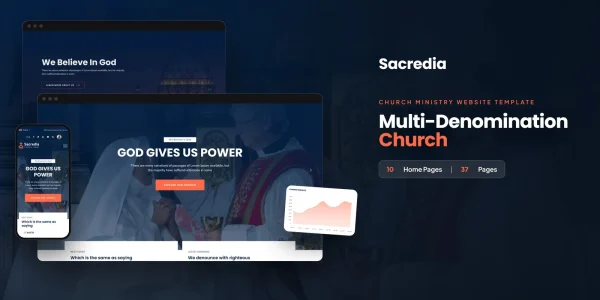
Spotlight — Sacredia, our Bootstrap 5 community-organization template
Sacredia is the template we use as the worked example for the rest of this guide because it has been engineered against every floor above and because its niche — small religious and community organizations — is one of the most demanding small business segments in 2026. The buyer profile is exactly the profile this guide is calibrated against: an owner or director paying for the site out of operating cash flow, a team that cannot afford to keep a developer on retainer, a customization need that exceeds what a DIY builder can deliver, and a maintenance budget that cannot tolerate a custom build. Sacredia is what we ship for that buyer.
Sacredia’s section architecture
Sacredia ships as a flat catalog of self-contained blocks rather than a deeply nested layout. Hero, navigation, service-times block, sermon archive, event calendar, donation form, ministries grid, blog index, blog single, contact, location, and a giving funnel that mirrors common church-payment-processor flows — each block lives as its own unit with its own documented markup, styles, and scripts. A buyer can drop or rearrange any block without breaking the others. That flatness is the structural choice that makes the customization layer practical for a non-developer to use without breaking the site.
Sacredia’s responsive breakpoints
Sacredia uses Bootstrap 5’s breakpoint set as its baseline and adds two custom breakpoints — one for the awkward middle around 880 to 992 pixels and one for ultra-wide layouts above 1600 pixels. Every block has been re-examined against both, and every interactive element has been audited for the 44-pixel minimum target size that WCAG 2.2 expects. The result is that Sacredia renders cleanly across the long tail of viewport widths a small organization’s audience actually uses — including the older mobile devices that dominate in lower-income demographics and the assistive technology that screen-reader users bring to faith-community sites.
Sacredia’s typography and color tokens
Typography in Sacredia is two families — display and body — both loaded with font-display swap and preloaded for the above-the-fold blocks. Color is expressed as a documented set of CSS custom properties scoped to the root, so a non-developer can reskin the entire template by editing roughly twelve variables in a single file. Contrast ratios were audited against WCAG 2.2 AA for every text-on-background pair, including the hover, focus, and disabled states marketplace templates routinely skip. The typography scale is fluid using clamp functions, so it adapts to viewport width without breakpoint jumps. The reskin operation is one of the operations explicitly documented in the customization roadmap.
Sacredia’s donation and giving flow
Small religious and community organizations in 2026 typically need a defensible donation flow that captures the donor’s giving choice, frequency, and identity in a way that satisfies the payment processor without dropping the donor out of the visual design. Sacredia ships a donation block built around standard form patterns, with field names that map cleanly to the major church-payment-processor APIs, and posts to a documented endpoint the buyer can wire to their chosen processor. The donation form has been audited for accessibility and for screen-reader compatibility, which matters for the elderly and visually-impaired demographics that are over-represented in faith-community giving.
Sacredia’s sermon archive and event calendar
The sermon archive in Sacredia handles the patterns small religious organizations actually need — chronological listing, search and filter by speaker or series, audio and video embed, transcript display, and the schema markup that lets sermon archives surface in podcast feeds and AI-assisted search. The event calendar handles recurring services, special events, fundraising drives, and registration flows for events that need a guest list. Both blocks are designed to be updated by a non-developer through a familiar admin interface in the WordPress variant, and through a documented JSON or YAML data file in the HTML5 base.
Sacredia’s accessibility audit
Every block in Sacredia has been audited against WCAG 2.2 AA. Headings nest in order. Landmarks are declared. Forms have explicit labels. Modals trap focus correctly and return focus on close. The skip link is wired up and visible on focus. Color contrast was checked for every state. The audit log is published with the template documentation. A small organization buyer who needs a defensible accessibility position — and increasingly, religious and community organizations are exactly the buyer profiles that face accessibility complaints — can hand that log to a regulator or a plaintiff’s attorney as evidence of due diligence.
Sacredia’s published Lighthouse scores
Sacredia’s published Lighthouse numbers, on a throttled mobile run with default content loaded, are 95 performance, 100 accessibility, 100 best-practices and 100 SEO. Those numbers are the documented baseline against the buyer’s expected content profile, not a one-time best-ever capture. The performance budget was set deliberately: every above-the-fold image preloaded as WebP with srcset, every render-blocking script deferred, every font preloaded for the first paint, every third-party script either removed or moved behind a consent gate. A buyer who deploys Sacredia against their own content can expect to land in the same neighborhood with no performance work of their own.
Sacredia’s framework variants
Sacredia ships in six framework variants — the Bootstrap 5 HTML5 base, plus React, Angular, Vue, a PHP back-end build, and a full WordPress theme. The visual design is identical across all six. The customization layer maps the same way. The Developer Bundle includes all six variants under one transparent price, which is the option most small business buyers eventually settle on once they understand that framework parity insulates the site against future stack decisions. A buyer who picks the WordPress variant on day one and decides at year two they want a separate React-based volunteer portal can use the React variant without redesigning anything.
The AICE rebuild cost — what AI would charge
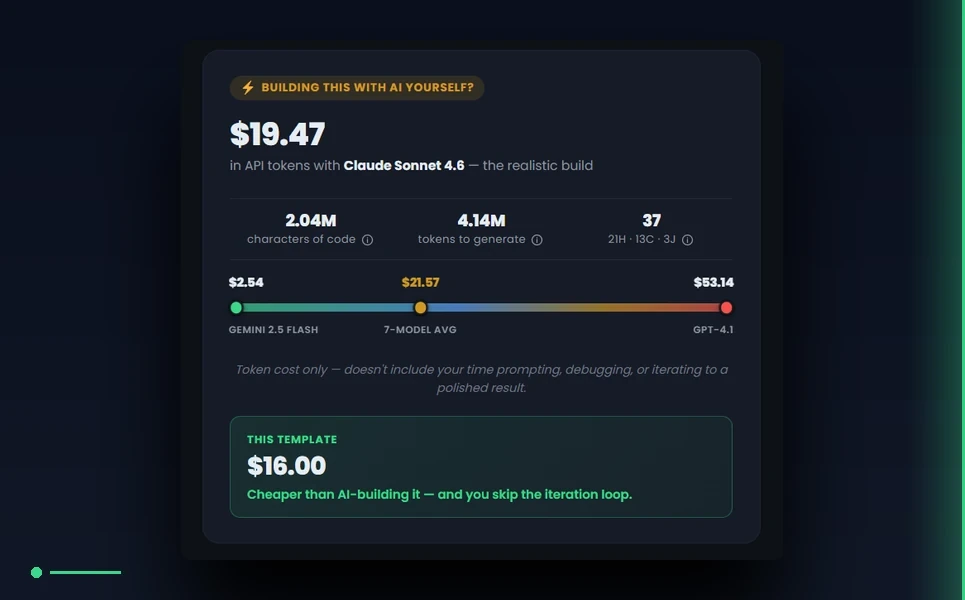
Every product page on MetropolitanHost publishes an AICE block — short for AI Cost Estimator — projecting the cost to rebuild the template from scratch using Claude, GPT, Gemini, Cursor or Lovable. We are the only marketplace that publishes this number per template. For Sacredia, the AICE block — part of our broader website cost calculator framework, with the full AICE methodology documented separately — reports the typical token spend, the cheapest model that produces a faithful rebuild, the most expensive model and what it would charge, and the framework family the estimate is calibrated against. The point is not that AI rebuilds the template better. The point is that the small business buyer should be able to see, at purchase time, what the realistic AI alternative would cost — and weigh the price of the template against it.
Self-install or managed launch service
Sacredia is documented thoroughly enough that a self-installing buyer with reasonable HTML, CSS and JavaScript fluency can be live within a working day. For buyers who would rather not own the install — which is most small business owners — our managed launch service handles deployment, content migration, payment-processor wiring, accessibility validation and SEO baseline configuration on the buyer’s own hosting, with a two-week launch window guaranteed. The same NYC team that wrote the template runs the launch service, which means the engineer answering the buyer’s questions during launch is the engineer who decided how the template was structured.
Pricing — the small business math
Sacredia’s price is in the forty-nine to one-hundred-forty-nine-dollar range depending on the SKU. The HTML5 base is at the floor. The Developer Bundle, with all six framework variants included, is at the ceiling. Both are above the offshore floor and the global-marketplace floor, and dramatically below any local-studio engagement. The total-cost-of-ownership math over three years favors the bundle for almost every small business case, because the bundle insulates the buyer against future framework decisions without a per-engagement cost. The buyer who pays one hundred forty-nine dollars at launch and never has to repurchase ends up paying less than the buyer who pays nineteen dollars at launch and has to repurchase or hire a developer at year two.
The 2026 small business buyer’s checklist
The checklist a small business buyer should run through before clicking purchase is roughly: does the template publish a current Lighthouse score against realistic content, does it ship with WCAG 2.2 AA accessibility audited and documented, does it ship with the structured data graph the page actually represents, can it be maintained by a non-developer through a familiar interface, does it ship with framework variants the buyer’s team can grow into, does it have a documented customization layer, does the support reach the engineer who wrote it, and does the price include the framework variants the buyer will eventually need. A template passing all of those is rare across the four marketplace archetypes. A template failing any of them will surface as a problem within months — and small business buyers cannot absorb that surfaced cost the way enterprise buyers can.
Final word — small business buyers should optimize for total cost
The small business buyer’s hardest discipline is to ignore the listing price and run the math on total cost of ownership over the lifetime of the site. The cheapest template, the priciest custom build, the simplest DIY builder — all three look attractive on first glance and all three turn into operational debt over a multi-year horizon. The premium template middle path, when chosen carefully against the five floors and the four marketplace archetypes, is the option that holds up. We built Sacredia to be a defensible answer for small religious and community organizations, and as the worked example for the rest of our small business catalog. The same standards apply to every other niche we ship.
More buyer's guides
- PageSpeed-Optimized Website Templates for 2026 — Why 90+ Lighthouse Should Be the Default
- Website Cost Calculator in 2026 — How to Measure Template & Theme Cost
- How We Calculate Every Template’s AI Rebuild Cost — The MetropolitanHost AICE Methodology
- AI Website Generators vs Premium Templates — Honest Comparison (2026)



